









AI Agent Orchestration: How to Build a Framework
AI Agent Orchestration: How to Build a Framework



Charlie Klein
AI Agent Orchestration: How to Build a Framework
AI Agent Orchestration: How to Build a Framework
Charlie Klein


Most popular articles


Get structured, reliable data for your stack.
AI Agent Orchestration: How to Build a Framework
What is an AI orchestration framework?
AI agent orchestration frameworks provide the infrastructure required to manage complex multi-agent systems. They coordinate task routing, state, handoffs, tool use, and failure handling to keep multi-agent workflows stable in production. Orchestration becomes necessary when agent workflows depend on branching logic, shared state, external tools, retries, or real-time data retrieval.
The eight steps to building an AI agent orchestration framework are:
- Define agent roles and boundaries
- Map task flow, state, and decision points
- Choose the orchestration pattern and stack
- Build the state and memory layer
- Connect a real-time data layer
- Add governance, validation, and compliance controls
- Implement retries, fallbacks, and loop detection
- Test, instrument, and deploy with observability
Multi-agent systems are going from demos to production, and the main engineering challenge is no longer just model quality. It’s coordination. Even a strong model can produce unreliable results when agents lose context, call the wrong tool, reason over stale data, overwrite shared state, or pass malformed outputs downstream, where one bad step can compound across the rest of the workflow.
40% of enterprise applications will include integrated task-specific AI agents by the end of 2026, up from less than 5% today. This deployment poses a practical engineering challenge: as agents are embedded in real workflows, teams need a way to orchestrate reliably how those agents plan, retrieve data, call tools, preserve context, and recover when a step does not behave as expected.
That is why AI agent orchestration has become a first-class engineering concern. A production framework needs to define how work moves through the system, how agents communicate, how data is validated, and how failures are handled before they affect the rest of the workflow.
AI Agent Orchestration: What is it, and what is an AI agent orchestration framework?
AI agent orchestration is the process of coordinating multiple AI agents to complete complex workflows. Each agent may have a specialized role, such as planning, retrieval, analysis, validation, reporting, or tool execution.
The orchestration layer manages how those agents interact. Basic chaining moves from one step to the next in a mostly linear path, which works for simple workflows. For AI engineers, orchestration becomes necessary when a workflow has multiple agents, multiple steps, and shared dependencies between them.
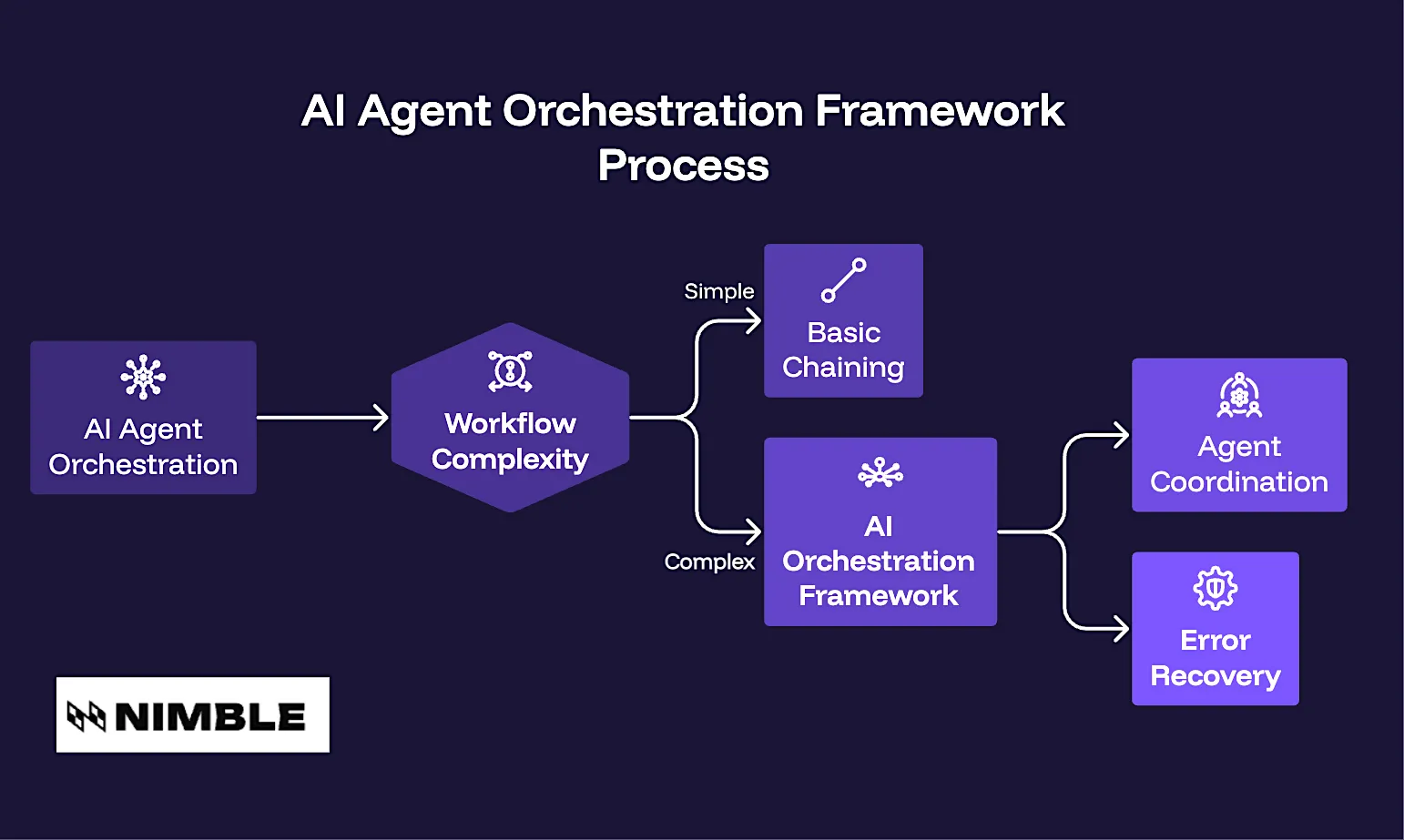
An AI agent orchestration framework is a software framework within broader AI agent infrastructure that coordinates how multiple agents work together to execute complex workflows. It provides the structure and runtime needed to manage the flow of work across the system from start to finish.
The framework determines which agent acts next, what context it receives, which tools it can call, and how the system should recover when an output is missing, malformed, stale, or unsafe to use.
Core Components of an AI Agent Orchestration Framework
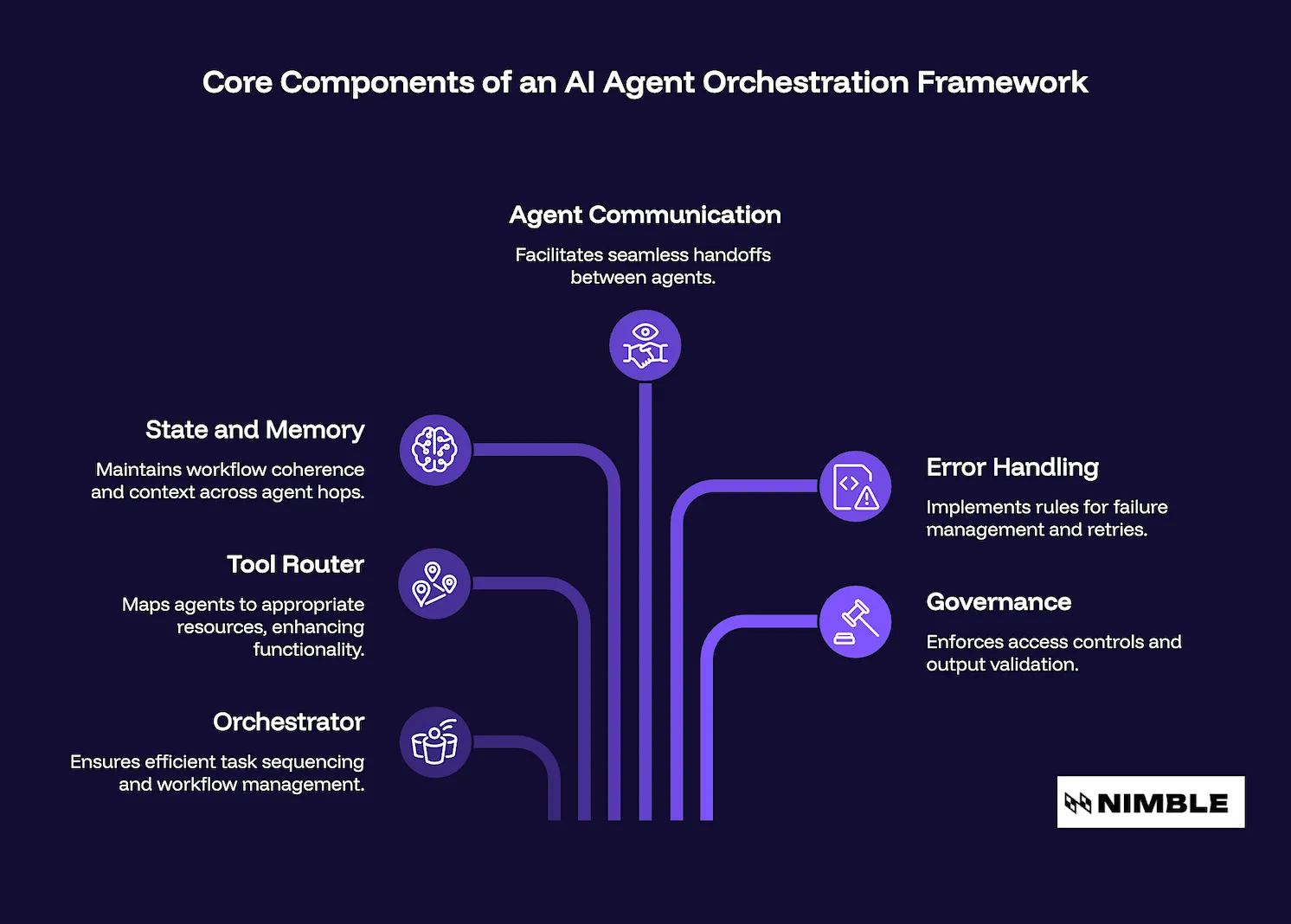
A production AI agent orchestration framework usually includes six core components:
- Orchestrator or planner: The control loop that sequences tasks, routes work between agents, and determines when to continue, retry, branch, or escalate.
- Tool router: The layer that maps agents to the APIs, retrieval systems, databases, managed agents, or services they are allowed to use.
- State and memory layer: The shared context that maintains workflow coherence across agent hops. This may include short-term working memory, persistent memory, structured state, or external storage.
- Agent-to-agent communication: The handoff format between agents, including the message structure, required fields, expected outputs, and context passed to the next step.
- Error handling and retry logic: The rules that define what counts as failure, how many retries are allowed, when to use a fallback path, and when to stop execution.
- Governance and validation layer: The controls that define what agents can access, which tools they can call, how outputs are checked, how public data boundaries are enforced, and how activity is logged before downstream use.
How to Build an AI Agent Orchestration Framework
Building an orchestration framework begins with architecture. Before choosing LangGraph, CrewAI, AutoGen, or a managed retrieval layer, teams need to state how the workflow should behave in real production environments. These eight steps lead to system design and deployment readiness:
Step 1: Define Agent Roles and Boundaries
This step defines the agents in the system, the responsibilities of each agent, and the boundaries of each role. Well-defined boundaries make it easier to debug, test, and govern the system. When many agents can make the same decision, modify the same state, or call the same tools without rules, it is harder to reason about the workflow.
Start by identifying the agents the workflow needs. For example, a production system may include a planner agent, a retrieval agent, a validation agent, an analysis agent, and a reporting agent
Then define:
- The role of each agent
- The tools each agent can access
- The data that each agent can read or modify
- The output each agent must produce
- The points where human review is required for high-risk outputs or actions
Teams can build custom agents, use agents that are native to frameworks like LangGraph, CrewAI, or AutoGen, or deploy managed agents for specialized tasks. For workflows that require live public web data, purpose-built retrieval agents such as Nimble’s Web Search Agents can reduce the need to develop and maintain custom scraping, parsing, and validation logic within the orchestration framework.
Step 2: Map Task Flow, State, and Decision Points
This step maps the workflow into tasks, branches, handoffs, dependencies, and escalation points. Multi-agent workflows are context-aware and transition smoothly from one step to the next.
A task map shows where state is created and updated, where agents can execute in parallel, and where a failed step affects the rest of the system. Pro tip: Map the happy path first, then add the real production paths around it.
Be sure to document:
- Each task in the workflow
- Which agent owns each task
- What data does the task require
- What output does the task produce
- Which branches are possible
- Where retries are allowed
- Where the workflow should escalate to a human reviewer
- Where recursive loops or expensive tool calls need execution caps
This gives the orchestration framework a clear operating model before tools are selected.
Step 3: Choose the Orchestration Pattern and Stack
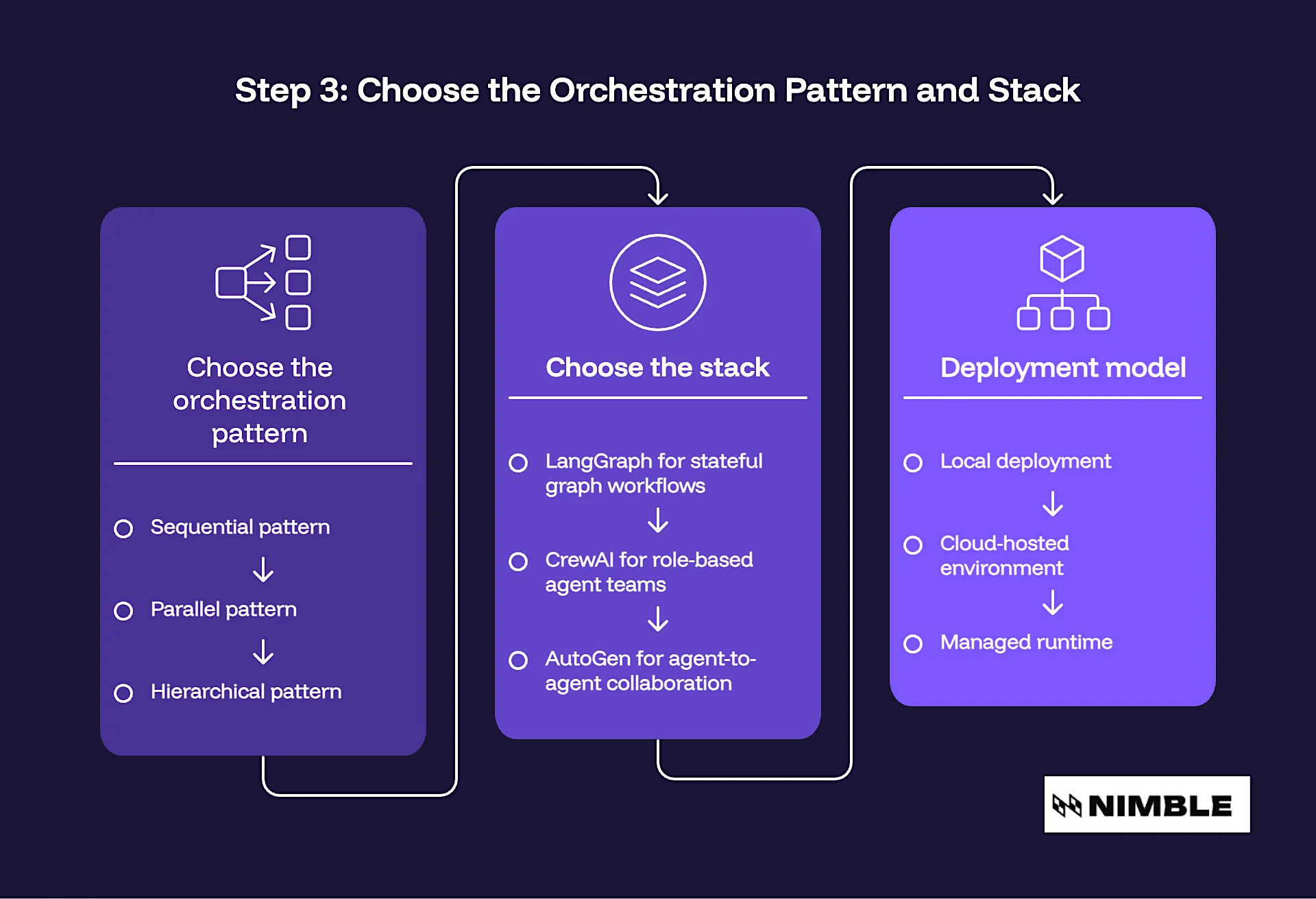
This step aligns the workflow with the appropriate orchestration pattern and implementation stack. The framework should fit the workflow. A simple sequential process does not need the same architecture as a stateful, cyclical, multi-agent system with branching and recovery paths.
First, choose the orchestration pattern:
- Sequential pattern – Fits linear workflows where each step depends on the previous one.
- Parallel pattern – Well-suited to workflows in which independent agents can work on separate subtasks simultaneously.
- Hierarchical pattern – Fits systems in which a supervisor or planner agent delegates work to specialist agents, reviews their outputs, and decides on the next step.
Next, choose the stack. If you’re evaluating different AI agent frameworks, LangGraph is often used for stateful graph workflows with cycles and branching, CrewAI is suitable for role-based agent teams, and AutoGen facilitates agent-to-agent collaboration and self-reflection loops.
The deployment model also matters. Select whether the framework will run locally, in a cloud-hosted environment, or in a managed runtime. This choice impacts latency, observability, security, and integration with enterprise systems.
Step 4: Build the State and Memory Layer
This step defines how the system preserves context across agents and workflow steps. LLMs do not automatically maintain a reliable workflow state. The orchestration framework needs a structured way to track what has happened, what information is current, and what the next agent can safely rely on.
Separate short-term memory from persistent memory. Then define data contracts between agents. Each handoff should specify:
- Required fields
- Expected schema
- Acceptable freshness window
- Validation checks
- What to do when data is missing or incomplete
Step 5: Connect a Real-Time Data Layer
This step connects the orchestration framework to current, structured external data. Agent reasoning depends on input quality.
When agents rely on stale, unstructured, or incomplete data, the issue can propagate across the rest of the workflow. This is especially important in use cases involving pricing, inventory, reviews, market signals, financial data, real estate listings, ticketing, or any public web data that changes frequently.
Treat live data retrieval as part of the system architecture. Define:
- Which agents can retrieve external data
- Which public sources can they access
- What data should be excluded
- What output schema is required
- How retrieval results are validated
- When human review is needed before downstream use
For AI systems that require current public web data, Nimble’s AI Search API can query the live web at request time, and return parsed, structured outputs that downstream agents can use more directly. That differs from index-based search tools such as Tavily and Exa, which can return cached results or unstructured text that downstream agents need to parse before use.
Nimble’s Web Search Agents can also operate as managed retrieval agents for teams that need live web data extraction, validation, and delivery without maintaining the full retrieval layer themselves. The goal is to give agent workflows current, structured, validated inputs that fit the rest of the orchestration framework.
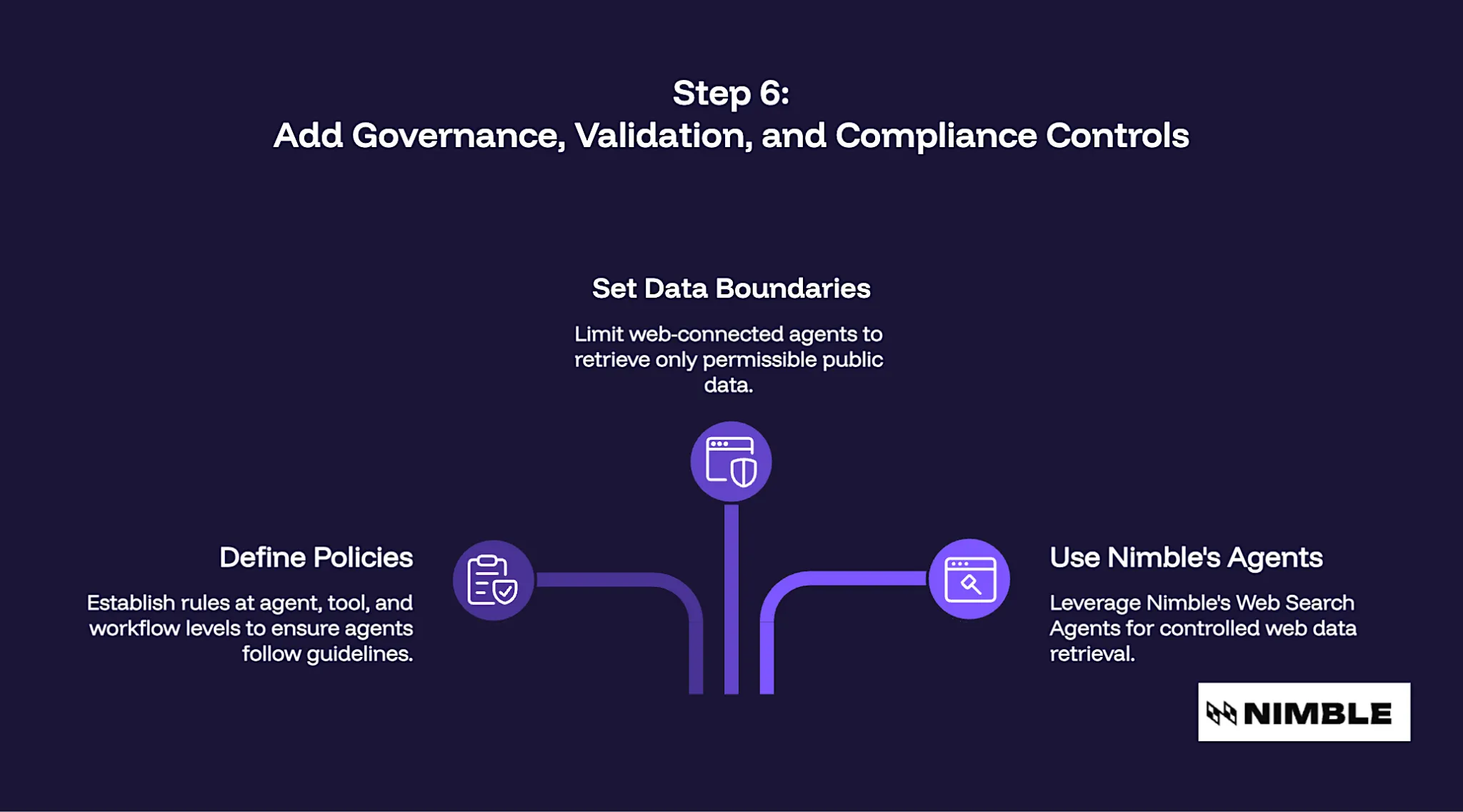
Step 6: Add Governance, Validation, and Compliance Controls
This step defines the rules agents must follow before data, tools, or outputs can be used in production workflows. Production AI systems need controls around access, retrieval, validation, and auditability.
Define policies at the agent, tool, and workflow level. For each agent, specify:
- What data can it access
- Which tools can it call
- Which actions require approval
- What output format must it return
- Which validation checks must pass
- What activity must be logged
Governance should also define public data boundaries for web-connected agents. The retrieval agent should only retrieve permissible public data, output structured data, and pass validation checks before data is used by another agent for reasoning, reporting, or decision making.
Nimble’s Web Search Agents fit naturally into this governance model by retrieving public web data, returning structured outputs, and supporting validation before results move to downstream agents. This gives teams greater confidence that live web data entering AI workflows is controlled, traceable, and ready for production use.
Step 7: Implement Retries, Fallbacks, and Loop Detection
This step prepares the workflow for tool failures, incomplete outputs, timeouts, and repeated agent actions. Agents work on probabilistic models, APIs, retrieval systems, and external data sources. The orchestration framework should describe how the system recovers when a step does not return the expected result.
Retries
Build retry budgets for agents and tool invocations. A retry budget should define what a failure is, how many retries are allowed, and when the workflow should give up on the path.
Fallbacks
Next, configure the fallback routes. Depending on the workflow, a failed step may lead the workflow to another agent, tap a secondary data source, require human intervention, or return a partial result that clearly states the limitations.
Loop Detection
Use loop detection and execution caps to stop agents from repeating the same action without progress. This protects reliability, latency, and cost.
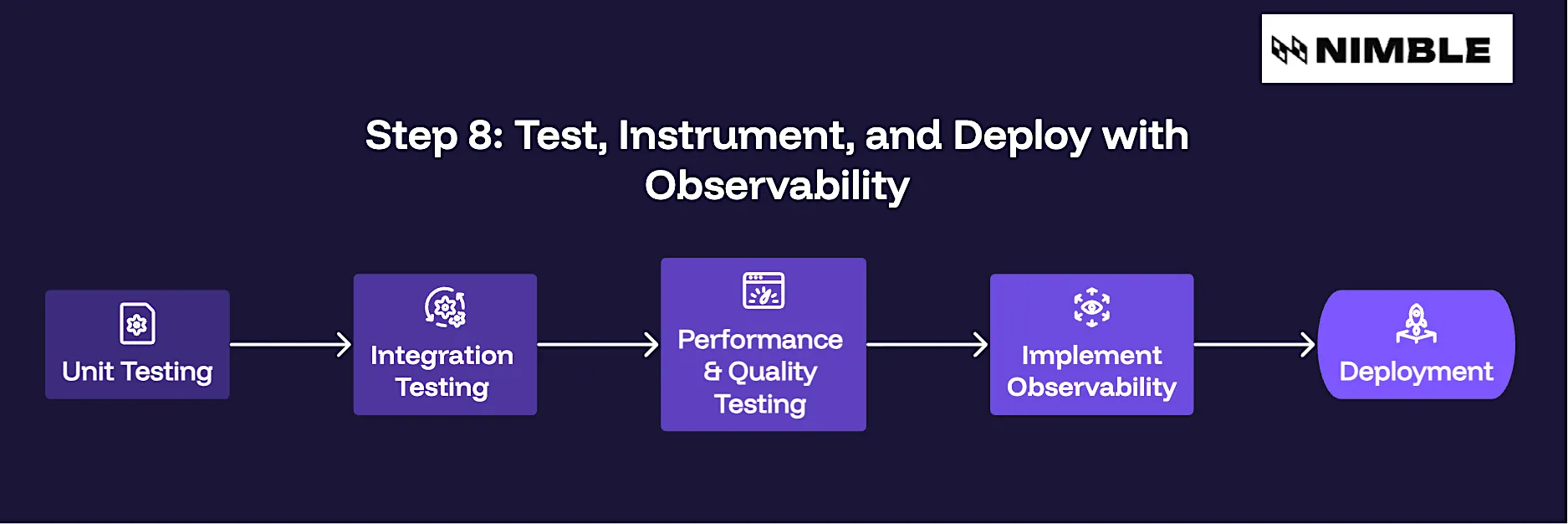
Step 8: Test, Instrument, and Deploy with Observability
This step is a test of the orchestration framework as a whole. Production testing should test the quality of coordination as well as output.
Start with unit tests for single agents. Next, run integration tests for handoffs, state persistence, schema consistency, tool routing, validation, and fallback behavior.
Test for:
- Correct tool selection
- Context preservation
- State integrity
- Retrieval quality
- Schema validation
- Retry behavior
- Fallback routing
- Loop detection
- Cost and latency under load
Observability should tell you what agents ran, what tools they invoked, what data they retrieved, how the state changed, where validation failed, and how much the workflow cost. This step gives engineering teams the visibility needed to improve the system after deployment.
Where Production Orchestration Frameworks Break Down
Orchestration issues often appear once agents move beyond controlled demos:
- Parallel agents can corrupt shared state when they read from or write to the same workflow context without clear ownership rules.
- Frameworks that work in demos may also break under production load when retries, conflicting agent actions, and non-deterministic outputs start to compound.
- Stale retrieval inputs can also cascade through the workflow, causing downstream agents to reason from outdated or loosely structured data.
This is where Nimble fits naturally. The AI Search API and Web Search Agents help give agent workflows access to live, structured, validated public web data, which can reduce the risk of bad inputs spreading through the system.
Other failures are the result of poor guardrails and bad visibility. Agents can call the wrong tools, overuse expensive APIs, or take actions that should be approved by a human. Without observability, teams don’t know which agent ran, what data was retrieved, where validation failed, or why the final output changed.
To make a production-ready architecture, you need data contracts, logging, validation, and an evaluation harness that tests routing, state integrity, retrieval quality, and failure recovery.
Build an AI Agent Orchestration Framework Before Scaling
A multi-agent system is only as reliable as the orchestration framework behind it. It determines how agents share context, call tools, preserve state, validate outputs, handle failures, or operate under production constraints. For workflows that depend on current public web data, the data layer deserves special attention.
Nimble’s AI Search API and Web Search Agents help connect agent workflows to live, structured, validated web data, giving downstream agents cleaner inputs to reason on and reducing the processing burden inside the orchestration framework. Build your orchestration framework first, then scale the agents around it. That is what turns a multi-agent demo into production-grade AI infrastructure.
Book a demo to see how Nimble connects AI agent workflows to live, structured web data built for production.
FAQ
Answers to frequently asked questions
.webp)
.webp)

.webp)
.avif)
.webp)
.webp)