









Dynamic Pricing Strategy: A Step-by-Step Guide
Dynamic Pricing Strategy: A Step-by-Step Guide with AI Agents



Charlie Klein
Dynamic Pricing Strategy: A Step-by-Step Guide
Dynamic Pricing Strategy: A Step-by-Step Guide with AI Agents
Charlie Klein


Most popular articles

Get structured, reliable data for your stack.
Dynamic Pricing Strategy: A Step-by-Step Guide
What is a dynamic pricing strategy?
A dynamic pricing strategy is a rules-based system for adjusting prices based on live market signals, including competitor pricing, demand, inventory, promotions, and margin targets.
With Nimble, pricing teams can build a dynamic pricing strategy around live public web data, defined pricing rules, and clear guardrails, then use an AI agent to turn competitor activity into structured inputs for price recommendations or automated price changes.
Dynamic pricing agent recipes in this guide include:
- Tracking a known competitor product
- Benchmarking a product category
- Comparing prices across retailers
- Monitoring promotions and pricing news
- Recommending a new price based on market data
- Scaling pricing checks across a large catalog
- Scheduling automated pricing runs
Dynamic pricing has become a standard capability in e-commerce, but the way businesses implement it is changing. What was once a rules engine connected to a limited set of pricing feeds can now be powered by AI agents that search the live web and act on current market data.
The global AI-driven price optimization market is projected to grow from $3.92 billion in 2026 to $11.74 billion by 2034, and is changing what a dynamic pricing strategy looks like. Instead of relying on predefined data sources, teams can build pricing logic around competitor information collected directly from the public web. The result is a strategy with broader market visibility and more control over how pricing decisions are made.
This guide explains what a dynamic pricing strategy is, then shows how to operationalize it with Nimble. You’ll get a dynamic pricing cookbook with seven recipes for agent workflows that search the live web, collect competitor pricing data, and use that data to support pricing recommendations or automated price changes.
What is dynamic pricing?
Dynamic pricing is the practice of adjusting prices as market conditions change. In e-commerce, those conditions often include competitor prices, product demand, inventory levels, and marketplace activity.
The model is common in industries where prices need to reflect changing conditions. For example, airlines, hotels, and ride-share platforms all adjust prices based on demand, timing, and availability. In e-commerce, Amazon and other large marketplaces use dynamic pricing across retail catalogs, where competitor movement and inventory changes can affect the right price for a product.
For e-commerce teams, dynamic pricing affects both conversion and margin. If a product stays priced too high against the market, demand may shift elsewhere. If the price drops too far, the business may protect volume while giving up profit it did not need to lose. Research indicates that implementing dynamic pricing can increase revenue by up to 20%.
Traditional vs. Automated Dynamic Pricing
A traditional approach to dynamic pricing still depends on manual monitoring or limited pricing feeds. Teams may check competitor prices by hand, work from spreadsheet exports, or rely on tools that only cover predefined sources. That can support basic price monitoring, but it does not scale well when a catalog spans hundreds or thousands of SKUs.
An automated approach uses software, rules, and market data to support pricing decisions. Instead of relying on manual monitoring, the system can collect current market information and use it to generate pricing recommendations or trigger price changes according to predefined rules.
Why You Need a Dynamic Pricing Strategy, Not Just a Pricing Tool
Many businesses start with dynamic pricing by buying a pricing tool. The appeal is clear: a SaaS dashboard can show competitor prices and let a team create rules like “stay 5% below Amazon” or “match the lowest marketplace seller.” That can be useful for basic monitoring, but it is not the same as having a pricing strategy.
What a Dynamic Pricing Strategy Actually Is
A dynamic pricing strategy is a deliberate, rules-based system that answers three questions:
- What data should we collect?
- When should we change prices?
- By how much?
It is a decision framework the business defines, tests, and then automates. Without that framework, any tool simply produces more data without explaining what the business should do with it.
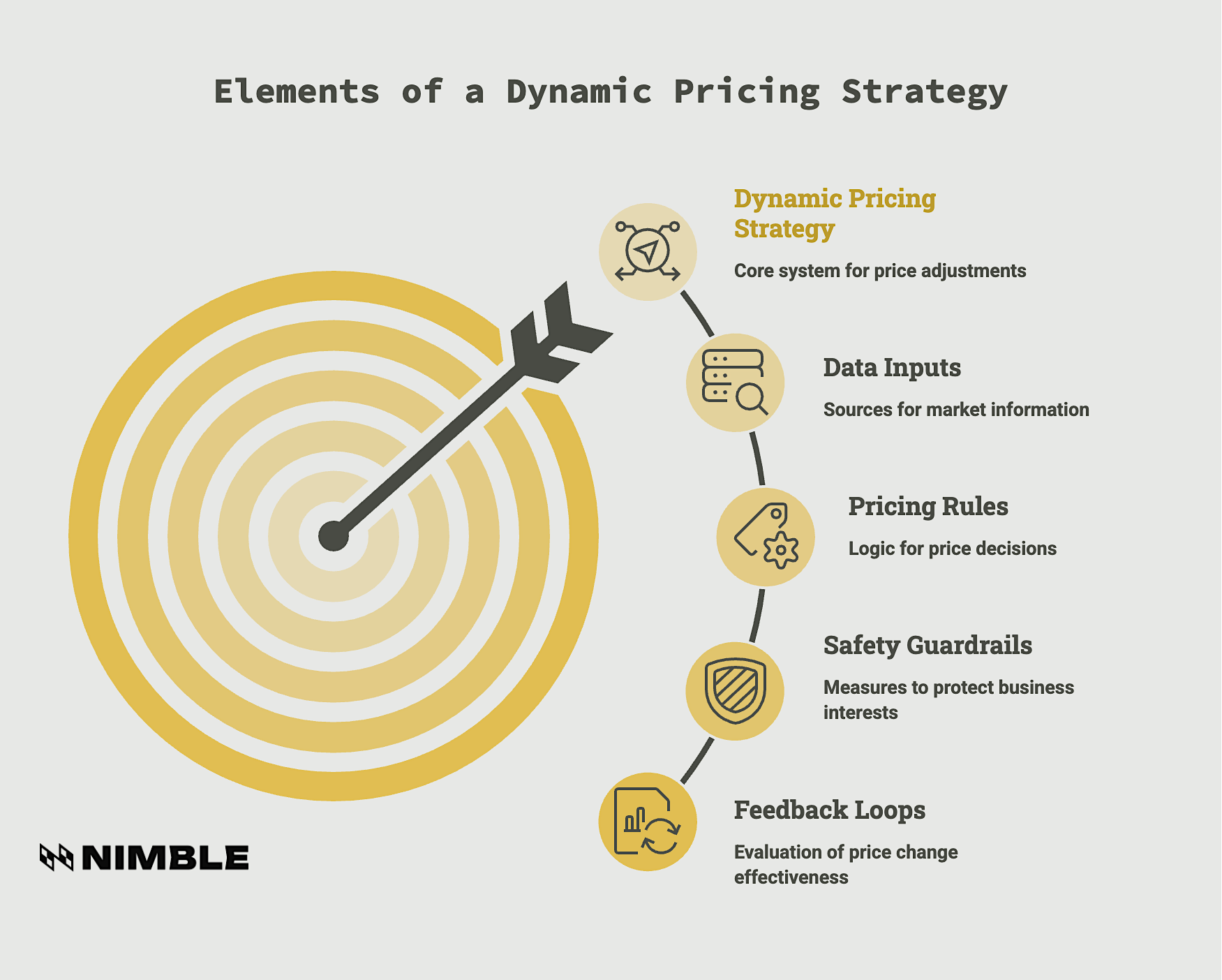
A complete dynamic pricing strategy includes:
- Data Inputs: Which competitors, marketplaces, product pages, search results, and other public sources to monitor, and how often to check them.
- Pricing Rules: The logic that turns market data into a pricing decision. For example, “if two or more priority competitors drop below $X, match the market; otherwise hold.”
- Safety Guardrails: Safety measures such as price floors that protect margin, ceilings that protect brand value, and change-rate limits that prevent excessive swings within a short period.
- Feedback Loops: A way to measure whether each price change improved margin, conversion, sell-through, or volume.
Why Using a Pricing Tool Is Not Enough
Many off-the-shelf pricing tools assume that the sources they already track are the sources your business needs. That can leave gaps when you need to monitor a niche competitor, a regional marketplace, a distributor’s public price list, or a product page that is not part of the vendor’s standard coverage.
Another issue with many pricing tools is context. A competitor dropping a price by 40% may be a serious market signal, but it may also indicate clearance inventory, a temporary promotion, a stock issue, or a seller trying to win the buy box for a short period. A rigid rule may follow that price down automatically, while a well-thought-out strategy asks whether that price movement should influence your own product at all.
How Nimble Fits Into a Dynamic Pricing Strategy
If a pricing tool cannot monitor the sources your strategy depends on, or cannot account for the context behind a price movement, the next option is to build the workflow around your own strategy. That is where Nimble fits.
Nimble provides Extraction Templates and live web data infrastructure for dynamic pricing workflows. Its templates can access current public web data from sources such as Amazon, Walmart, Google, and other relevant sites, then return structured outputs that can be used in pricing logic. Instead of asking a team to check product pages manually or maintain custom scrapers, Nimble gives pricing teams a dependable way to collect pricing intelligence at scale.
With Nimble, you decide which public sources to monitor and which signals to include. That can include availability, ratings, reviews, and promotional context alongside pricing data. You can also connect the output to your database, data warehouse, BI workflow, approval queue, or e-commerce platform API.
For a dynamic pricing strategy, current market data is what makes the rules actionable. If the data is incomplete or outdated, even a well-defined pricing rule can produce the wrong recommendation. Nimble helps teams collect and structure public web data before it reaches the pricing workflow.
Overview: Nimble Tools Used in a Dynamic Pricing Workflow
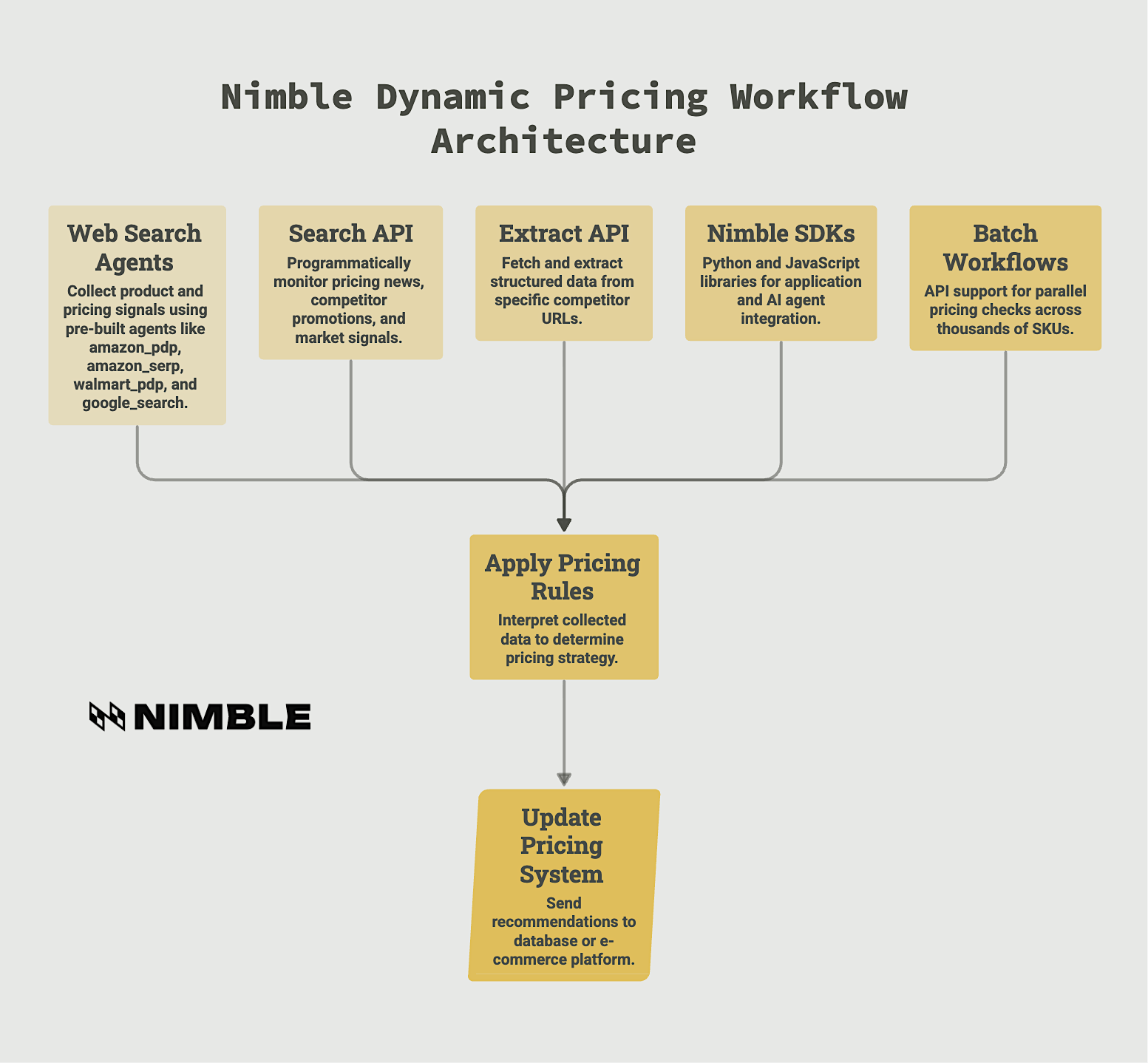
In the following Dynamic Pricing Strategy Cookbook, we use several Nimble tools to build pricing workflows:
- Extraction Templates: Pre-built and custom templates that search, extract, and structure live web data. In this guide, we use templates such as amazon_pdp, amazon_serp, walmart_pdp, and google_search to collect product and pricing signals.
- Search API: A way to search the web programmatically and return structured search results. This is useful for monitoring pricing news, competitor promotions, product launches, and other market signals beyond product pages.
- Extract API: A tool for fetching and extracting structured data from a specific URL. This is useful when the agent already knows which competitor page or public source it needs to analyze.
- Nimble SDKs: Python and JavaScript libraries that make it easier to call Nimble from an application, script, pricing workflow, or AI agent.
- Batch Workflows: API support for running many pricing checks in parallel, which matters when a team needs to monitor hundreds or thousands of SKUs rather than a single product.
This setup gives the pricing agent a practical architecture: use Nimble to collect and structure live market data, apply your pricing rules to interpret that data, then send the recommendation into your pricing system, database, or e-commerce platform.
Dynamic Pricing Strategy Cookbook: A Step-by-Step Guide
Before you automate pricing decisions, you need to connect each pricing strategy to a reliable data workflow. These seven recipes show how to use Nimble to collect live market data, evaluate competitor movement, and turn those signals into pricing recommendations your team can review or apply automatically.
The examples are written in Python and are intended for developers, data engineers, and technical pricing teams responsible for implementing pricing workflows.
Setup and Prerequisites
Before we start ‘cooking’, there’s some setup required. To follow the recipes below, you’ll need a Nimble account, an API key, and a Python environment. These examples use Python because it is common for pricing, data, and automation workflows, but Nimble also supports other SDK and API options.
You’ll need:
- Nimble account and API key: Sign up for Nimble and create an API key from your account settings.
- Python 3.9 or later: The Nimble Python SDK requires Python 3.9+.
- Basic Python familiarity: You should be able to install a package, run a script, and read a JSON-style response.
- A small set of products to monitor: For the first recipes, start with a few known competitor products or search terms before scaling to a larger catalog.
Get Started:
Install the Nimble Python SDK:
For production workflows, store your API key as an environment variable rather than hardcoding it into your script:
Then initialize the Nimble client:
For local testing, you can also pass the API key directly:
Use the environment variable approach for production so API keys are not exposed in source code, shared notebooks, or logs.
Reference Docs: See Nimble’s Python SDK installation guide and Python SDK documentation for the latest package requirements and setup instructions.
Strategy 1: Track a Known Competitor Product
Use this strategy when you already know the exact competitor product you want to monitor. For example, if you sell a product that competes directly with a specific Amazon listing, you can track that listing’s current price, availability, rating, and review count.
This is the simplest dynamic pricing workflow because the agent does not need to discover competitors first. It only needs to check a known product page and return the latest structured data. From there, your pricing logic can decide whether to hold, lower, or raise your price.
In this recipe, we’ll use Nimble’s Amazon product detail page template, amazon_pdp, to fetch live product data from an Amazon ASIN.
Example output:
For a pricing team, this recipe gives the agent a reliable starting point: the current market price of a specific competing product. In a real workflow, you would store this result, compare it against your own current price, and decide whether the competitor’s price movement is meaningful enough to trigger a recommendation.
For example, your pricing rules might say:
- If the competitor price drops by less than 5%, hold your current price.
- If the competitor price drops by more than 10% and the item is in stock, review whether to match or narrow the gap.
- If the competitor item is out of stock, ignore the price drop because it may not represent a real conversion threat.
This is where your strategy matters. A lower competitor price should not automatically force your price down. The agent should also consider availability, margin, product rating, and the size of the price gap before recommending a change.
Reference Docs: See Nimble’s Extraction Templates documentation for details on available templates and supported parameters.
Strategy 2: Benchmark a Product Category
Use this strategy when you want to understand the broader price range for a product category, not just the price of one known competitor. For example, instead of tracking one Amazon listing for “wireless earbuds,” you can search the category and collect prices across many competing products.
This data is useful when your team needs to answer questions like:
- What is the current market range for this category?
- Where does our product sit relative to similar products?
- Are competitors clustering around a new price point?
- Is the low end of the market moving because of promotions or lower-quality alternatives?
In this recipe, we’ll use Nimble’s Amazon search results template, amazon_serp, to search for a product keyword and calculate basic market pricing benchmarks.
Example output:
This recipe gives your pricing agent a quick category-level view. Instead of reacting to one competitor, the agent can compare your current price against the market average, the lowest visible price, and the premium end of the category.
For example, your pricing rule might say:
- If your product is positioned as a value option, keep it within 5% of the category average.
- If your product has stronger ratings or more reviews, allow a premium above the average competitor price.
- If the lowest price comes from a poorly rated product, ignore it or assign it less weight.
- If several competitors move below your current price at the same time, trigger a review or recommendation.
This is the difference between simple price matching and a real dynamic pricing strategy. A category benchmark gives the agent context. It can see whether one competitor is moving unusually, or whether the entire market is shifting.
Reference Docs: See Nimble’s Extraction Templates documentation for details on the amazon_serp template and pagination support.
Strategy 3: Compare Prices Across Retailers
Use this strategy when your pricing decision depends on more than one marketplace or retailer. A single competitor price can be useful, but it may not represent the full market. If Amazon is discounting a product while Walmart is holding steady, your response may be different than if every major retailer is moving down at once.
Cross-retailer comparison helps your pricing agent understand whether a price change is isolated or part of a broader market shift. It also helps your team avoid overreacting to one channel, especially when a promotion, stockout, or marketplace seller behavior creates a temporary pricing signal.
In this recipe, we’ll compare the same or similar product across Amazon and Walmart using Nimble’s product detail page templates.
Example output:
This workflow gives your pricing agent a broader view of the competitive landscape. Instead of treating one retailer’s price as the market price, the agent can compare multiple sources and decide how much weight each one deserves.
For example, your pricing rule might say:
- If two or more priority retailers drop below your current price, recommend a price review.
- If only one retailer drops and the others hold steady, wait before changing your price.
- If the lowest-price retailer is out of stock, ignore that price or reduce its weight.
- If Amazon and Walmart both move down within the same day, treat the signal as a likely market-wide shift.
This strategy is especially useful for products sold across major marketplaces, big-box retailers, or regional e-commerce sites. It gives your dynamic pricing system a more accurate market reference point before it recommends a change.
Reference Docs: See Nimble’s Extraction Templates documentation and Agent Gallery for details on supported product detail page templates.
Strategy 4: Monitor Promotions and Pricing News
Use this strategy when product-page data alone does not explain what is happening in the market. A competitor’s price may drop because of a planned sale, a holiday promotion, a product launch, or a short-term inventory push. If your pricing agent only sees the price, it may miss the reason behind the change.
Market context helps the agent decide whether a price movement should trigger action. A one-day promotion may not require the same response as a permanent price cut. A seasonal sale may be worth matching for a limited window. A competitor’s new product launch may require closer monitoring across both pricing and demand signals.
In this recipe, we’ll use Nimble’s Search API to monitor recent pricing news, promotions, and sales signals.
Example output:
This recipe gives your pricing agent additional context beyond the product detail page. Instead of seeing a lower price as a standalone event, the agent can evaluate whether the change is connected to a promotion, sale period, product launch, or broader market movement.
For example, your pricing rule might say:
- If a competitor price drop is tied to a short-term promotion, match only during the promotional window.
- If several news results mention a category-wide sale event, increase monitoring frequency for affected SKUs.
- If a competitor is clearing older inventory, avoid matching the price unless your own inventory strategy requires it.
- If a new product launch is driving discounts on older models, review whether your catalog contains comparable products.
This strategy helps keep dynamic pricing from becoming blind price matching. The agent can use search results to identify why the market is moving, then apply pricing logic that reflects the business context.
Reference Docs: See Nimble’s Search API documentation for details on search depth, result limits, and web search workflows.
Strategy 5: Recommend a New Price Based on Market Data
The first four strategies help your AI agent to collect market signals. This strategy shows how to translate those signals into a decision your team can review or send into a pricing system. Use this strategy when you want to turn live competitor data into a pricing recommendation.
This recipe is where dynamic pricing becomes more than monitoring. The agent compares your current price against competitor prices, applies your margin requirements, checks your price floor and ceiling, and explains why it recommends a change.
In this recipe, we’ll use Nimble’s Amazon product detail page template, amazon_pdp, to gather competitor prices, then apply a simple pricing rule set.
Example output:
This example keeps the decision logic intentionally simple. The agent is not trying to maximize every possible cent of margin. It is applying a clear business rule: stay within a reasonable range of the market average, but never break the company’s margin or brand guardrails.
For example, your pricing rule might say:
- If your price is more than 10% above the competitor average, recommend moving closer to the market.
- If your price is more than 10% below the competitor average, consider raising it to recover margin.
- Never recommend a price below your floor or below the minimum profitable price.
- Never recommend a price above your ceiling, even if the market average is higher.
This is the core of a dynamic pricing strategy. The agent weighs live market data against your own business constraints, then produces a recommendation that can be logged, reviewed, or applied automatically.
Reference Docs: See Nimble’s Extraction Templates documentation and SDK code examples for current template syntax and structured output examples.
Strategy 6: Scale Pricing Checks Across a Large Catalog
This strategy is ideal for when your pricing workflow needs to move beyond a few products. Checking one competitor ASIN is useful for testing, but most e-commerce teams need to monitor dozens, hundreds, or thousands of products across a catalog.
At that point, running each request one by one becomes inefficient. A batch workflow lets you submit many product checks at once, then retrieve the results when the jobs complete. This is useful for daily pricing reviews, high-volume competitor monitoring, and scheduled repricing workflows.
In this recipe, we’ll use Nimble’s Agent Batch workflow to check multiple Amazon product pages in parallel.
Example output:
After the batch is submitted, the next step is to poll the batch progress endpoint until the batch is complete, then retrieve the successful task results. In a production workflow, those results would be normalized and stored in your pricing database, data warehouse, or repricing system.
This strategy turns dynamic pricing from a single-product workflow into a catalog-level process. Instead of manually checking each SKU or running one script per product, your team can submit a group of product checks and process the results together.
For example, your pricing rule might say:
- Run batch checks every morning for priority SKUs.
- Run more frequent checks for products in highly competitive categories.
- Send large price gaps into a human review queue before applying changes.
- Store every batch result in a database or data warehouse so the team can track pricing trends over time.
This also creates a stronger feedback loop. When batch results are stored historically, pricing teams can see which competitors move most often, which categories are most volatile, and which pricing rules improve conversion or margin. That turns dynamic pricing into a continuous operating model rather than a one-off automation script.
Reference Docs: See Nimble’s Extraction Templates documentation, Agent Batch API reference, and batch progress documentation for details on async and batch workflows.
Strategy 7: Schedule Automated Pricing Runs
Use this strategy when you want your pricing workflow to run continuously without manual triggering. Once your agent can collect competitor data, evaluate market context, and recommend prices, the next step is to decide how often it should run.
Not every product needs the same schedule. A fast-moving electronics SKU may need hourly checks during a major sales event, while a long-tail product may only need a daily or weekly review. The schedule should match the volatility of the category, the value of the SKU, and the risk of being late to a market change.
Here are two primary ways to schedule a pricing agent:
- For a simple workflow, you can run the script with a cron job.
- For a cloud-based workflow, you can deploy the logic as a scheduled function using AWS Lambda, Google Cloud Functions, or another orchestration tool.
Option A: Run the Agent With a Cron Job
A cron job is useful when the pricing script runs on a server or internal machine that your team controls. The example below runs the pricing agent every day at 6 AM and writes the output to a log file.
Option B: Run the Agent With AWS Lambda
A cloud function is useful when you do not want to manage a server. In this example, AWS Lambda runs the pricing logic, and Amazon EventBridge triggers it on a schedule.
In a production workflow, store your Nimble API key as an environment variable, log each pricing run, and capture the recommendation reason for every price change. That makes the system easier to audit and safer to operate when automated pricing decisions affect revenue and margin.
For example, your pricing schedule might say:
- Run hourly checks for top-selling products during peak promotional periods.
- Run daily checks for priority SKUs in competitive categories.
- Run weekly checks for low-volume or stable products.
- Trigger an extra run when a competitor promotion, inventory shift, or major shopping event appears in search results.
Scheduling turns the pricing agent into an operating system for market response. The agent no longer waits for a team member to open a dashboard or check a competitor page. It watches the market on a defined cadence, applies the strategy, and sends the result to the right workflow.
Reference Docs: See Nimble’s Python SDK installation guide and Search API documentation for current SDK setup and search workflow details.
Scaling Up: Batch and Async
The seven recipes in this dynamic pricing agent cookbook are intentionally small so you can see how each part of the pricing workflow works. In a real e-commerce environment, the same logic has to run across a much larger catalog. Your team may need to check hundreds of competitor products before a pricing review or refresh priority SKUs during fast-moving market periods.
That is where batch and async workflows become important:
- Batch processing lets you submit many product or category checks at the same time.
- Async execution lets those checks run without making the rest of your workflow wait.
- Centralized storage keeps each result available for analysis, reporting, and future pricing decisions.
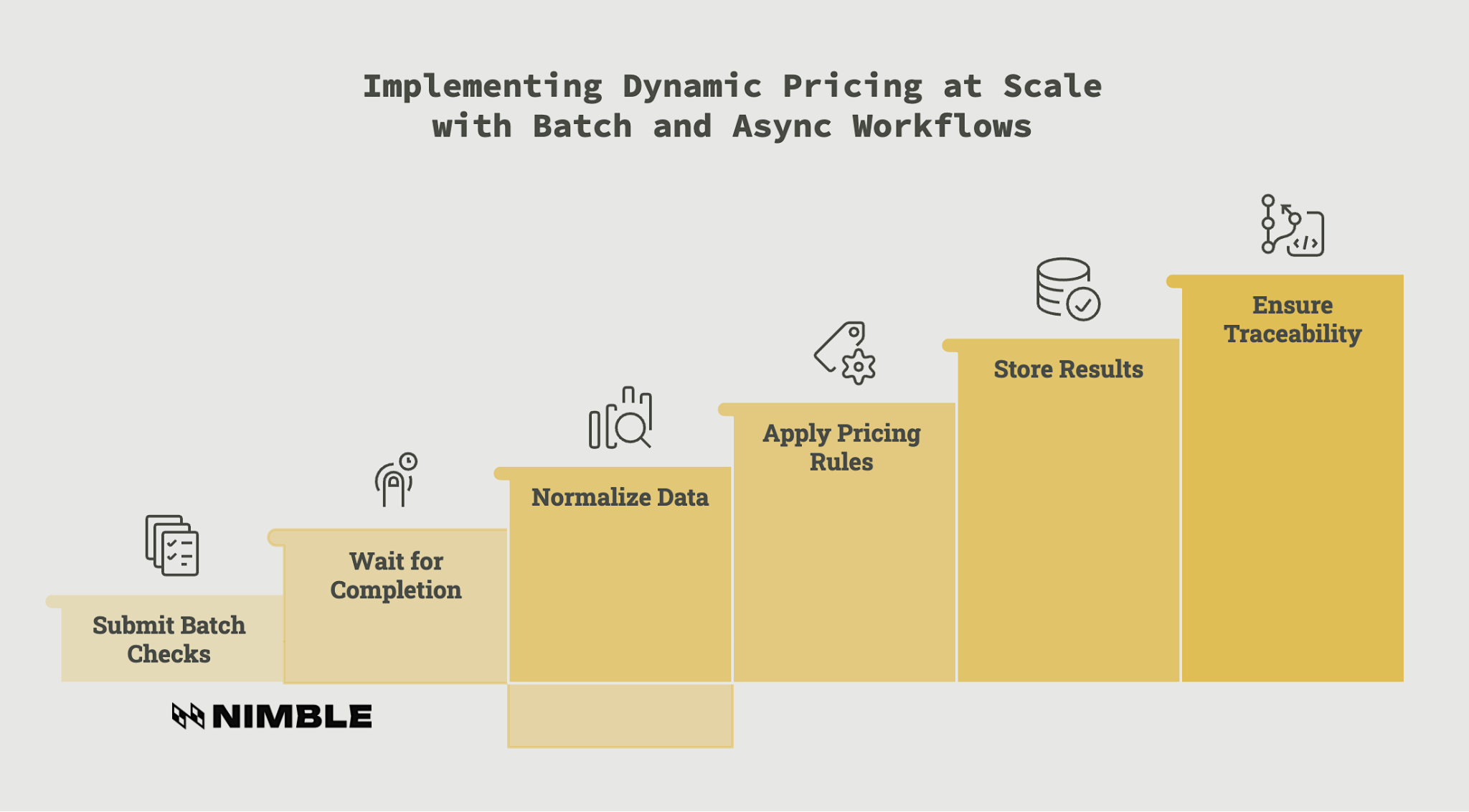
While it deals with a larger catalog, this production workflow usually follows a simple path:
- Submit a batch of competitor product checks.
- Wait for the batch to complete.
- Normalize the returned prices, availability signals, and product details.
- Apply the pricing rules from your decision engine.
- Store the results in a data storage system like Snowflake, Databricks, S3, or your pricing database.
It moves dynamic pricing from a useful script to a repeatable operating process. The agent can check large groups of products, compare current market signals against your rules, and preserve the data behind each recommendation.
What’s critical here is traceability. For every recommendation, be sure to store the source data, the rule applied, the suggested price, and the reason behind the change. That gives your business a faster way to respond to the market without losing control over how pricing decisions are made.
Safety Rails and Best Practices
Dynamic pricing strategies executed by AI agents should have limits before reaching production. The agent can collect data and recommend prices automatically, but your business still needs clear rules for when a price can change and when a person should review it first.
Before applying automated pricing changes, define:
Price floors: The lowest acceptable price for each product, based on cost, margin, and business goals.
- Price ceilings: The highest acceptable price, especially for products where brand perception or customer trust matters.
- Change limits: The maximum allowed price movement in a given period, such as no more than a 10% or 15% change in 24 hours.
- Human review triggers: The conditions that should send a recommendation to a pricing manager before it goes live, such as unusually large discounts, sharp increases, or conflicting competitor signals.
- Decision logs: A record of the source data, pricing rule, suggested price, timestamp, and reason behind each recommendation.
- Public-data boundaries: Dynamic pricing workflows should focus on publicly available data. Nimble is designed for public web data collection and supports compliance-conscious workflows aligned with GDPR, CCPA, and SOC 2 expectations
These safeguards keep the agent useful without making it reckless. The goal is to automate repetitive market monitoring and pricing recommendations while preserving control over margin, customer experience, and compliance.
Put Dynamic Pricing Strategy Into Motion with Nimble
A dynamic pricing strategy gives pricing teams a clear framework for using market data to guide price changes. This cookbook shows how to build Nimble agent workflows that search the live web, collect current competitor data, and feed that data into pricing recommendations. It’s a customizable approach that gives teams more control than a fixed pricing dashboard because the data sources and decision logic can be shaped around your business.
Nimble gives your pricing agents reliable access to real-time public web data. Extraction Templates collect current data from public web sources and return it in a structured format the pricing agent can use. Pricing teams can use current competitor data across larger catalogs without building and maintaining fragile scraping workflows.
Book a Nimble demo to see how its AI agents and real-time web data can help you implement a scalable dynamic pricing strategy that increases revenue.
FAQ
Answers to frequently asked questions
.webp)

.webp)
.webp)
.webp)
.webp)
.avif)
.webp)