









Nimble x Snowflake: High-Scale Data Enrichment with a Web Search Agent UDTF
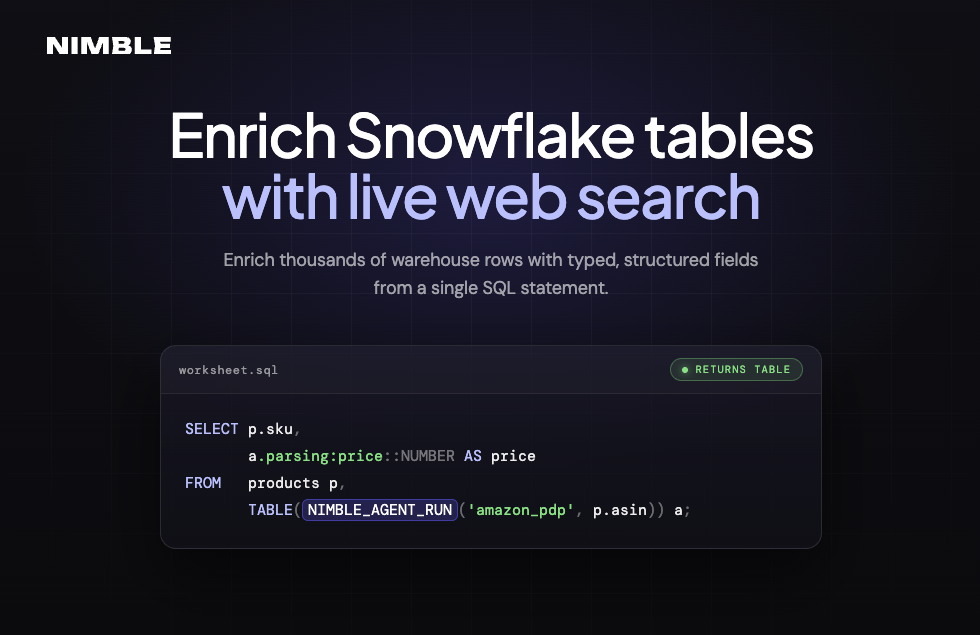
How to enrich N warehouse rows with typed, structured web fields from a single SQL statement. One Web Search Agent per row, parsed server-side, consumed by dbt and Tasks like any other model.


.avif)
Ilan Chemla
Nimble x Snowflake: High-Scale Data Enrichment with a Web Search Agent UDTF
How to enrich N warehouse rows with typed, structured web fields from a single SQL statement. One Web Search Agent per row, parsed server-side, consumed by dbt and Tasks like any other model.
Ilan Chemla


Most popular articles



Get structured, reliable data for your stack.
Our last post on Nimble's Snowflake integration was about chatting with your data. We built a Cortex Agent you talk to, backed by Nimble's NIMBLE_SEARCH and NIMBLE_EXTRACT so it could pull in live web data when a question called for it.
But a lot of warehouse work isn't one question, it's a whole table that needs enrichment. Ten thousand SKUs that need pricing, a few hundred markets where you want the local landscape.
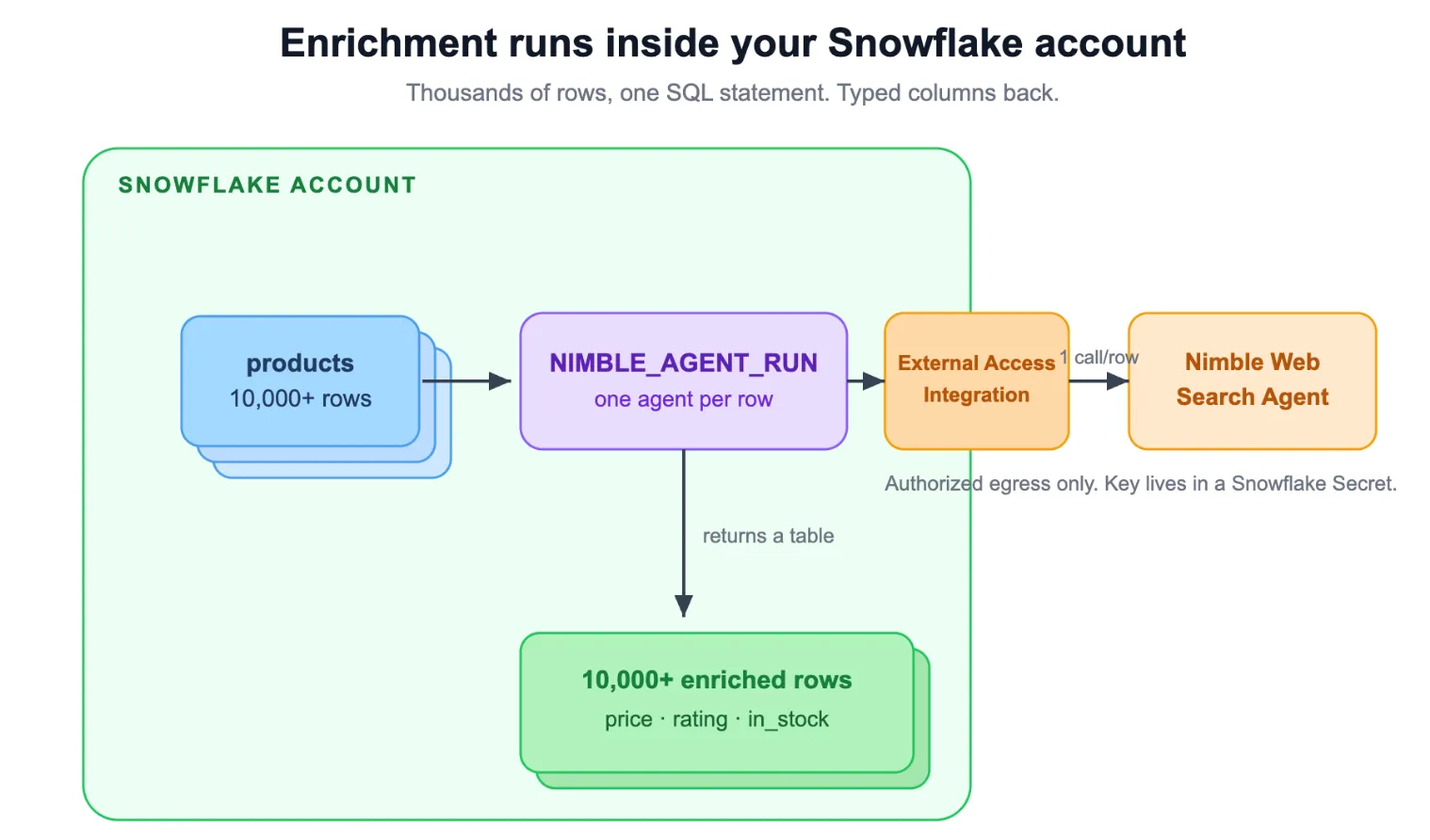
That's what NIMBLE_AGENT_RUN is for: you call one Web Search Agent per row and get back typed fields Nimble parses server-side, on a schedule, landed somewhere dbt can read.
It's a UDTF, so it returns a table. You call one Web Search Agent per row and get back typed, structured fields that Nimble parses server-side: product title, price, rating, review count, or anything else that lives on the web.
Because the values come back already typed, you skip the parts that usually make web data painful. No LLM pass downstream to dig values out of HTML, no selectors to write and maintain, no Python middle-tier sitting between your warehouse and the web. You write one SQL statement, and dbt, Tasks, Streamlit, and your BI tool read the output like any other table.
Where this fits in the integration
The Snowflake integration now ships three primitives. The quickest way to pick one is to ask what the job actually is.
If you want to chat with an agent that knows the web, use the pre-built Cortex Agent. If you want generic search or page extraction inline in a query, use the NIMBLE_SEARCH and NIMBLE_EXTRACT scalar UDFs. And if you want to enrich a lot of rows with structured fields per row, that's NIMBLE_AGENT_RUN, the UDTF this post is about.
What one function actually gives you
NIMBLE_AGENT_RUN has one signature for every agent. You pass an agent name and that agent's params, and you get back a table. The shape doesn't change whether you're hitting retail, real estate, local business, social, or jobs.
A few things matter more than the rest. Each agent parses its own domain server-side and hands back purpose-built fields: product title, price, rating, review count, ranking position. No Cortex Complete pass to extract values from markdown, because the values arrive already typed. PDP-style agents return one object per input row. SERP-style agents return an array, and you pair them with LATERAL FLATTEN to fan out into one row per result. Each row carries its own status, so a clean run lands as status='success' and you filter on it like any other column.
And the whole thing stays inside your account... only the calls you authorized leave, secrets live in Snowflake's secret manager.
Here's a quick overview of enriching your Snowflake data tables with Nimble's web search:
The shape, in one statement
Here's the whole thing in a single SELECT. A product master, enriched with live Amazon detail:
SELECT  p.sku,
        a.parsing:web_price::NUMBER(10, 2)         AS amazon_price,
        a.parsing:availability::BOOLEAN            AS in_stock,
        a.parsing:average_of_reviews::NUMBER(3, 2) AS rating
FROM    products p,
        TABLE(NIMBLE_INTEGRATION.TOOLS.NIMBLE_AGENT_RUN(
            'amazon_pdp',
            OBJECT_CONSTRUCT('asin', p.amazon_asin)
        )) a
WHERE   p.amazon_asin IS NOT NULL
  AND   a.status = 'success';
No stored procedure. No CALL plus RESULT_SCAN round-trip. No Python middle-tier sitting between your warehouse and the web. One statement, and dbt models, Snowflake Tasks, Streamlit, and any BI tool read the output like they would any other table. That last part is the point. The enrichment isn't a separate system you babysit. It's a row in your warehouse.
Workflow 1: product-master enrichment
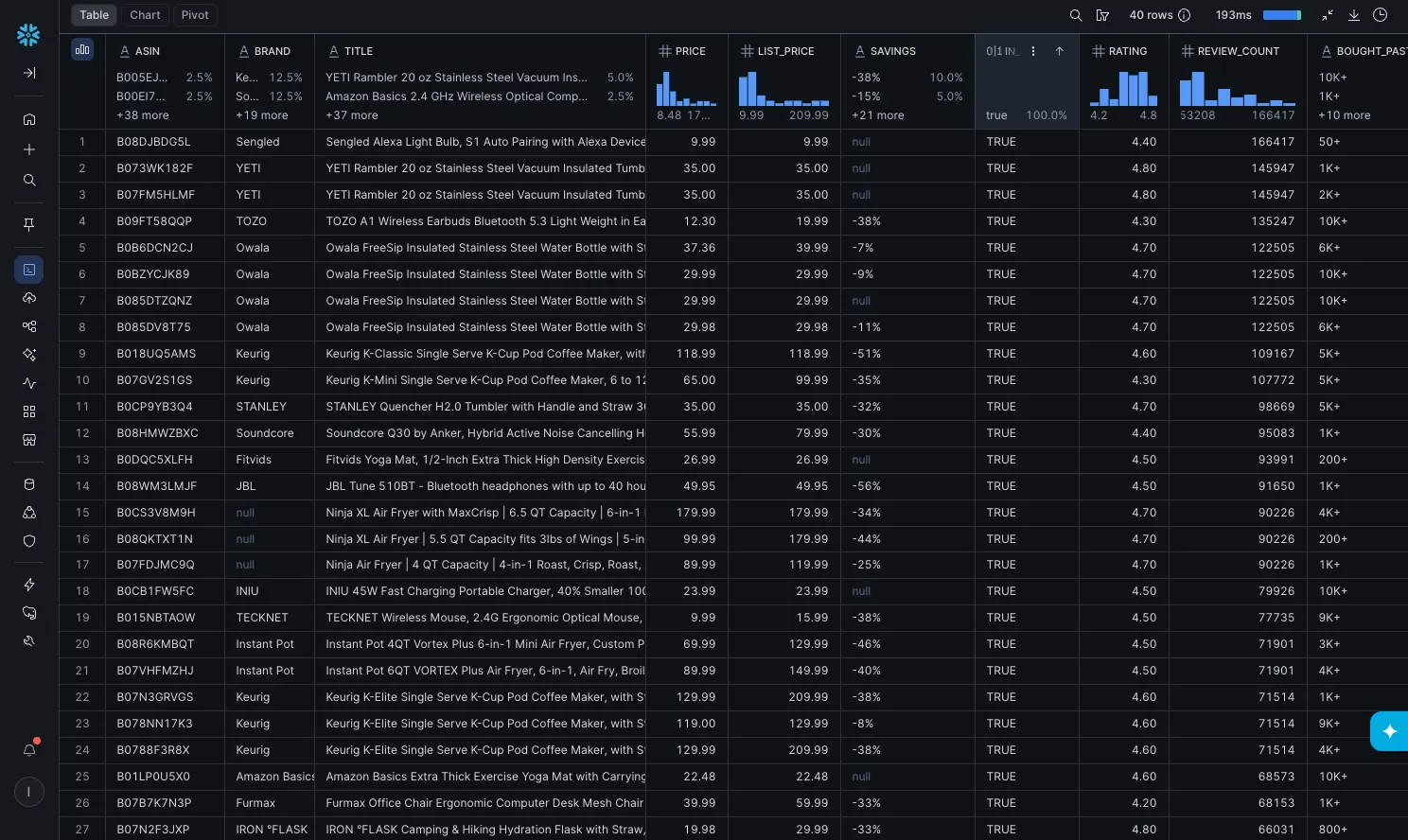
Start with the case where you already know what you care about. You have a PRODUCTS table with Amazon product IDs (ASINs) in it. You want a full attribute dump per identifier: brand, description, color, packaging, price, availability, rating.
This is the PDP-style agent. One input row, one output row, no FLATTEN needed, because amazon_pdp returns the product as a single typed object.
SELECT
    p.sku,
    a.parsing:brand::STRING                     AS brand,
    a.parsing:product_title::STRING             AS title,
    a.parsing:brief_product_description::STRING  AS description,
    a.parsing:color::STRING                     AS color,
    a.parsing:web_price::NUMBER(10, 2)          AS price,
    a.parsing:availability::BOOLEAN             AS in_stock,
    a.parsing:average_of_reviews::NUMBER(3, 2)  AS rating
FROM   PRODUCTS p,
       TABLE(NIMBLE_INTEGRATION.TOOLS.NIMBLE_AGENT_RUN(
           'amazon_pdp',
           OBJECT_CONSTRUCT('asin', p.amazon_asin)
       )) a
WHERE  p.amazon_asin IS NOT NULL
  AND  a.status = 'success';
A PDP agent typically returns around 30 fields. You project the subset your downstream models need and ignore the rest. The reason this works where a generic scrape would fight you: the agent is built for Amazon's page. It knows where price lives, how reviews are structured, what "out of stock" looks like across the variants. You're not writing selectors. You're naming fields.
Workflow 2: local business discovery at scale
Now the case that leans on Snowflake harder. You don't have a list of things to look up. You have a list of questions, and each one fans out into many rows.
Feed a LOCATION_QUERIES table of research terms ("coffee shop in austin texas", "veterinary clinic in seattle wa"). For each one, google_maps_search returns up to 20 ranked places with name, address, rating, review count, phone, price level, the sponsored flag, hours. One input row becomes twenty output rows. LATERAL FLATTEN does the unfold:
INSERT INTO LOCAL_BUSINESSES (query, category, position, name, address, city, rating, review_count, phone, status, enriched_at)
SELECT
    q.query,
    q.category,
    p.value:position::INTEGER                           AS position,
    p.value:title::STRING                               AS name,
    p.value:address::STRING                             AS address,
    p.value:city::STRING                                AS city,
    p.value:review_summary:overall_rating::NUMBER(3, 2)  AS rating,
    p.value:number_of_reviews::INTEGER                  AS review_count,
    p.value:phone_number::STRING                        AS phone,
    a.status                                            AS status,
    CURRENT_TIMESTAMP()                                 AS enriched_at
FROM LOCATION_QUERIES q,
     TABLE(NIMBLE_INTEGRATION.TOOLS.NIMBLE_AGENT_RUN(
         'google_maps_search',
         OBJECT_CONSTRUCT('query', q.query)
     )) a,
     LATERAL FLATTEN(INPUT => a.parsing:entities:SearchResult) p
WHERE a.status = 'success';
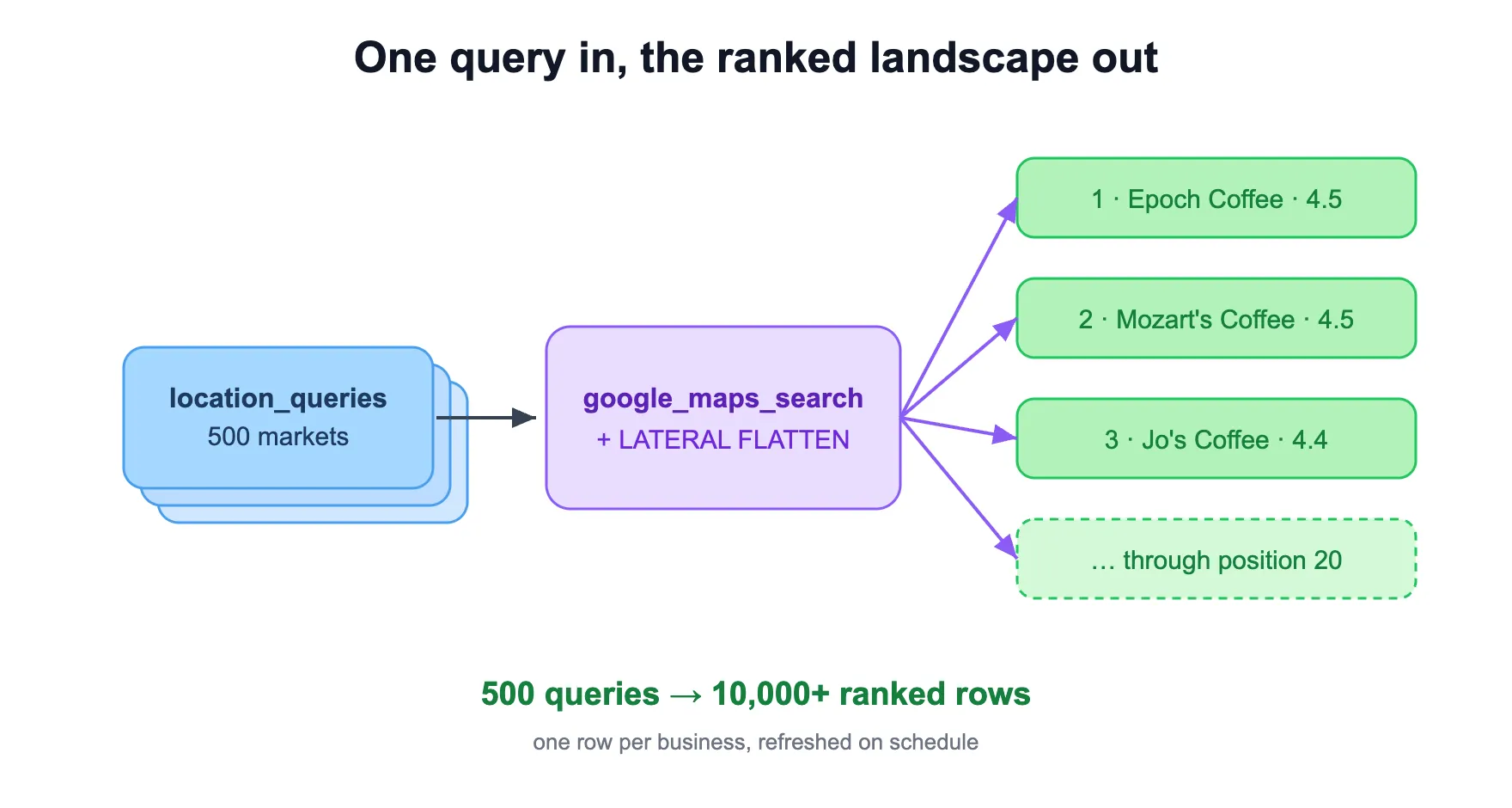
This is market sizing, account-universe building, competitive territory mapping, POI databases. One row per business per query per refresh. Layer a view on top that flags any place_id ranking in the top 20 for the first time in the last seven days, and you're catching new market entrants before they take real share.
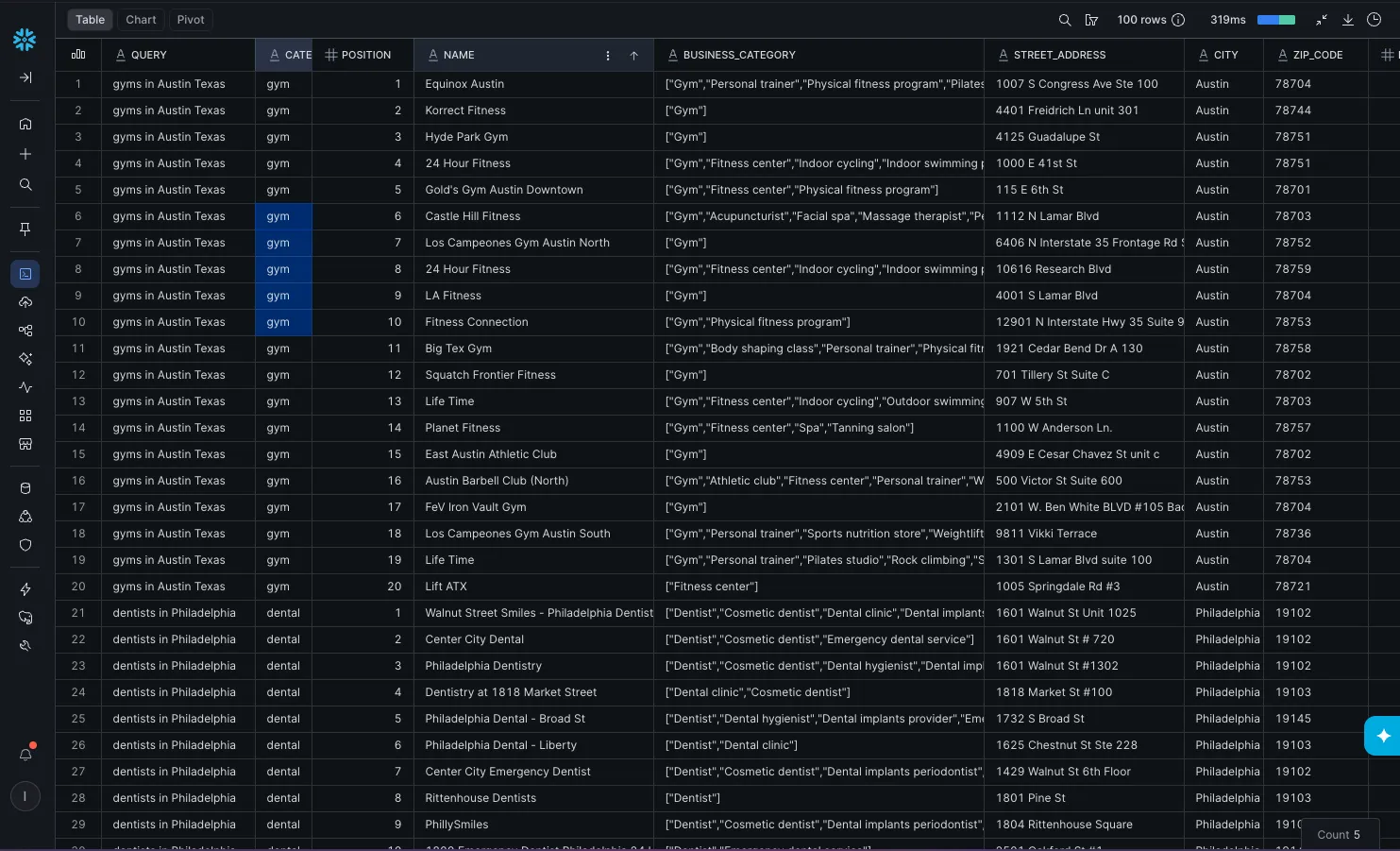
One thing worth knowing before you wire this in: agents nest their results differently. google_maps_search puts them under parsing.entities.SearchResult, not a flat parsing array like Amazon SERP. So inspect the shape once per agent (SELECT raw FROM ...) before you pin a FLATTEN target. Don't ship a guess.
Running it nightly, without a middle-tier
The reason both workflows are production-grade and not just clever queries is that NIMBLE_AGENT_RUN runs as a single SQL statement. That unlocks the rest of the Snowflake stack for free.
A Snowflake Task can run the enrichment directly. No wrapper procedure:
CREATE OR REPLACE TASK daily_local_business_discovery
  WAREHOUSE = NIMBLE_AGENT_WH
  SCHEDULE  = 'USING CRON 0 8 * * * America/Los_Angeles'
AS
  INSERT INTO LOCAL_BUSINESSES (...)
  SELECT ... FROM LOCATION_QUERIES q,
       TABLE(NIMBLE_INTEGRATION.TOOLS.NIMBLE_AGENT_RUN('google_maps_search', OBJECT_CONSTRUCT('query', q.query))) a,
       LATERAL FLATTEN(INPUT => a.parsing:entities:SearchResult) p
  WHERE a.status = 'success';

ALTER TASK daily_local_business_discovery RESUME;
The same SELECT is also a valid dbt model body. Add an incremental config block and dbt orchestrates the daily refresh exactly like it would for any other model. The web data stops being a special case. It's just a model in your DAG.
A couple of sizing notes from the docs. XSMALL with 60-second auto-suspend comfortably handles a few hundred rows a day. For a bigger batch, step up to SMALL or MEDIUM just for the duration of that task and let it suspend after, since Snowflake bills per second. Each call is one upstream request per input row, so match your input cardinality to your Nimble tier and the daily refresh runs hands-off. The per-row status column makes the whole thing easy to monitor: a quick count by status gives you a clean health check on every run.
Where to start
Setup shares the same role, warehouse, secret, and External Access Integration as NIMBLE_SEARCH and NIMBLE_EXTRACT, so if you already deployed those, you skip straight to the function. Otherwise it's one ACCOUNTADMIN script.
- Setup and full UDTF spec: docs.nimbleway.com/integrations/partnerships/snowflake/data-enrichment
- Every SQL file here, plus the Amazon keyword research recipe: github.com/Nimbleway/cookbook (snowflake/)
- Free Nimble API key: online.nimbleway.com/signup
Deploy the function. Run the smoke test. Then go look at the tables you already refresh on a schedule, and ask which of them would be worth more with a column of live web data sitting next to the rest.
FAQ
Answers to frequently asked questions
.webp)

.webp)
.webp)