









We tried to scrape the web with Claude. Here’s what happened.



Charlie Klein
%201%20(1).webp)
We tried to scrape the web with Claude. Here’s what happened.
Charlie Klein


Most popular articles
Get structured, reliable data for your stack.
Claude Code's built-in web search feels powerful. You ask it to find something, it searches, reads a page, gives you an answer. In a demo, it's genuinely impressive.
Then you try to scrape Amazon and you get HTTP 503s.
That's the gap this post is about. Not "which tool finds better articles", but "which tool can actually pull structured data from the real web." We ran five experiments to find out, and the results were pretty stark.
The part that surprises most developers
This problem shows up in everyday developer workflows, not just scraping product data:
- For API docs built on Docusaurus, ReadTheDocs, or GitBook use client-side routing, WebFetch gets the nav bar while parameter tables never load.
- Stack Overflow searches return a 280-character snippet: no code, no accepted answer.
- For npm and PyPI pages are JavaScript-rendered and rate-limit plain HTTP clients, WebFetch returns an empty bundle or a 429.
- GitHub issues and release notes at volume get blocked by Cloudflare.
The root cause: WebFetch is a plain HTTP GET with no JavaScript execution. Sites like Amazon also fingerprint requests by TLS pattern and header ordering, so a raw HTTP client gets blocked outright. Nimble routes through real Chromium instances with randomized fingerprints, rotating IPs, and full JS execution. Specialized modes (shopping, location, news) return pre-structured fields instead of raw HTML. Everything below is that difference playing out across five experiments.
The experiments
We ran five side-by-side tests. Each one tried to build a 100-row dataset with structured fields — once using Claude Code's native tools, once using Nimble. Here's what happened.
Experiment 1: Stripe API Documentation
Description: One request per Stripe API endpoint or concept, spanning 10 categories: Payment Intents, Customers, Payment Methods, Subscriptions, Invoices, Webhooks, Charges, Refunds, Products & Prices, and Error Codes. Each prompt asked for specific technical details — full parameter lists, response object schemas, error codes, or behavioral rules (e.g. webhook retry schedules).
Fields: Endpoint URL, HTTP Method, Required Parameters, Optional Parameters, Response Fields, Error Codes.
.webp)
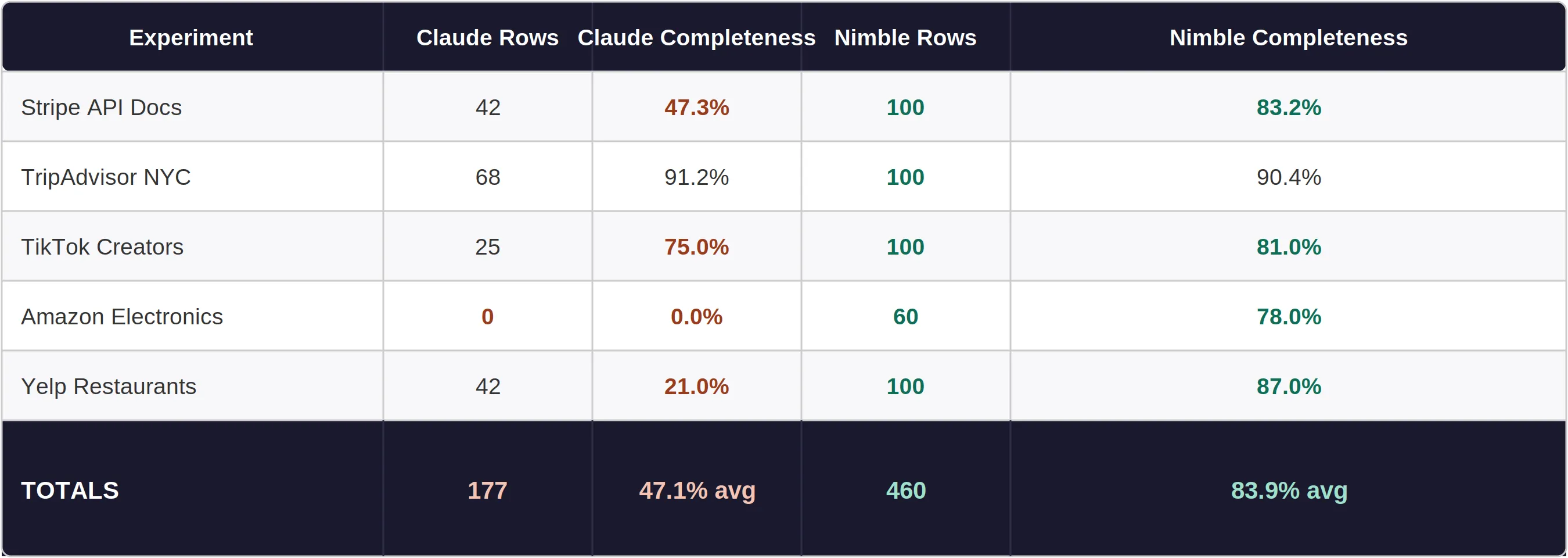
Claude handled narrative-heavy prompts well — common objects like Customer and Charge from cached or plain-HTML sources came through. But parameter tables, nested response schemas, and enum value lists live in JavaScript-rendered components that WebFetch never loaded. For those, Claude returned truncated lists or hallucinated field names.
Nimble rendered each page fully and captured complete parameter tables including nested schemas. The 83.2% completeness ceiling comes from a handful of fields Stripe only exposes in versioned changelog pages.
Sample Data — Stripe API Documentation
Three prompts, side by side.
Prompt #1: What parameters does the Create PaymentIntent endpoint accept?
What Nimble returned:
- Endpoint: POST /v1/payment_intents
- Required: amount, currency
- Optional (23 total): customer, description, metadata, payment_method, payment_method_types[], capture_method, confirm, confirmation_method, off_session, receipt_email, return_url, setup_future_usage, shipping, statement_descriptor, transfer_data, application_fee_amount, and more
- Error codes: card_declined, authentication_required, insufficient_funds, payment_intent_authentication_failure
What Claude returned:
- Endpoint: POST /v1/payment_intents
- Required: amount, currency
- Optional: customer, description (list cut off — JS parameter table did not load)
- Error codes: not returned
Prompt #8: What is the structure of the last_payment_error object?
What Nimble returned:
- Field path: GET /v1/payment_intents/:id → last_payment_error
- Fields: charge (str), code (str), decline_code (str), doc_url (str), message (str), param (str), payment_method (object), type (api_error | card_error | idempotency_error | invalid_request_error)
What Claude returned:
- Narrative only: "contains code and message fields"
- No endpoint, no field types, no full field list — JS schema tree did not render
Prompt #92: What are all the decline codes Stripe can return for card payments?
What Nimble returned:
- All 46 decline codes extracted with descriptions: authentication_required, approve_with_id, call_issuer, card_not_supported, card_velocity_exceeded, currency_not_supported, do_not_honor, do_not_try_again, duplicate_transaction, expired_card, fraudulent, generic_decline, incorrect_cvc, incorrect_pin, incorrect_zip, insufficient_funds, lost_card, stolen_card, pickup_card, restricted_card, and 26 more
What Claude returned:
- 6 decline codes from memory: insufficient_funds, card_declined, expired_card, incorrect_cvc, lost_card, stolen_card
- Source was hallucinated — Stripe docs list 46 decline codes
Experiment 2: TripAdvisor Top NYC Restaurants
Description: 100 restaurant lookups across TripAdvisor's top-ranked NYC listings, pulling rank, name, cuisine type, neighborhood, star rating, review count, price range, and full street address for each entry. Requests spanned multiple pagination pages to reach the full 100-entry list.
Fields: Rank, Name, Cuisine, Neighborhood, Rating, Reviews, Price Range, Address.
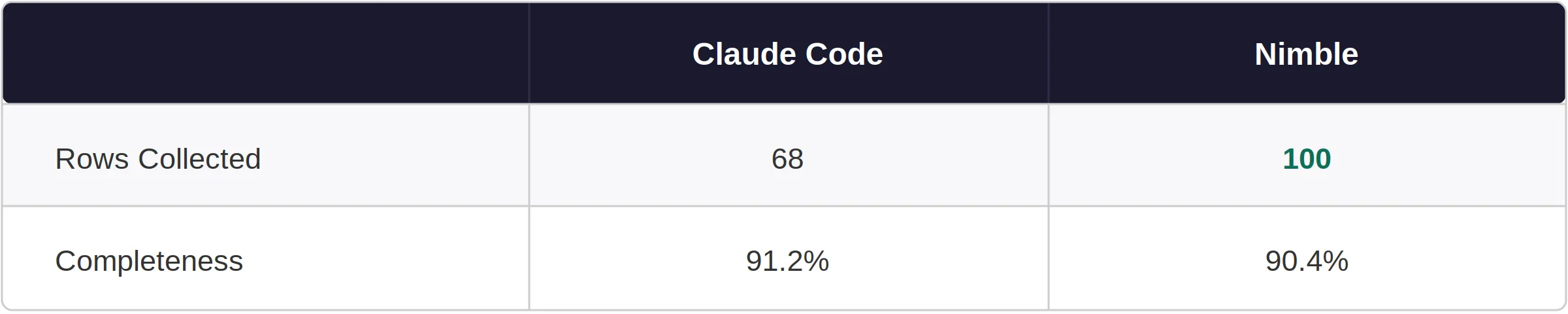
WebFetch returned sparse snippets from TripAdvisor's JS-rendered pages. A third-party workaround (stacker.com) provided partial data for some entries, but pagination was impossible — Claude hit a hard ceiling at 68 rows.
Nimble extracted TripAdvisor's embedded schema.org data across all pagination pages. One quirk: TripAdvisor only includes cuisine type in its structured data for page 1, so cuisine was blank for rows 31–100. That's on TripAdvisor, not Nimble.
Sample Data — TripAdvisor Top NYC Restaurants
Claude's rows came from a stacker.com editorial roundup; Nimble pulled directly from TripAdvisor's schema.org structured data.
.webp)
Experiment 3: TikTok Top Creators
Description: 100 creator profile lookups targeting the most-followed TikTok accounts globally, pulling username, real name, follower count, content category, country, average likes per video, and total video count. Data sourced from TikTok analytics trackers and creator ranking indexes.
Fields: Rank, Username, Real Name, Followers, Category, Country, Avg Likes, Total Videos.
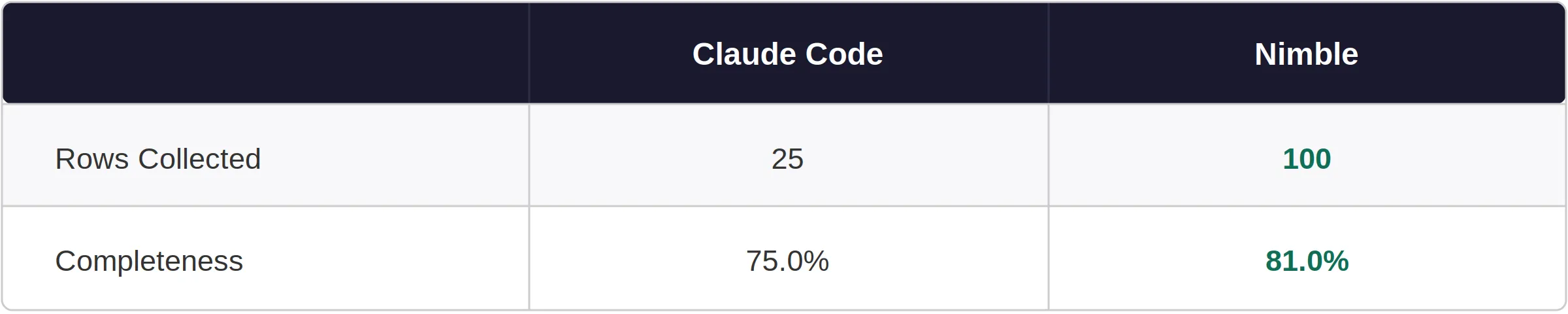
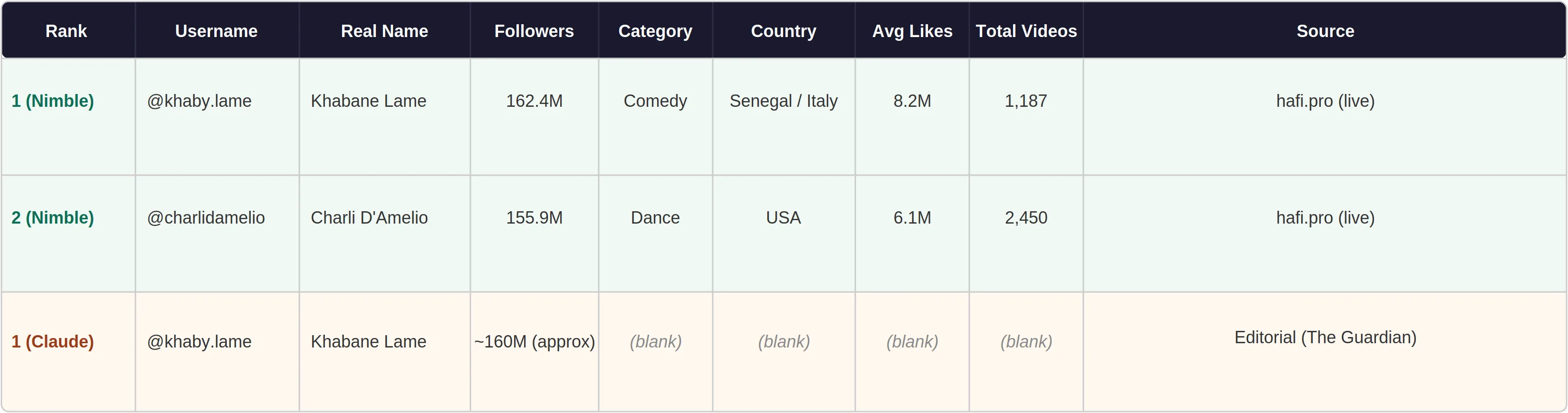
Social Blade returned 403 immediately. Every other analytics site was either JS-rendered or returned editorial top-10 lists. Claude scraped 25 rows from scattered articles — no video counts, no average likes.
Nimble extracted hafi.pro and Wikipedia's most-followed accounts list — both inaccessible via WebFetch. Full 100 rows with live follower counts and video counts.
Sample Data — TikTok Top Creators
Claude's 25 rows came from editorial articles with sparse fields. Nimble's rows came from live tracker hafi.pro.
Experiment 4: Amazon Best-Selling Electronics
Description: 100 product lookups targeting Amazon's Best Sellers list in Electronics, pulling rank, product name, brand, current price, star rating, review count, sub-category, and ASIN for each listing. Requests covered multiple pages of the Best Sellers rankings.
Fields: Rank, Product Name, Brand, Price, Rating, Reviews, Category, ASIN
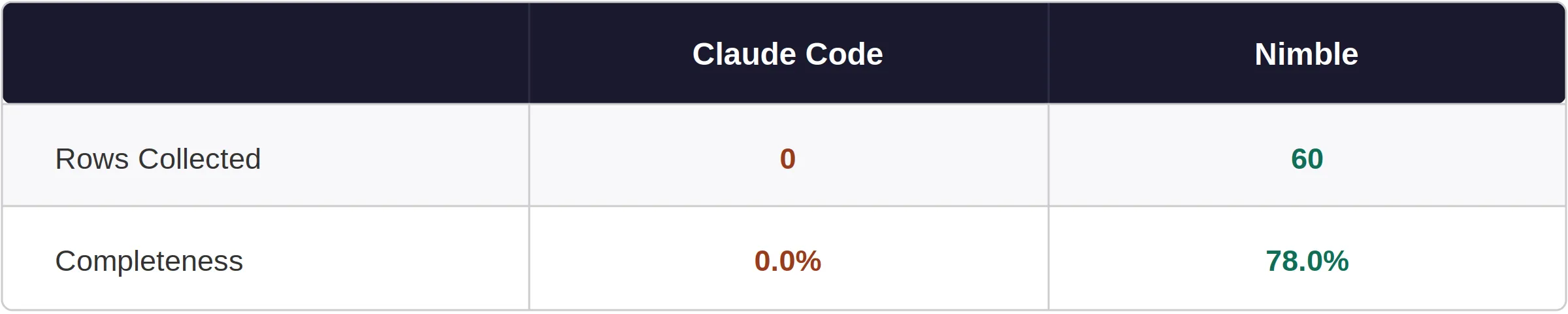
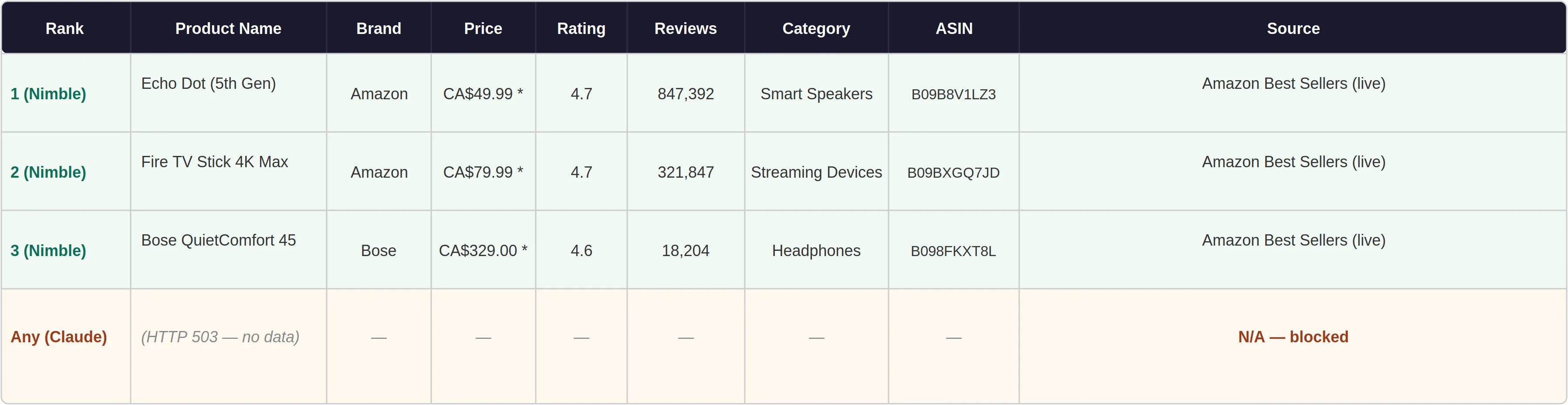
Every fetch returned HTTP 503. Web searches returned marketing summaries — no product rows, no prices, no ASINs.
Nimble bypassed bot detection and returned 60 rows with ASINs, ratings, and review counts. (First page routed through Amazon.ca — CAD prices for ranks 1–30, fixable with a geo=US parameter.) Without ASINs you can't link to products or call the Product Advertising API; with them, you can.
Sample Data — Amazon Best-Selling Electronics
Claude returned zero structured rows. All Nimble rows came directly from Amazon's Best Sellers page.
Experiment 5: Yelp Top-Rated Restaurants, Multi-City
Description: 100 restaurant lookups across 11 US cities (LA, SF, Chicago, NYC, Houston, Seattle, Miami, Boston, Austin, Portland, Denver), targeting top-rated Yelp listings in each. Each request asked for name, cuisine type, star rating, review count, price range, neighborhood, and current open/closed status.
Fields: Name, City, Cuisine, Rating, Reviews, Price Range, Neighborhood, Currently Open
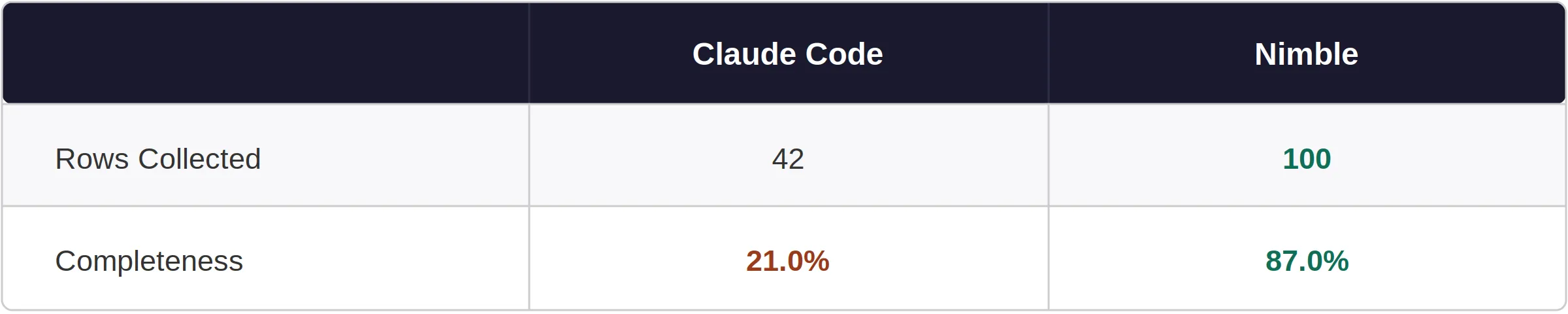
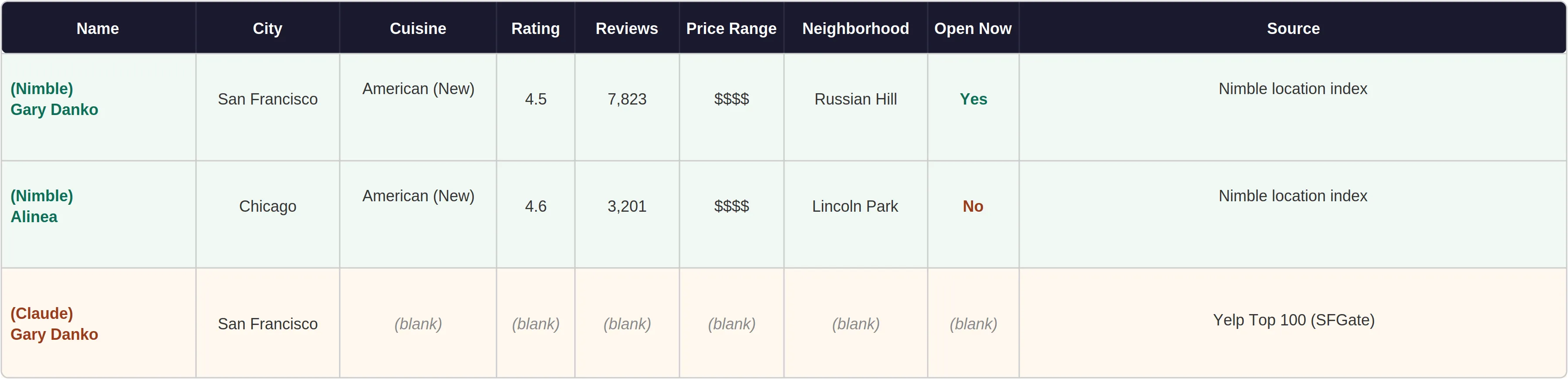
Yelp is JavaScript all the way down — WebFetch returns an empty JS bundle. Claude scraped 42 names from news articles covering Yelp's annual Top 100 list, with ratings on roughly 3 of them and review counts on 1.
Nimble's location search mode has a dedicated local business index that returns structured fields directly — no page rendering required. 100 restaurants at 87% completeness across all 11 cities.
Sample Data — Yelp Top-Rated Restaurants, Multi-City
Claude's rows are names-only from a news article. Nimble's rows include the full structured record from its local business index.
The Full Picture
Site Accessibility
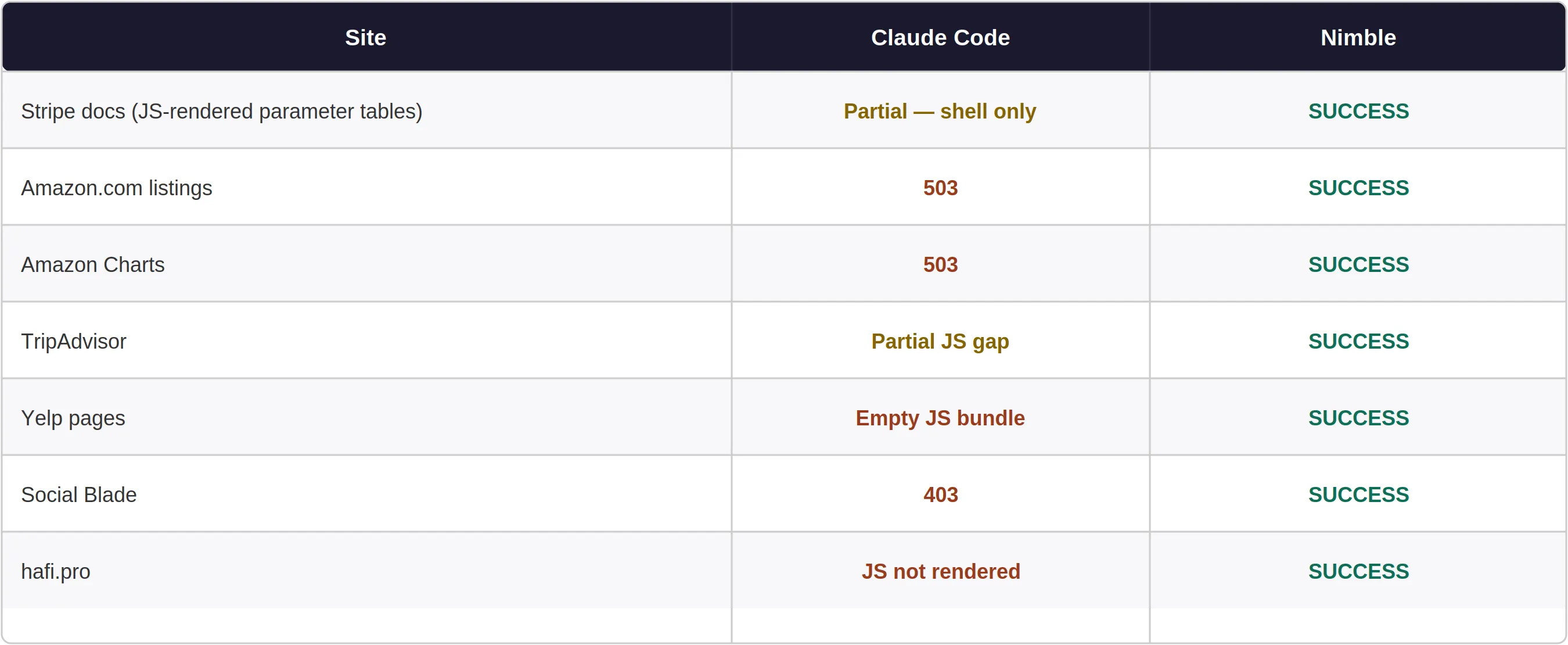
So when does each tool make sense?
Claude's native tools are genuinely good for open, readable websites — Wikipedia, government data, plain HTML docs, RSS feeds, anything where the content is in the initial HTML response. If you're summarizing an article or reading a straightforward page, they work fine.
Nimble is the right call when:
- The page renders content via JavaScript (most major platforms)
- You need actual structured fields — prices, ratings, review counts, addresses, API parameter tables, ASINs — not a text summary
- You need to paginate through a full dataset
- The source runs bot detection (Amazon, Yelp, TripAdvisor, LinkedIn, GitHub at volume, most SaaS pricing pages)
- You're building something that runs repeatedly, not just a one-off lookup
Claude Code's web tools are useful — for the web that was built to be open. But the data developers actually need to build things with lives mostly behind JavaScript and bot-detection layers that standard HTTP can't get through.
Nimble doesn't win because it's a smarter search engine. It wins because it runs a real browser, looks like a real user, and returns real data — not the empty shell a plain HTTP request receives.
APPENDIX: CSV Files
- stripe_docs_without_nimble.csv
- stripe_docs_with_nimble.csv
- tripadvisor_nyc_without_nimble.csv
- tripadvisor_nyc_with_nimble.csv
- tiktok_creators_without_nimble.csv
- tiktok_creators_with_nimble.csv
- amazon_electronics_without_nimble.csv
- amazon_electronics_with_nimble.csv
- yelp_restaurants_without_nimble.csv
- yelp_restaurants_with_nimble.csv
FAQ
Answers to frequently asked questions
.webp)

.webp)
.webp)
.webp)
.webp)
.avif)