







Turning eBay and Carvana Into a Used EV Deal Finder with Nimble Web Search Agents


Tom Shaked
Turning eBay and Carvana Into a Used EV Deal Finder with Nimble Web Search Agents
Tom Shaked


Most popular articles


Get structured, reliable data for your stack.
Gas hit $4.229 per gallon this week, the highest it's been since August 2022. At the same time, used EV prices are down 20–30% from their 2021–2022 peak, and inventory is deeper than it's ever been. The problem isn't that good deals don't exist, it's that finding them means sorting through thousands of unstructured listings across multiple platforms, with no way to compare.
eBay Motors and Carvana together list thousands of used EVs at any given moment including Nissan Leafs, Chevrolet Bolts, Tesla Model 3s, Kia EV6s, and more. A 2021 Tesla Model S can list for $9,900 or $29,000 for the same year and model, depending on mileage, condition, and seller. That spread is the opportunity.
This post covers how we built a tool that collects all of that data automatically, scores every listing on the factors that actually matter, and surfaces the real deals using Claude Code and Nimble.
What we built
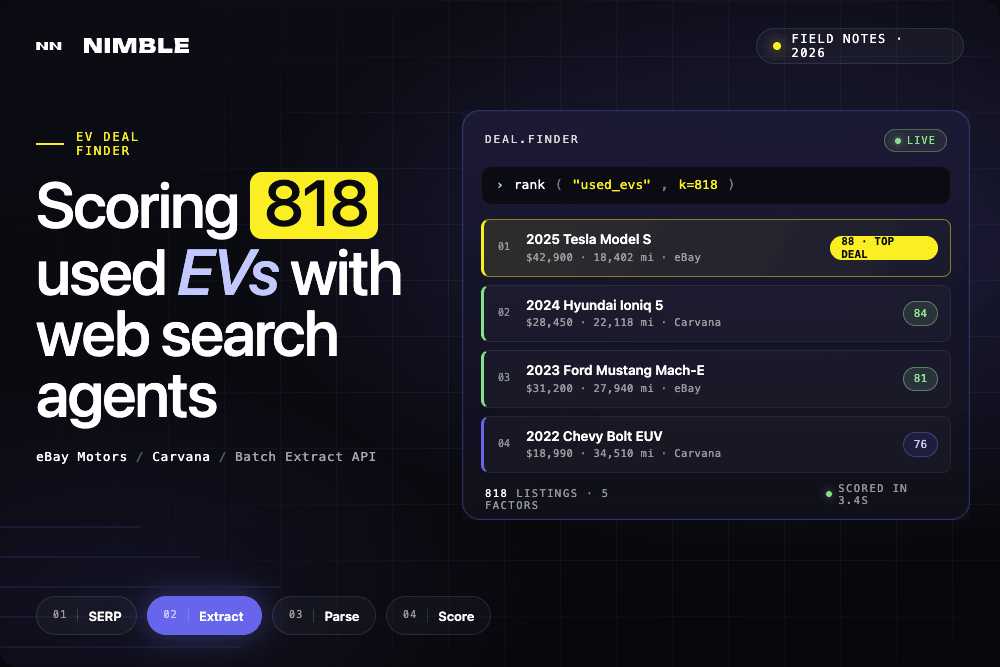
818 used EV listings pulled from two sources — eBay Motors and Carvana — normalized into a single dataset, scored on five factors, and browsable through a filterable dashboard with a direct link to every live listing.
The data collection uses two Nimble agents: a pre-built eBay Search Results agent for eBay Motors, and a custom Carvana agent built from scratch using Nimble Agent Builder. Individual eBay pages are fetched in parallel through the Batch Extract API. Structured fields — mileage, condition, VIN, title status, location — are parsed directly from each listing. The scoring engine ranks every car 0–100 across price, mileage, year, condition, and title status.
The result is a dataset that didn't exist anywhere before running the app. No manual searching, no copy-pasting, no spreadsheet.
See the full project live on github: github.com/Nimbleway/cookbook-ev-deal-finder
Here's how it was built.
Step 1: Collecting listings from eBay Motors
eBay Motors search pages require JavaScript rendering and geo-targeted requests to return consistent results. Nimble's vx10-pro driver — a stealth headful browser — ensures smooth access and handles any friction transparently.
Search results are collected through Nimble's eBay Search Results agent:
nimble --transform "data.parsing" agent run \
  --agent ebay_search_results_community_2026_03_23 \
  --params '{"keyword": "used Tesla electric car"}'
The agent returns structured results including item IDs. Those IDs are then batched through Nimble's Batch Extract API to pull individual listing pages in parallel:
import requests

batch_payload = {
    "requests": [
        {"url": f"https://www.ebay.com/itm/{item_id}", "format": "html"}
        for item_id in item_ids
    ]
}

resp = requests.post(
    "https://sdk.nimbleway.com/v1/extract/batch",
    json=batch_payload,
    headers={"Authorization": "Bearer YOUR_API_KEY"}
)
batch_id = resp.json()["batch_id"]
Each listing's Item Specifics section is parsed:
from bs4 import BeautifulSoup

def parse_item_specifics(html: str) -> dict:
    soup = BeautifulSoup(html, "html.parser")
    specs = {}
    for dl in soup.find_all("dl", class_="ux-labels-values"):
        labels = [dt.get_text(strip=True) for dt in dl.find_all("dt")]
        values = [dd.get_text(strip=True) for dd in dl.find_all("dd")]
        specs.update(dict(zip(labels, values)))
    return specs
Step 2: Building a Carvana agent from scratch
Carvana had no pre-built Nimble agent. Rather than writing custom scraping logic — selectors, XPath, pagination handling, schema mapping — the Carvana agent was built using Nimble Agent Builder.
Agent Builder works through Nimble Studio, a no-code interface where you point Nimble at a target URL, let it render the page, and define what structured data you want extracted. There's no selector writing. You provide the data schema, and Nimble’s Agentic Studio automatically recognizes page elements and builds a customer parser. Pagination behavior is configured in the same interface: define the page parameter, set the range, and the agent handles the rest.
Once built, the agent is published with a version-stamped ID and immediately callable via the CLI or API:
# Published as: carvana_electric_cars_serp_2026_04_30_auw1p8rf
nimble --transform "data.parsing" agent run \
  --agent carvana_electric_cars_serp_2026_04_30_auw1p8rf \
  --params '{"page": "1"}'
Each call returns a structured JSON array of listings for that page — make, model, year, trim, price, mileage, and listing URL — ready to merge with the eBay data. Running it across 30+ pages of carvana.com/cars/electric collected 761 Carvana listings with no scraping code written.
This is the part of the workflow that would have taken days to build by hand. Writing a Carvana scraper means handling JS rendering, working around detection, maintaining selectors as the site updates, and building a pagination loop. Agent Builder compresses that to an afternoon.
Both sources normalize to the same schema:
818 total listings ready for scoring.
Step 3: Scoring every deal
Each listing gets scored on five factors. The weights reflect what matters most when buying a used car:
WEIGHTS = {
    "price":     0.30,
    "mileage":   0.25,
    "year":      0.20,
    "condition": 0.15,
    "safety":    0.10,
}
All continuous metrics (price, mileage, year) are scored relative to the full dataset — not per model. The cheapest car across all 818 listings scores 100 on price, regardless of make. A $10,000 Model S competes directly against a $10,000 Leaf.
def relative_score(value, lo, hi, lower_is_better=True):
    if hi == lo:
        return 0.5
    if lower_is_better:
        return max(0.0, min(1.0, 1.0 - (value - lo) / (hi - lo)))
    return max(0.0, min(1.0, (value - lo) / (hi - lo)))

price_lo, price_hi     = min(prices), max(prices)
mileage_lo, mileage_hi = min(mileages), max(mileages)
year_lo, year_hi       = min(years), max(years)

for listing in listings:
    p_score = relative_score(listing["price"],   price_lo,   price_hi,   lower_is_better=True)
    m_score = relative_score(listing["mileage"], mileage_lo, mileage_hi, lower_is_better=True)
    y_score = relative_score(listing["year"],    year_lo,    year_hi,    lower_is_better=False)
Condition and title status are mapped from text labels:
CONDITION_MAP = {
    "certified pre-owned": 1.0,
    "excellent":           0.95,
    "very good":           0.85,
    "good":                0.75,
    "used":                0.70,
    "fair":                0.55,
    "for parts":           0.10,
}

TITLE_MAP = {
    "clean":   1.0,
    "lien":    0.80,
    "rebuilt": 0.50,
    "salvage": 0.20,
}
The five scores combine into a single deal_score between 0 and 1. Running the engine:
python3 score.py
# Scored 807 listings.
# Top 5 deals printed to terminal.
Step 4: Building the dashboard
The dashboard is built with Streamlit and Plotly. It loads the scored dataset, applies sidebar filters, and renders across seven tabs: an overview, a top deals section with cards for the four best listings, and one tab per scoring metric.
streamlit run app.py
The top of the page displays the current national average gas price as context — a reminder of why the search matters right now.
The Overview tab shows deal score distribution by model, a price vs. mileage scatter plot, listings by year, and a score breakdown for the top deal. The Top Deals tab surfaces four deal cards side by side, each with price, mileage, condition, location, and a link to the live listing. Each metric tab shows a ranked table sorted by that factor, with a progress bar score column and a direct link to every listing.
What the data actually shows
Across 807 scored listings from two sources, a few patterns stand out.
Carvana's inventory is deep — 761 listings across nearly every EV model currently on the used market. eBay's 57 listings skew toward more unusual finds: older Model S units, high-mileage outliers, and the occasional below-market deal that the algorithm surfaces immediately.
The scoring surfaces cross-source comparisons that would be invisible when browsing either site manually. A low-mileage Carvana Bolt competing against a cheap eBay Model S on the same leaderboard is the point of the exercise.
The dataset reflects inventory at a moment in time. Carvana updates daily. eBay listings turn over in hours. Two minutes to refresh is fast enough to catch deals before they disappear.
Why this works: Web Search Agents
The data collection step is the part that normally kills projects like this.
eBay Motors requires JS rendering and geo-targeted requests. Carvana has no public API. Pulling 800+ pages reliably — with consistent structured output — means handling rendering, proxy rotation, session management, and pagination across two completely different site architectures. Building that infrastructure from scratch is weeks of work before any actual analysis begins.
Nimble compresses that to a few API calls. The vx10-pro driver unlocks JS-rendered pages with smooth, consistent access. The Batch Extract API parallelizes 800 page fetches and returns clean HTML. The Agent Builder turns Carvana — a site with no pre-built agent — into structured data in minutes.
The same approach that powered this app powers production data pipelines at scale. The only difference is volume.
For AI-assisted development in tools like Claude Code, this matters for a different reason. Claude can call Nimble directly — searching, extracting, and returning structured data without leaving the development environment. The gap between "I want to build something with live web data" and "I have the data" collapses to a single conversation.
Continue Exploring
FAQ
Answers to frequently asked questions
.png)
.png)

.png)
.avif)
.png)
.png)