









The Architecture of Agent Skills: How We Built a Web Intelligence Layer for AI Coding Assistants


.avif)
Ilan Chemla

.webp)
The Architecture of Agent Skills: How We Built a Web Intelligence Layer for AI Coding Assistants
Ilan Chemla


Most popular articles


Get structured, reliable data for your stack.
AI coding assistants are remarkably good at reasoning — but remarkably bad at accessing the live web. We built Nimble Agent Skills to fix that. This post walks through the architecture, the design decisions, and why we think this is the right abstraction layer for giving AI agents real-time web intelligence.
The Problem: AI Assistants Are Blind to the Live Web
If you've used Claude Code, Cursor, or any AI coding assistant for web-related tasks, you've hit the wall. Ask it to "get the pricing from this competitor's website" and you'll get one of three outcomes:
- Raw HTML dump — thousands of tokens of
<div>soup that the LLM has to parse, burning context and money - Stale cached results — data that's hours or days old, with no way to verify freshness
- "I can't access the web" — the assistant simply can't do it
The underlying issue isn't the LLM's reasoning capability. It's the tooling layer. Built-in web tools (when they exist) are designed for convenience, not for production use. They have no structured output, no source governance, no reusability, and no audit trail.
For developers building agent workflows — or for teams that depend on web data for competitive research, due diligence, or market monitoring — this is a blocking problem.
Our Design: Three-Tier Skill Architecture
We designed Nimble Agent Skills as a three-tier system. Each tier handles a different concern, and they compose cleanly.

┌─────────────────────────────────────────────────────────┐
│  TIER 1 — SKILLS (What users trigger)                   │
│                                                         │
│  nimble-web-expert    nimble-agent-builder               │
│  company-deep-dive    competitor-intel                   │
│  competitor-positioning    meeting-prep                  │
├─────────────────────────────────────────────────────────┤
│  TIER 2 — AGENTS (What skills orchestrate)              │
│                                                         │
│  nimble-researcher (Haiku) — fast parallel web search   │
│  nimble-analyst (Sonnet) — synthesis & strategic output  │
│  nimble-setup (Haiku) — onboarding & configuration      │
├─────────────────────────────────────────────────────────┤
│  TIER 3 — INFRASTRUCTURE (What agents call)             │
│                                                         │
│  Nimble CLI    Nimble MCP Server    Nimble REST API      │
│  (search, extract, map, crawl)                          │
└─────────────────────────────────────────────────────────┘
Why this layering matters
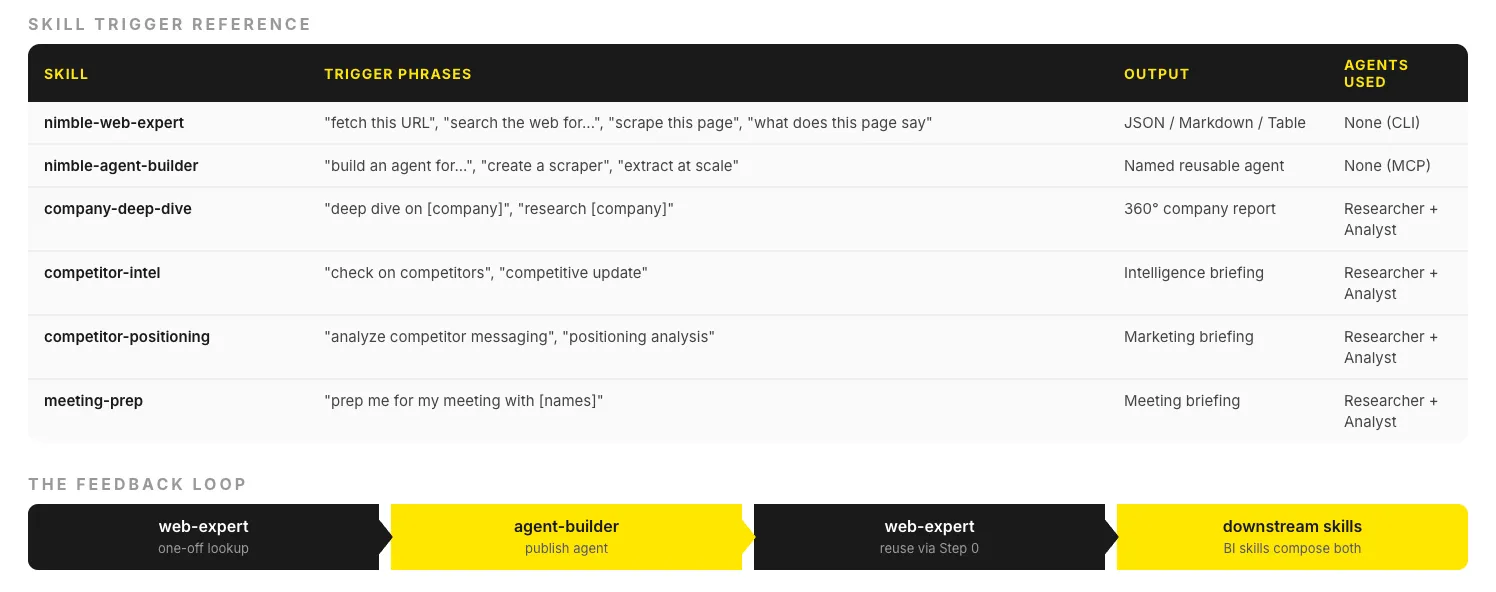
Skills are the user-facing interface. They're triggered by natural language ("deep dive on Stripe", "prep me for my meeting with Sarah at Datadog"). Skills define what to do and how to structure the output. They're platform-agnostic — the same skill works in Claude Code, Cursor, and Vercel.
Agents are the execution layer. A skill like competitor-intel doesn't make web calls itself — it orchestrates nimble-researcher agents to gather data in parallel, then routes results to nimble-analyst for synthesis. This separation lets us optimize each agent for its role:
- Researcher runs on Haiku (fast, cheap) and executes parallel web searches
- Analyst runs on Sonnet (better reasoning) and produces structured reports
Infrastructure is the Nimble platform — search, extraction, mapping, and crawling APIs that handle the hard parts: JavaScript rendering, rate limiting, anti-bot bypass, structured output, and content parsing.
The Two Core Skills: Web Expert and Agent Builder
The plugin ships with two foundational skills that form a feedback loop.
nimble-web-expert — Immediate data access
This is the default skill for any web task. It handles:
- Web search — vertical focus modes such as (general, coding, news, academic, shopping, social, geo, location)
- URL extraction — fetch any URL, get clean markdown or JSON back
- Site mapping — discover all URLs on a domain before extraction
- Bulk crawling — crawl entire site sections with path filters
The key design decision: automatic render-tier escalation. When you ask for a URL, Web Expert tries the fastest extraction method first (static HTML parse). If that fails (JavaScript-rendered content), it silently escalates to headless browser rendering. If that fails (anti-bot protection), it escalates again. The user never sees this — they just get the data.
User: "Get the pricing from stripe.com/pricing"

Step 0: Check for existing extraction agent → none found
Step 1: nimble extract --url "<https://stripe.com/pricing>" --format markdown
        → Success (JS-rendered page, auto-escalated)
Step 2: Return structured pricing data
nimble-agent-builder — Reusable extraction workflows
When a one-off extraction becomes recurring, Agent Builder creates a durable, named agent:
User: "Build an agent for Amazon product pages"

Step 1: nimble_agents_generate → creates agent via NL prompt
Step 2: nimble_agents_status → poll until ready
Step 3: Test on sample URL → validate schema
Step 4: nimble_agents_update_session → refine if needed
Step 5: nimble_agents_publish → named agent, reusable
The critical design choice: published agents auto-appear in Web Expert. Once you publish an "amazon-product" agent, saying "get ASIN B08N5WRWNW" in Web Expert will automatically route to that agent via Step 0 (nimble agent list). No manual wiring.
This creates a flywheel:
web-expert (one-off) → agent-builder (publish) → web-expert (reuse)
         ↑                                              │
         └──────────────────────────────────────────────┘
Business Intelligence Skills: The Researcher-Analyst Pipeline
The four business intelligence skills — company-deep-dive, competitor-intel, competitor-positioning, and meeting-prep — all follow the same orchestration pattern:
Skill trigger
    │
    ├──→ Spawn N researcher sub-agents (parallel, Haiku)
    │        │
    │        ├──→ nimble search --query "..." --focus news
    │        ├──→ nimble search --query "..." --focus general
    │        └──→ nimble search --query "..." --focus academic
    │
    ├──→ Collect raw findings
    │
    ├──→ Deep-extract top URLs (nimble extract --url "...")
    │
    └──→ Route to analyst agent (Sonnet)
             │
             └──→ Structured report with citations
Example: Company Deep Dive
When you say "deep dive on Datadog", the skill spawns 5 researcher sub-agents across 3 batches:
Each researcher runs 2-3 targeted searches, the skill deep-extracts the top URLs found, and the analyst agent synthesizes everything into a structured report with sections, citations, and a strategic assessment.
Delta Detection in Competitor Intel
competitor-intel has a notable feature: delta detection. On first run, it establishes a baseline of findings for each competitor. On subsequent runs, it compares new findings against the baseline and surfaces only what's changed.
This means:
- First run → full briefing (all signals)
- Run after <14 days → quick refresh (new signals only)
- Same-day run → latest signals check (minimal)
The skill stores findings in project memory, so delta detection works across conversations.
Integration Architecture
The plugin works across three platforms with the same skill definitions:
agent-skills/
├── skills/                     # Shared by all platforms
│   ├── nimble-web-expert/
│   │   ├── SKILL.md            # Skill definition
│   │   ├── references/         # CLI docs, patterns
│   │   └── rules/              # Platform rules
│   └── nimble-agent-builder/
│       ├── SKILL.md
│       ├── references/
│       └── rules/
├── agents/                     # Sub-agent definitions
│   ├── nimble-researcher.md
│   ├── nimble-analyst.md
│   └── nimble-setup.md
├── .mcp.json                   # Claude Code MCP config
├── mcp.json                    # Cursor MCP config
└── README.md
Claude Code reads skills from the skills/ directory and connects to the MCP server via .mcp.json.
Cursor reads the same skills/ directory, uses .cursor-plugin/plugin.json for metadata, and connects via mcp.json.
Vercel installs via npx skills add Nimbleway/agent-skills and reads the same skill definitions.
The MCP server handles agent CRUD operations (generate, update, publish) — operations that mutate state and should run in background tasks, not in the foreground conversation.
Performance Characteristics
Some numbers that informed our design:
The researcher agent uses Haiku specifically because search-and-collect is a high-volume, low-reasoning task. The analyst uses Sonnet because synthesis requires stronger reasoning. This split keeps costs down while maintaining output quality.
What's Next
We're working on:
- Scheduled skills — run competitor-intel on a cron schedule, get a Slack digest
- Cross-skill memory — company deep dive feeds into meeting prep automatically
- Custom skill authoring — build your own skills on top of the researcher-analyst pipeline
The full plugin is open source at github.com/Nimbleway/agent-skills. Install in 5 minutes:
npm i -g @nimble-way/nimble-cli
claude mcp add --transport http nimble-mcp-server <https://mcp.nimbleway.com/mcp> \\
  --header "Authorization: Bearer $NIMBLE_API_KEY"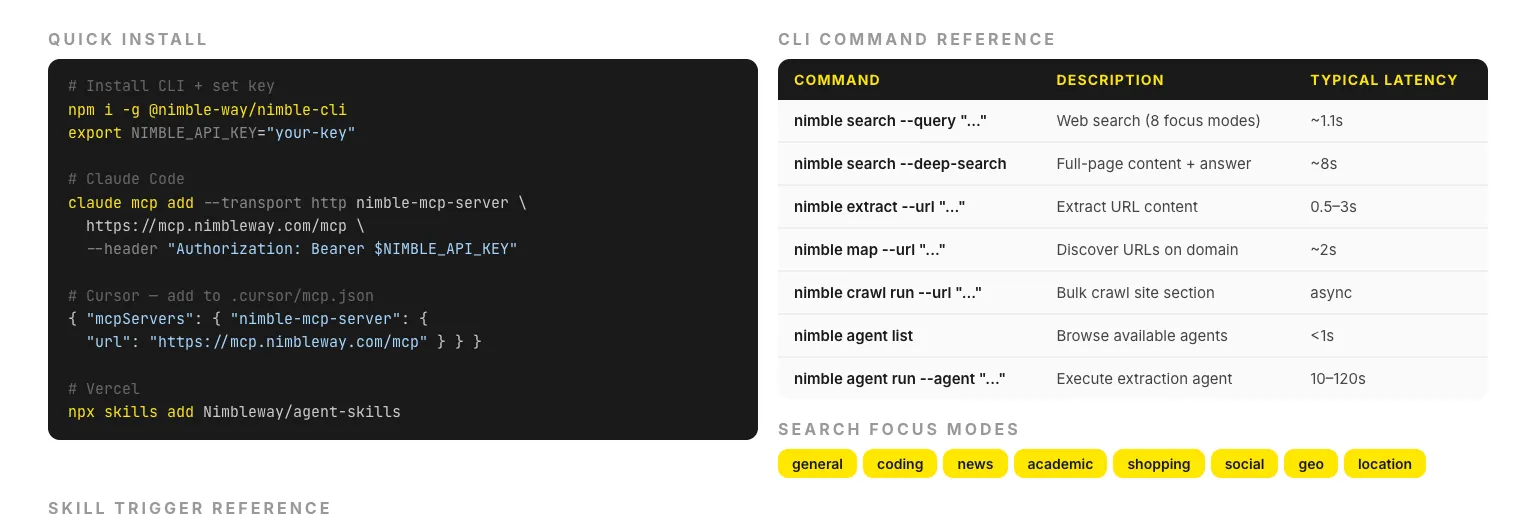
Nimble Agent Skills is an open-source plugin for Claude Code, Cursor, and Vercel. It connects AI assistants to Nimble's search platform for real-time web intelligence. — 5,000 pages included.
FAQ
Answers to frequently asked questions
%20(1).webp)
.webp)
.png)
.webp)
.webp)
.webp)
