







Step-by-step Guide to Building a RAG (Retrieval-Augmented Generation) Pipeline


.avif)
Ilan Chemla
.png)
Step-by-step Guide to Building a RAG (Retrieval-Augmented Generation) Pipeline
Ilan Chemla


Most popular articles


Get structured, reliable data for your stack.
As organizations race to deploy LLMs into production, Retrieval-Augmented Generation (RAG) has emerged as the architecture that separates prototypes from trustworthy systems. RAG is an approach where an LLM retrieves relevant documents or text chunks at query time and incorporates that retrieved context into the prompt it uses to generate an answer. The answers produced by chatbots, copilots, and other LLMs using RAG are current, contextual, and explainable.
Recent industry surveys show that enterprise AI design with RAG has been adopted by 51% of systems, a substantial increase from 31% last year. However, many teams still struggle with brittle scrapers, unstructured data, and stale datasets that weaken the entire retrieval layer. To build RAG pipelines that scale, enterprises need structured, continuously refreshed, and validation-ready data that flows cleanly into retrieval and reasoning.
This guide walks through the practical steps of building a RAG pipeline, with a focus on architectures suitable for production workloads.
What is a RAG pipeline?
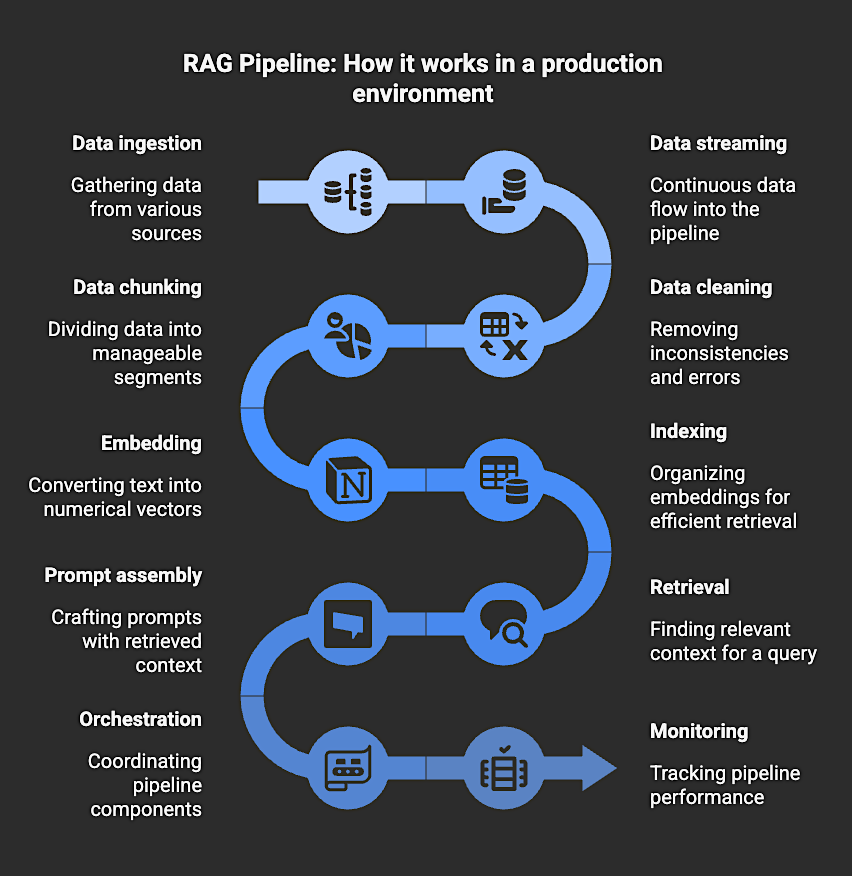
A RAG pipeline is the system that performs all the steps required to make Retrieval-Augmented Generation work in a production environment. It handles the data ingestion, streaming, cleaning, chunking, embedding, indexing, retrieval, prompt assembly, orchestration, and monitoring that allow an LLM to use retrieved context when generating an answer.
The RAG pipeline connects the model to the information it needs at query time. When a user asks a question, the pipeline retrieves the most relevant documents, prepares that text as context, and includes it in the prompt so the model can generate an answer grounded in the retrieved material rather than in its training data alone.
A production RAG pipeline typically includes several components:
- Data ingestion and preparation – Collecting raw data, cleaning it, and structuring it into embeddable chunks.
- Embedding and indexing – Transforming text into vector representations and storing them in a vector database for fast similarity search.
- Retrieval and prompting – Fetching the most relevant documents for a given query and injecting that context into the model’s prompt before generation.
- Orchestration and workflow management – Coordinating retrieval, generation, and dependencies across the system.
- Evaluation and monitoring – Tracking retrieval relevance, answer quality, and system performance over time.
Together, these components form the infrastructure that supplies the model with the context it uses during generation. If the data feeding the pipeline becomes stale or incomplete, retrieval quality declines, and the model’s answers become less reliable. A production pipeline mitigates this risk by keeping retrieval predictable and aligned with current data.
Top 5 Benefits of RAG Pipelines
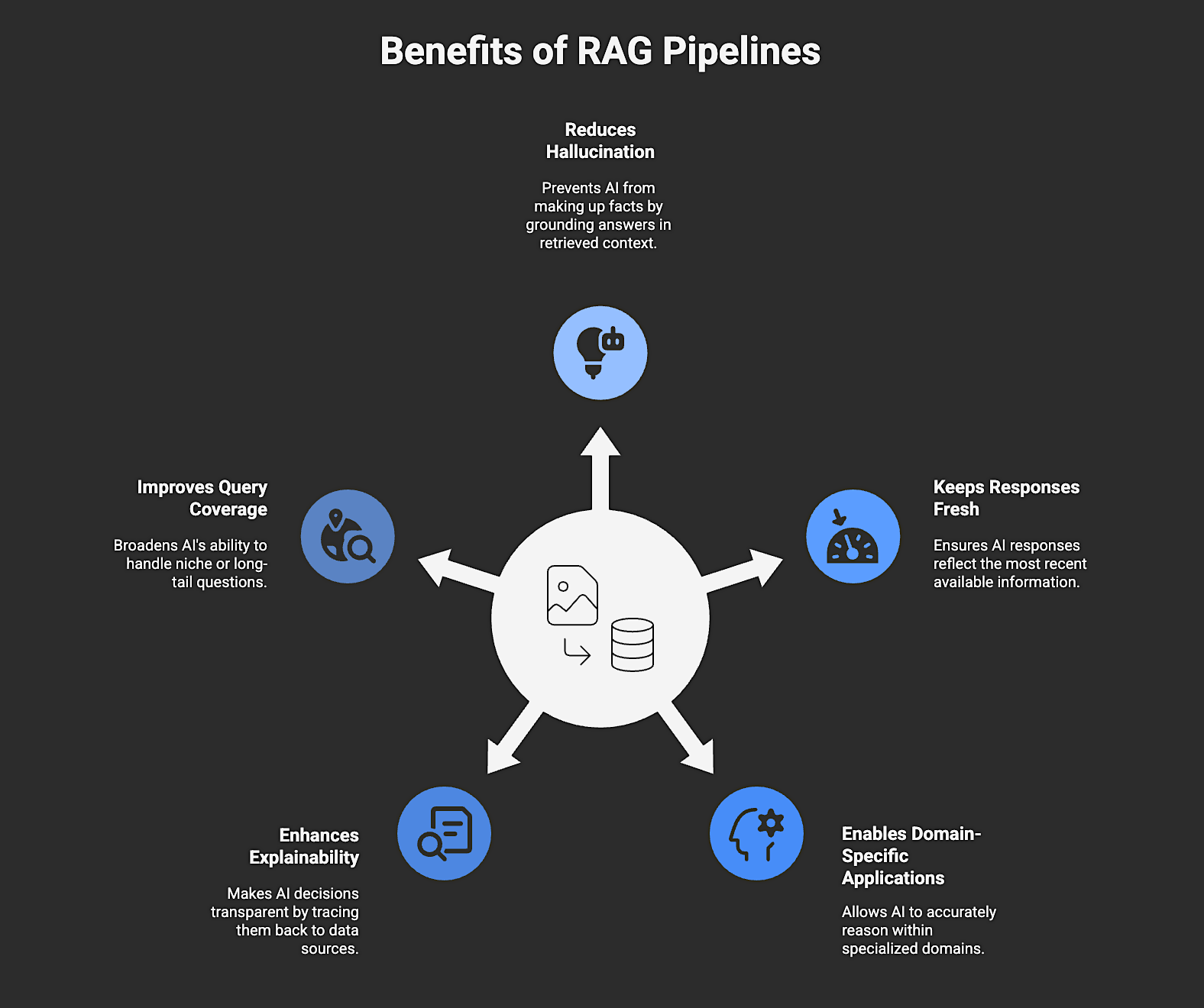
A RAG pipeline offers many benefits, including:
1. Reduces Hallucination
Hallucination occurs when an AI fills gaps with guesses instead of facts. RAG pipelines help reduce this by grounding every answer in the retrieved context. Before generating text, the system retrieves relevant documents or records so it speaks from evidence, not memory. That’s why, for example, a retail chatbot using RAG will always pull the latest return policy or product info instead of inventing details to sound confident.
2. Keeps Responses Fresh
In fast-moving industries, information changes fast: think product listings, stock prices, compliance updates, or market trends. Static models can’t keep up. RAG pipelines solve this by connecting models to continuously updated data stores, whether internal knowledge bases or live web data streams. The result is answers that reflect the most recent available information.
3. Enables Domain-Specific Applications
Enterprises often operate in specialized domains with unique terminology, data security compliance needs, and decision logic that general-purpose LLMs don’t understand out of the box. RAG pipelines enable AI systems to dynamically incorporate domain-specific bodies of knowledge like internal documents, research papers, product manuals, or regulatory filings. The model can then reason accurately within that context.
4. Enhances Explainability
Trust in AI depends on transparency. A RAG pipeline makes every response explainable by tracing it back to its data sources. Because retrieved context can be logged with each answer, teams can audit what evidence influenced the model’s decision, which is useful for regulatory or customer-facing use.
5. Improves Query Coverage
Traditional models struggle with niche or long-tail questions because they rely only on training data. RAG broadens what an AI can handle by searching both internal knowledge and live external data before replying. That means a commerce assistant can answer questions about yesterday’s price drop or competitor trends without retraining. It retrieves the data, reasons over it, and delivers actionable insights.
How to Build a RAG (Retrieval-Augmented Generation) Pipeline in 8 Steps
This section outlines a broadly applicable RAG architecture framework for production use. Exact implementations may vary depending on application, tooling stack, and model constraints.
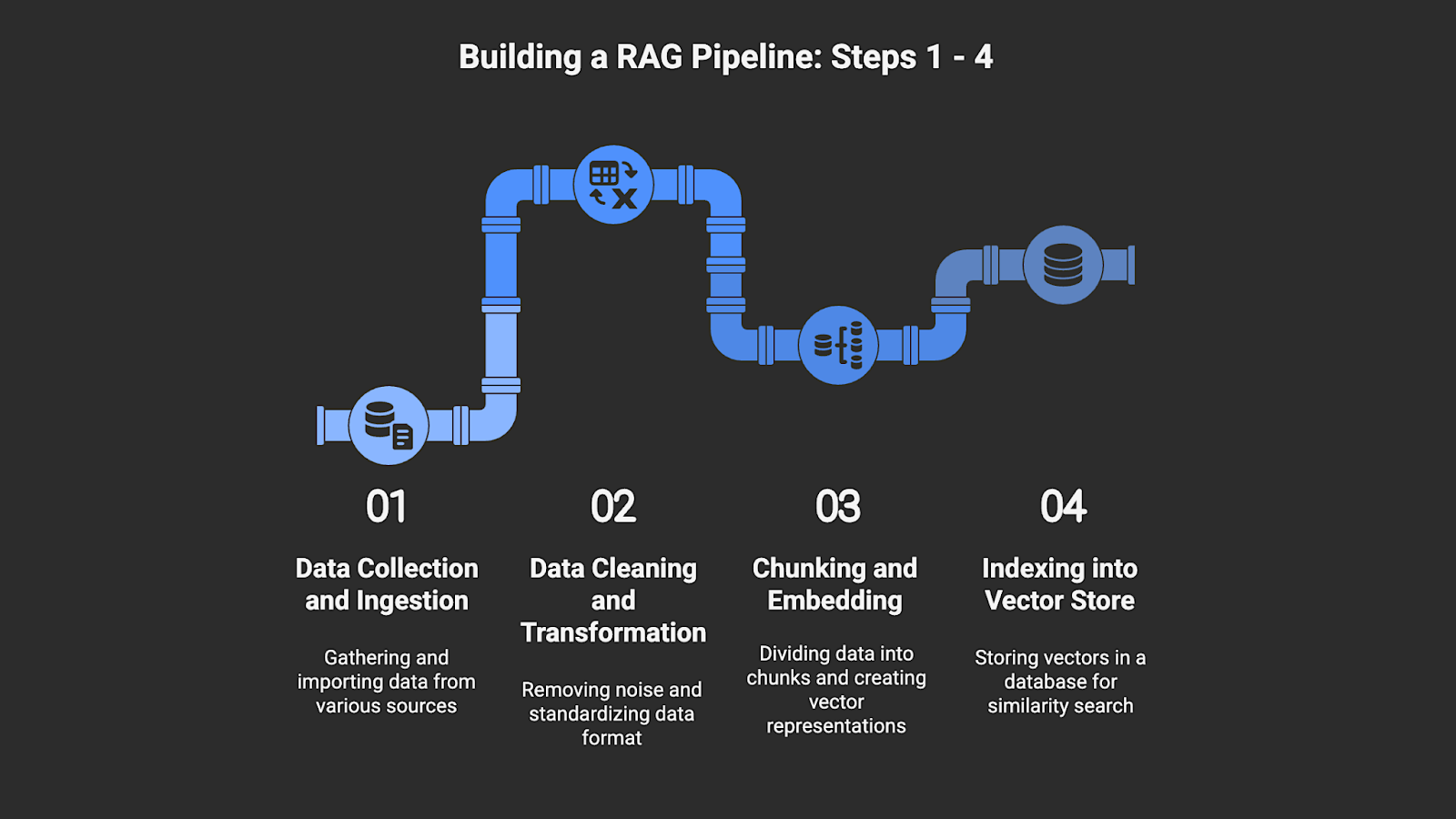
Step 1: Data Collection and Ingestion
The data ingestion layer is where your pipeline begins. It’s the process of gathering, importing, and syncing information from all relevant sources into a unified, accessible format. It typically includes internal repositories (such as wikis, CRM systems, databases, and product documentation) and external public data (such as competitor pricing, market reviews, or regulatory updates).
A RAG pipeline is only as strong as the data it can see. If ingestion is patchy, delayed, or unstructured, the system will respond with outdated or incomplete information. The ingestion layer creates a single, living source of truth for everything the model retrieves later.
For public data, Nimble’s Web Search Agents can replace brittle scrapers with compliant, real-time public web data extraction that outputs ready-to-ingest structured data, reducing engineering overhead from day one.
How to do it:
- Establish connectors and feeds. Use ETL tools or APIs to extract internal data on a scheduled basis. For public data, deploy managed extraction services or use Web Search Agents to stream structured, compliant web data (e.g., product listings, pricing, reviews) directly into your storage layer.
- Build an ingestion pipeline. Set up an event-driven or scheduled pipeline (e.g., with Kafka, Airflow, or AWS Glue) that automatically processes new data batches. Include steps for validation and error logging.
- Store for access. Load clean, structured data into a centralized repository (e.g., Amazon S3, GCS, or a data warehouse like Snowflake or BigQuery). Tag each record with metadata, such as timestamp, source, and data type, so that retrieval later can filter by recency, origin, or content category.
Step 2: Data Cleaning and Transformation
Raw data is messy. The cleaning and transformation stage removes noise, fixes inconsistencies, and standardizes formatting across all inputs. Unclean or unstructured data reduces retrieval precision and increases the chance of irrelevant or duplicated results. A clean corpus improves both retrieval accuracy and embedding quality.
How to do it:
- Normalize structure. Convert all inputs to a consistent format like JSONL or Parquet. Preserve key attributes such as source URL, timestamp, author, and content type so retrieval can filter the results effectively. Use AI data classification when needed to organize documents into categories that support retrieval and filtering.
- Remove noise and non-content. Use parsing libraries to extract only the primary content from web pages or PDFs, and remove boilerplate, navigation links, and disclaimers.
- Automation is key here because manual cleaning slows down refresh cycles and introduces inconsistency. Platforms with built-in data pipelines help ensure every update maintains schema consistency and produces structured outputs without rework.
Step 3: Chunking and Embedding
Once clean, content must be divided into manageable, context-rich chunks, typically 300–500 tokens, depending on the model and the content type. These chunks are then converted into embeddings, which are vectorized representations that capture semantic meaning.
Chunking makes information retrievable; embeddings make it searchable by meaning rather than keywords. Each chunk should carry metadata, such as topic, date, and source, so that retrieval can filter and rank results more effectively.
How to do it:
- Use recursive text splitters (LangChain, LlamaIndex) to segment content into 300–500 token chunks while preserving sentence boundaries.
- Generate vector embeddings with models like OpenAI’s text-embedding-3-large, Cohere, or Sentence-BERT.
- Store each vector with source metadata such as document ID, title, and timestamp. This allows retrieval to apply relevance and recency filters.
Step 4: Indexing into a Vector Store
After embedding, store vectors in a vector database optimized for similarity search. Popular options include Pinecone, Weaviate, Milvus, and FAISS. The vector store is the retrieval engine’s memory. It holds the embedded representations that the retrieval system searches. If it’s poorly indexed, you’ll get irrelevant or slow responses.
How to do it:
- Choose a vector database that matches your scale.
- Fine-tune similarity thresholds, metadata filters, and indexing strategies to match your use case, such as emphasizing recency for pricing data, or domain relevance for documentation retrieval.
Step 5: Building the Retrieval and Query Engine
This step involves taking a user query, retrieving the top-ranked relevant chunks, and feeding them into the LLM. When a query is made, the system embeds it, searches the vector store for the most semantically similar chunks, and filters results based on metadata rules.
The system then uses its retrieval logic to select the top-ranked relevant chunks. It combines them into a concise context block that the LLM can reference without unnecessary or unrelated text.
How to do it:
- Embed the incoming query using the same embedding model used during data preparation.
- Apply metadata filters: for example, limit results to the last 30 days for pricing data.
- Optionally blend semantic and keyword search (hybrid retrieval) to improve coverage and ranking.
- Assemble the returned chunks into a structured context block to feed the model.
Step 6: Prompt Engineering and LLM Integration
This stage translates retrieval into reasoning. Prompts combine the user’s query with retrieved context and task instructions, formatted for clarity and structure. Great prompt engineering helps maintain consistency in tone, factual grounding, and citation style, while minimizing the risk of hallucination.
Good data doesn’t help if the model cannot reference and use it effectively. Prompt engineering defines the logic and tone of every answer. Consistent prompt structure also helps evaluation and monitoring systems compare outputs over time.
How to do it:
- Integrate fail-safes such as confidence scoring, fallback answers, or no-answer options to ensure outputs align with business standards.
- Test prompt variations to reduce hallucination and maintain a consistent tone.
Step 7: Orchestration, Evaluation, and Monitoring
Once built, a RAG pipeline behaves more like a living system than a static product. It requires ongoing coordination and monitoring. Orchestration ensures consistency, while monitoring ensures trust and ongoing accuracy across workflows that many AI companies operate in production. The more observability you build in, the faster you can debug and refine your system when data drifts or errors in retrieval or generation occur.
How to do it:
- Use orchestration tools or workflow managers such as Airflow, Argo Workflows, or custom DAGs to connect components, cache results, and manage dependencies.
- Continuous monitoring should track retrieval precision, latency, and hallucination rates as part of a broader validation plan.
- Track accuracy-related signals using dashboards such as Grafana or Prometheus, and incorporate evaluation logic that checks whether answers reflect the retrieved context.
- Set alerts for failed jobs or high error rates.
Step 8: Continuous Improvement and Refreshing
Data ages fast, and so does your knowledge base. This step keeps your RAG pipeline aligned with current information by updating the data and embeddings that the system depends on. Without regular refreshes, retrieval relevance declines as source content changes.
How to do it:
- Set up recurring schedules to rechunk, reembed, and reindex as new content arrives, or apply incremental updates when only part of the data changes.
- Evaluate user feedback to help identify missing information, weak retrieval results, or outdated data.
- A real-time data pipeline can automate much of this work, allowing the system to stay current without manual intervention.

Power a Reliable RAG Pipeline with Nimble
A RAG pipeline enables AI systems to respond using the most current information available for your use case. Whether you’re building a financial copilot, a product intelligence engine, or a customer support assistant, a well-architected RAG pipeline ensures that your model can reason over current, retrieved data.
Nimble supports teams building reliable RAG pipelines by removing the data infrastructure burden that often makes these systems brittle. Its Web Search Agents deliver clean, structured, and analysis-ready outputs in real-time, and provide you with automated data pipelines that handle streaming, validation, and compliance. With throughput engineered for large-scale workloads and real-time updates, the platform offers a robust foundation for a production-grade RAG pipeline.
Book a demo to discover how Nimble powers reliable, real-time RAG pipelines at scale.
FAQ
Answers to frequently asked questions

.png)

.png)
.png)
.png)