







Nimble is Bringing Native Web Search Into Databricks


Tom Shaked
Nimble is Bringing Native Web Search Into Databricks
Tom Shaked


Most popular articles


Get structured, reliable data for your stack.
AI in the warehouse has a data problem, and it isn't the warehouse's fault. The thing missing from both is live web information such as current prices, new competitors, today's listings, this week's news. For any AI system meant to reason about the real world, fresh web search isn't a nice-to-have. It's the input that makes the rest trustworthy.
Nimble brings that input directly into Databricks. The Nimble Search API installs as a native table function inside Unity Catalog, so live web search becomes something a SQL query, a Genie agent, or an AI-built app can call on demand. No middleware, no scraping project, no leaving the platform. The result is a single new search capability, wired into three places where Databricks teams already work. To get started, go to Nimble's MCP listing on Databricks.
What that unlocks is the story below: enrich a table from the live web, ask questions in plain English, and ship a working app. Each one is powered by Nimble Search.
1. Web search becomes a table
Most teams treat web data as a project: build the extraction service, manage credentials, handle failures, schedule the refresh, land it somewhere governed. Nimble collapses all of that into a function call.
Start with a plain table of search queries. Each row is a market plus a category, the only thing authored by hand:
coffee shops in Williamsburg Brooklyn   | coffee
coffee shops in Astoria Queens          | coffee
pizza restaurants in Chicago Loop       | pizza
gyms in Austin Texas                    | gym
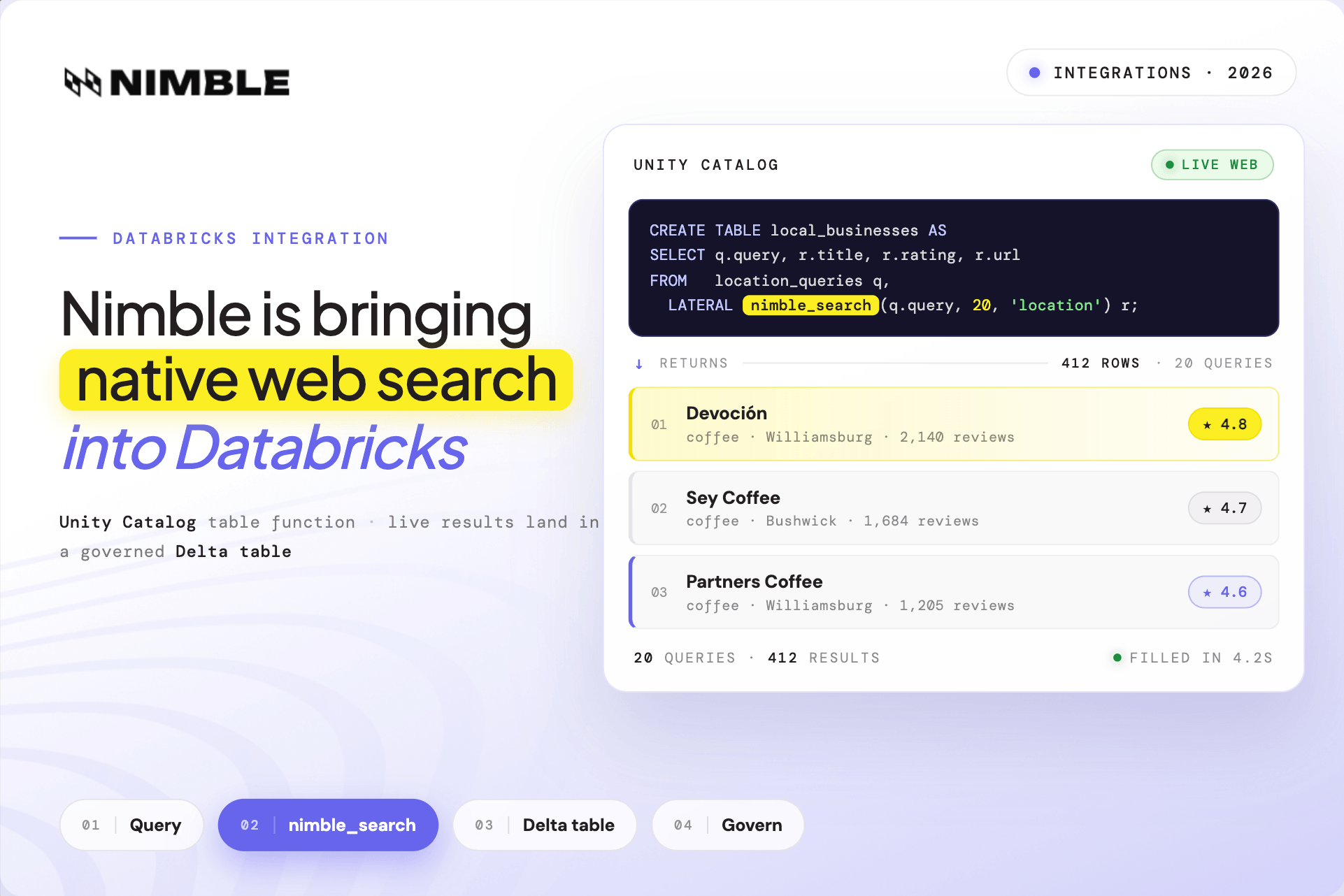
Then enrich every row from the live web in a single statement. Nimble Search runs once per query and returns real businesses, descriptions, and links straight into a new table:
CREATE OR REPLACE TABLE local_businesses AS
SELECT q.query, q.category, r.title, r.description, r.url
FROM   location_queries q,
       LATERAL nimble_search(q.query, 20, 'location') r;
Twenty queries go in; hundreds of live results come back. The searches run in parallel, so the table fills in seconds, and the output is an ordinary governed Delta table. It's access-controlled, lineage-tracked, and time-travelable like everything else in the catalog. Point a scheduled Workflow at the same statement and the dataset stays current on its own.
A list of markets becomes a living map of the businesses in them, whether that's a competitive landscape, a territory plan, or a site-selection dataset, without a single line of scraping code. For a data team, web enrichment stops being an infrastructure project and becomes a SELECT. For the business, the question "what's actually out there right now?" gets a same-day answer.
Here are some additional resources to learn more about enriching your internal data with live web search:
- Blog: How to Enrich Databricks Tables with Fresh Web Data in Minutes + Examples
- Documentation: Databricks data enrichment
- Video: Query the Live Web in Databricks SQL — Nimble UDTF Setup
- Cookbook: Enriching local businesses with live web search
2. Anyone can ask, and the agent searches for them
An SQL function is powerful for the people who write SQL. The bigger shift comes when the search lives behind natural language.
Databricks Genie can use the Nimble Search function as a tool. Connect it once, and Genie decides on its own when a question needs the live web. A business user types a question in plain English:
Which neighborhoods have the most coffee shops but the lowest average ratings? Use the local business table and enrich the ratings with live search.
Genie finds the right table, recognizes that the ratings aren't in it, calls Nimble Search to pull them from the live web, and builds the chart itself, with no SQL, no plotting step, and no engineer in the loop. The same pattern answers questions that have no static answer at all, like which products launched this quarter, returning a structured comparison rather than a paragraph.
This is what "search for AI" actually looks like in practice. The agent isn't guessing from stale training data. It reaches for a live search tool the moment the question demands current information, then grounds its answer in what it finds. Self-serve analytics stops being limited to the data someone already loaded. The audience widens from the SQL-fluent few to anyone who can ask a question.
To learn more about searching the web with Genie using Nimble, check out these resources:
- Docs: Using Nimble with Databricks Genie
- Blog: Build a Company Enrichment Agent with Nimble + Databricks + LangChain
- Cookbook: Build a Company Enrichment Agent with Nimble + Databricks + LangChain
- Video: Connect Nimble's MCP Web Search to Databricks Genie
3. From a brief to a shipped app
The final step turns the capability into a product. The build runs through Claude, with a Nimble skill that teaches it both Nimble's tools and Databricks' tools and how to connect them. Starting from a short conceptual brief, Claude plans the data table, writes the search pipeline, builds the interface, and deploys it to Databricks.
In this example, we’ve built a Local Business Scout: type a business type and a neighborhood, and the app uses the Nimble Search API to discover matching businesses across the live web, enriches each with location detail, and lands everything in a Delta table. The screen fills with a ranked leaderboard, KPI cards, a ratings chart, and a searchable history, all on a clean, non-technical surface anyone in the organization can use. Every run appends, so the dataset compounds with use.
Concept to deployed app: under thirty minutes, with effectively no hand-written code.
The distance between "we should look that up" and "here's a live tool the whole team can use" used to be a sprint. With live search as a native capability and an AI that can build against it, that distance is an afternoon. Non-technical users get real-time web intelligence in a familiar dashboard, and the engineering team didn't have to babysit a build.
Check out more ways to build apps on Databricks to monitor the web with Nimble:
- Blog: Build Data Apps on Databricks in Minutes Based on Fresh Web Data
- Video: Build a Real-Time Web Data App in Databricks with Nimble + Claude
- Example: Monitor the Full Digital Shelf with Nimble and Databricks
Live web search that’s actually useful - at scale
Live web search is a single capability that shows up as an SQL column, as a tool an agent reaches for in conversation, and as the engine behind a shipped app. AI systems are only as current as the data they can touch, and the live web is the input most of them are missing. Put Nimble Search inside Databricks and that input is always one call away: governed, composable, and ready for whatever or whoever needs to ask.
Continue Exploring
FAQ
Answers to frequently asked questions
.png)
.png)
.png)
.png)
.png)
.avif)
.png)