









How to Enrich Databricks Tables with Live Web Search in Minutes + Examples
SQL-native web data enrichment for Databricks, without Python middleware, custom integrations, or leaving your warehouse.


.avif)
Ilan Chemla

.webp)
How to Enrich Databricks Tables with Live Web Search in Minutes + Examples
SQL-native web data enrichment for Databricks, without Python middleware, custom integrations, or leaving your warehouse.
Ilan Chemla
Data engineering teams spend a lot of time solving a problem that shouldn't be this hard: getting fresh web data into their tables. The usual path involves stitching together API clients, writing Python extraction logic, managing credentials, handling failures, and then figuring out how to land the results somewhere governed. All of that before anyone has actually used the data.
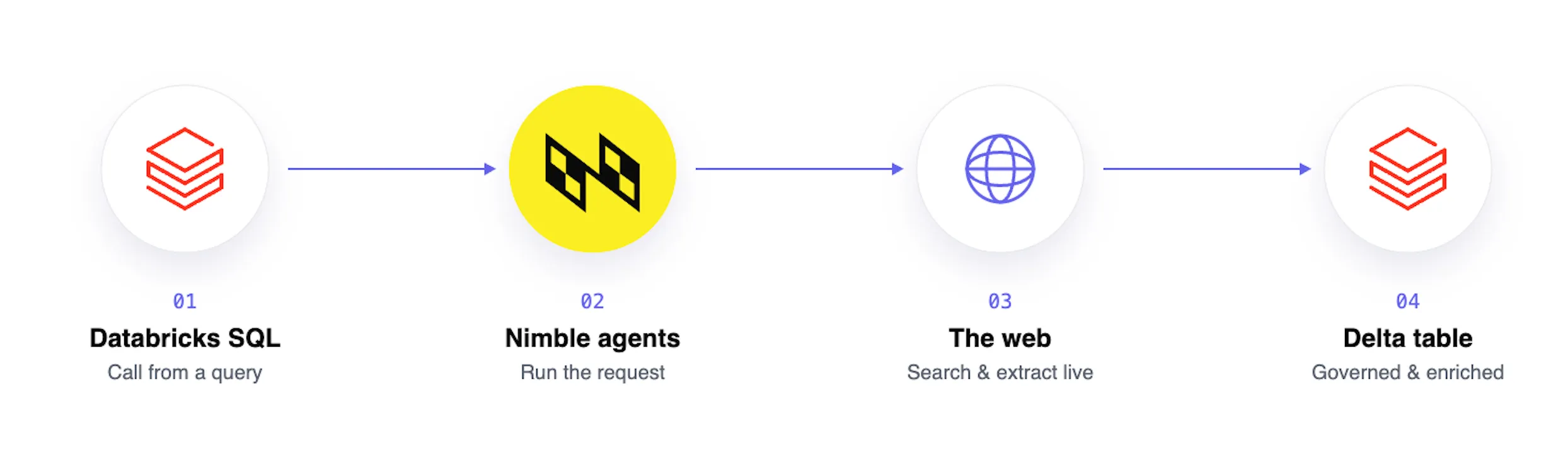
The Nimble + Databricks integration removes that entire middle layer. Nimble ships as a set of SQL-native table functions inside Unity Catalog. Live web search, page extraction, and structured agent results become part of a SELECT statement. Results land directly as governed Delta tables, with access control, lineage tracking, and time travel included. No Python middle-tier. No custom API integration. No leaving Databricks.
How Teams Are Using It
The integration is general-purpose by design, but a few use cases show up repeatedly:
Local market intelligence (see below for the full cookbook): Query location-based terms to surface businesses and local listings as a structured Delta table. Useful for territory planning, competitive mapping, and site selection.
- Local market intelligence (see below for the full cookbook): Query location-based terms to surface businesses and local listings as a structured Delta table. Useful for territory planning, competitive mapping, and site selection.
- Retail and CPG price intelligence: Feed a table of competitor product URLs into Nimble, get back current pricing and availability as a Delta table, and refresh it on a daily schedule. No bespoke scraping infrastructure required.
- Financial services company monitoring: Search a watchlist of companies and keywords to surface breaking news or filings for analysts through a Databricks Genie space. The table is lineage-tracked for compliance auditing.
- B2B sales and account enrichment: Pull current product descriptions, leadership mentions, and messaging from a CRM export of company homepages. The output feeds scoring models or populates a dashboard, refreshable on demand.
- Real estate market tracking: Pull listing data across target zip codes into a managed Delta table and track price changes over time with Delta time travel. One scheduled Workflow keeps the dataset current.
Example: Gathering intel on local markets
The Nimble cookbook ships a complete, runnable recipe for local business discovery. It's a good end-to-end example of how the integration works in practice. Here's how it comes together.
Step 1: Install the Functions
The four table functions (nimble_search, nimble_extract, nimble_agent_list, and nimble_agent_run) are deployed as Python UDTFs behind thin SQL wrappers in Unity Catalog. The cookbook provides a deploy script that handles the multi-statement SQL files:
WH=<your-serverless-warehouse-id>

python3 databricks/helpers/deploy_sql.py --file databricks/01_setup.sql --warehouse "$WH"
for f in databricks/tools/*.sql; do
    python3 databricks/helpers/deploy_sql.py --file "$f" --warehouse "$WH"
done
The Nimble API key lives in a Databricks secret scope and is injected server-side. It never appears in a function signature or at a call site:
databricks secrets create-scope nimble
databricks secrets put-secret  nimble api_key
databricks secrets put-acl     nimble users READ
One prerequisite worth noting: serverless SQL warehouses block Python UDTF egress by default. You need to enable "Enable networking for isolated workloads in Serverless SQL Warehouses" under Workspace Settings > Previews, then cold-restart the warehouse (a plain restart is not enough). Workspaces that can't enable the preview have an http_request() fallback path documented in the cookbook.
Step 2: Create the Input Table
The recipe starts with a seed table of location-based search queries. Each row is a market + category combination:
-- Input: location_queries
-- query                                  | category
-- coffee shops in Williamsburg Brooklyn  | coffee
-- pizza restaurants in Chicago Loop      | pizza
-- gyms in Austin Texas                   | gym
This is the only data you author. Everything downstream is generated from it.
Step 3: Run the Search and Collect Results
nimble_search with focus='location' is a table function you call in the FROM clause with a LATERAL join — one row per result returned. The location focus mode routes each query through Nimble's location-specialized Web Search Agents, surfacing businesses, places, and local listings. Results come back as flat rows with title, description, url, and content fields — no VARIANT navigation or array explosion needed.
The full CREATE OR REPLACE TABLE statement runs the entire pipeline in a single query:
CREATE OR REPLACE TABLE nimble_integration.recipes.local_businesses AS
SELECT
    q.query,
    q.category,
    r.title,
    r.description,
    r.url,
    r.content,
    current_timestamp()                        AS enriched_at
FROM nimble_integration.recipes.location_queries q,
     LATERAL nimble_integration.tools.nimble_search(
         q.query,
         20,
         'location'
     ) r;
The output is a real Unity Catalog Delta table:
Step 4: Govern and Schedule
Because the output is a standard Delta table, Unity Catalog governance applies immediately with no extra configuration:
-- Time travel: inspect a previous snapshot
DESCRIBE HISTORY nimble_integration.recipes.local_businesses;

-- Access control: share with a team
GRANT SELECT ON TABLE nimble_integration.recipes.local_businesses TO analysts;
To keep the table fresh, point a Databricks Workflow SQL task at the CREATE OR REPLACE TABLE statement and set a cron trigger. No wrapper procedure, no orchestration logic. The SQL statement is the pipeline.
Step 5: Surface it in Genie
Databricks Genie registers table functions as tools directly. Point a Genie space at nimble_integration.tools.nimble_search (and the other functions), and the function comments become the spec the LLM reads to decide when and how to call each tool. The cookbook includes helpers/create_genie_space.py to wire all four functions into a Genie space programmatically. The result: natural-language access to live web data from inside Genie, with no additional integration work.
Web Data Should Be a Column, Not a Project
The fundamental problem with web data in analytics pipelines has never been access. It's been the operational weight. Every team that needs it ends up building and maintaining the same infrastructure: extraction logic, credential management, failure handling, retry loops, and some mechanism to land results in a governed store.
The Nimble/Databricks integration makes web data a first-class citizen in the warehouse. A data engineer can write SELECT * FROM nimble_search('AI agent news', 10) the same way they'd query any other table. The results compose with JOIN, CREATE TABLE AS, dbt models, and Databricks Workflows. Governance is inherited, not bolted on.
For teams already running their data stack on Databricks, web enrichment goes from a bespoke infrastructure project to a SQL problem. And SQL problems are solved in an afternoon.
Start a free trial at nimbleway.com to get your API key, then follow the integration docs or the cookbook on GitHub to deploy the functions into your workspace.
FAQ
Answers to frequently asked questions


.webp)



.webp)

.webp)
.webp)