









Build LiteLLM Apps with Live Web Search Through One Interface
Route 100+ LLM providers and Nimble Search through LiteLLM's unified interface to build AI applications grounded in live web data.



Charlie Klein
Build LiteLLM Apps with Live Web Search Through One Interface
Route 100+ LLM providers and Nimble Search through LiteLLM's unified interface to build AI applications grounded in live web data.
Charlie Klein


Most popular articles

Get structured, reliable data for your stack.
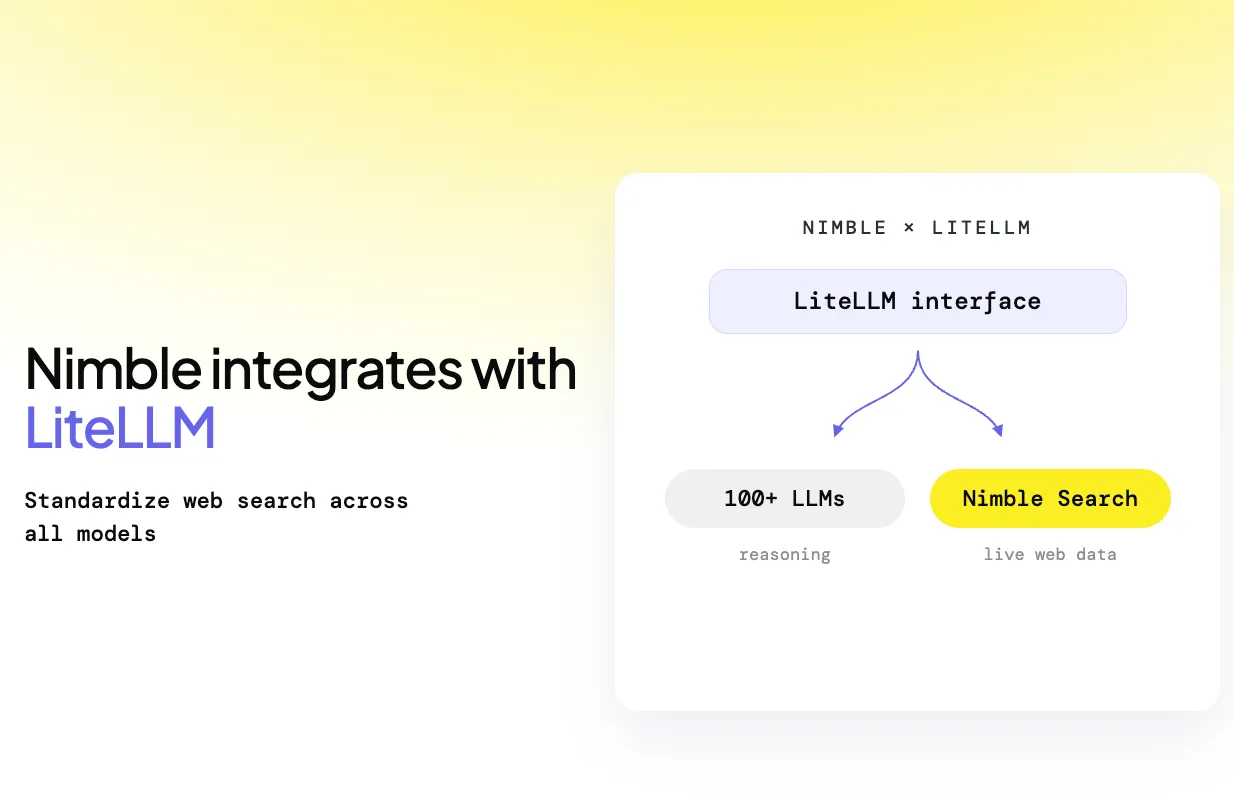
Today, we're announcing the Nimble integration for LiteLLM. Developers can now access Nimble Search as a native LiteLLM search provider, bringing live web data into applications that already use LiteLLM to route across models and providers.
With Nimble built directly into LiteLLM's Search API, there's no plugin, custom adapter, or separate search integration to maintain. Set search_provider="nimble" and send searches through the same LiteLLM interface your application already uses.
What You Can Do with Nimble + LiteLLM
LiteLLM gives developers a unified interface for more than 100 LLM providers. Its Search API extends the same model to web search providers, letting applications access search without building separate integrations for each backend.
Nimble now ships as a native provider in LiteLLM v1.98.0 and later. Calls are routed directly to Nimble Search and returned in LiteLLM's unified search response.
That means developers can use LiteLLM to:
- Add live web data to AI applications. Give models current information from the web instead of limiting them to what they already know.
- Keep one interface across models and search. Route different model providers and Nimble Search through the same application layer instead of maintaining separate integrations.
- Control search for each task. Use common LiteLLM search parameters while retaining access to Nimble-specific controls for how searches are executed and returned.
- Centralize credentials through the LiteLLM Gateway. Keep the Nimble API key server-side while applications authenticate with LiteLLM virtual keys.
- Track search and model costs together. When using the gateway, Nimble search spend can be tracked alongside model usage in LiteLLM's logging and dashboard layer.
Getting started takes just a few lines:
from litellm import search

response = search(
      query="latest AI developments",
      search_provider="nimble",
      max_results=5,
)

for result in response.results:
      print(result.title, result.url)
The integration currently supports Nimble Search through LiteLLM. Nimble Extract, Crawl, Map, and Web Search Agents remain available directly through the Nimble SDK or MCP Server.
Cookbook: Build a Claim Verifier with LiteLLM and Nimble
To show what this looks like in practice, we built a Claim Verifier that takes a document, identifies its factual claims, searches the live web for evidence, and returns a verdict for each one.
The application demonstrates the core advantage of combining LiteLLM and Nimble: different parts of an AI workflow can use the model or data source best suited to the task, while the application interacts with them through one interface.
Here's how it works:
- Extract every checkable claim. A lightweight model reads the document and separates factual statements from opinions and predictions.
- Search the web for each claim. Every factual claim triggers its own Nimble Search, with searches running concurrently to retrieve current supporting or contradicting evidence.
- Reduce unnecessary context. Retrieved page content is narrowed to the portion relevant to the claim before it is passed to the judging model, reducing the amount of content the model needs to process.
- Adjudicate against the evidence. A stronger reasoning model evaluates each claim and classifies it as supported, contradicted, or unverifiable.
- Keep the source behind every verdict. The result includes the deciding URL and, where appropriate, a correction based on the retrieved evidence.
- Track what the verification costs. The final report separates search spend from model token spend, making the cost of the full workflow visible.
The result is an annotated version of the original document where each factual claim can be inspected alongside its verdict and source.
More importantly, the architecture is reusable far beyond fact checking.
A production application might use a fast, inexpensive model for extraction or classification, a more capable model where deeper reasoning is needed, and Nimble Search whenever the workflow needs current information from the web. LiteLLM provides the routing layer across those services, while Nimble provides the live web context the models need to work with up-to-date information.
Give LiteLLM Applications Live Web Context with Nimble
LiteLLM simplifies how developers work across models and providers. Nimble extends that same architecture to the live web.
Instead of adding another standalone search integration to your stack, applications using LiteLLM can call Nimble through the same unified interface they already use for AI models.
Together, Nimble and LiteLLM make it easier to build applications where models and live web data are treated as composable parts of the same workflow: use the right model for each reasoning task, search the web when current context is required, and manage the system through a common application layer.
Building with LiteLLM + Nimble? Get 2x Free Credits
If you're building a project with LiteLLM and Nimble, we'd love to hear about it.
Book a 15-minute call with our team, tell us what you're working on, and we'll double your Nimble trial credits so you have more room to build, test, and experiment with live web search.
Start a free trial -> Book a short call to get 2x credits
Documentation
This integration has two doc homes:
FAQ
Answers to frequently asked questions



.avif)
.webp)
.webp)
.webp)
