







Announcing Nimble's Integration with Omnigent: Bring Live Web Search Into Your Agents



Charlie Klein

Announcing Nimble's Integration with Omnigent: Bring Live Web Search Into Your Agents
Charlie Klein


Most popular articles

Get structured, reliable data for your stack.
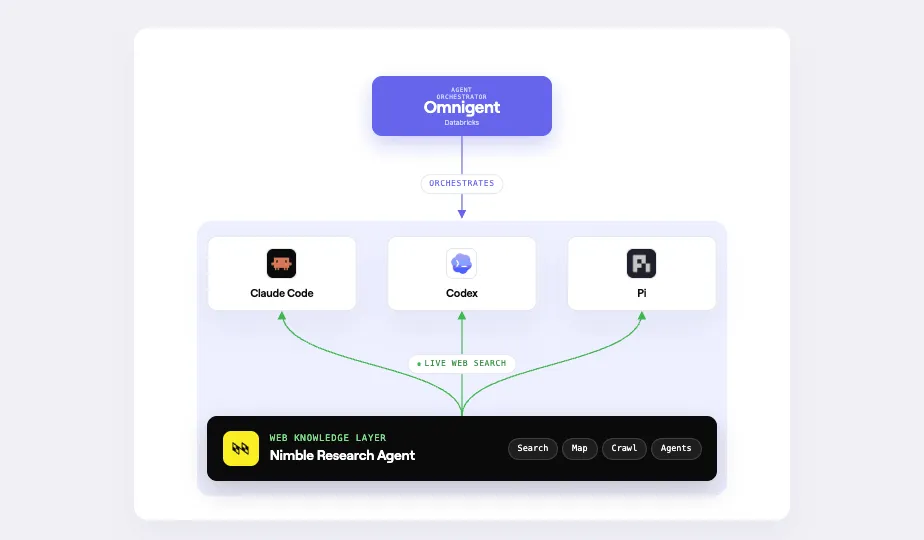
We're thrilled to announce that Nimble is the web search launch partner for Omnigent, the open-source AI agent meta-harness from Databricks. Set search_provider: nimble in your config to ground every Omnigent-orchestrated agent in deep web research.
Nimble automatically optimizes each search request for your use case. Broad discovery queries get fast, lightweight results. Tasks that need richer content get full page extraction. The result is higher retrieval accuracy and lower costs across your agent workflows, with no manual tuning required.
How It Works
Omnigent is built around model-agnosticism. You can run Claude, Llama, or any Databricks-hosted model and swap between them with a one-line change. The web_search builtin extends that flexibility to search: set search_provider: nimble in any agent spec and every model running in that agent gets access to live web results through Nimble's Search API, with anti-bot handling, JavaScript rendering, and geo-targeting included.
No fork or plugin needed. Nimble is a first-class provider in Omnigent from day one. Below, see what you can do with the results - search the web and stream the results to Databricks for visualization.
Build a Web Research Agent on Omnigent
A good pattern for grounding your Omnigent-orchestrated agents is to deploy a dedicated web research agent alongside them. This agent acts as a research expert: it handles live web lookups on behalf of your other agents, returning grounded, current information that the broader workflow can reason over.
To set this up, create a directory for your agent and add a config.yaml at the root:
spec_version: 1
name: research-agent
prompt: |
  You are a research assistant. Use web_search to ground your
  answers in current information from the web.

executor:
  type: omnigent
  model: databricks-claude-sonnet-4-6

tools:
  builtins:
    - name: web_search
      search_provider: nimble
      api_key: ${NIMBLE_API_KEY}
Export your Nimble API key and run the agent:
export NIMBLE_API_KEY="your-api-key"
omni run ./research-agent -p "What were the biggest AI model releases this month?"
Tuning Search for Your Use Case
The web_search builtin gives you two knobs worth knowing about:
- search_depth controls the speed-vs-richness tradeoff. lite mode returns titles, URLs, and snippets at low latency, which is enough for broad discovery. deep mode runs full page extraction for richer content when your task needs it.
- max_results sets how many results to return, from 1 to 100.
A fully configured provider looks like this:
tools:
  builtins:
    - name: web_search
      search_provider: nimble
      api_key: ${NIMBLE_API_KEY}
      max_results: 10
      search_depth: deep
Full documentation is at docs.nimbleway.com/integrations/connectors/omnigent.
What You Can Build
Earnings research and financial analysis. Build an agent that pulls live filings, analyst commentary, and market news at query time. Grounding the agent in current web data means it works from what's been published, not what it was trained on. That matters when a company reports after market close and you need analysis before open.
Topic and brand monitoring across news sources. Wire a monitoring agent to track specific topics, companies, or regions across news sources. Use search_depth: lite to keep latency low on high-frequency sweeps, then route flagged results to a deep pass for full article extraction and summarization. You get broad coverage without paying extraction costs on every result.
Competitive and market research on demand. Run agents that pull live pricing pages, product announcements, and trade coverage whenever you need them. Because Omnigent lets you swap models without changing your search configuration, you can test different reasoning models against the same web data and optimize for cost or quality independently.
Summary: What you get with a Nimble Agent in Omnigent
- Live data for any model. Omnigent's model-agnosticism extends to web search. One search_provider: nimble config line grounds any model you run in current information, without per-model integration work.
- Optimize search accuracy and retrieval. match retrieval cost and latency to what each task actually needs, rather than paying for full page extraction on every query.
- Production-grade from day one. Get reliable live data without building or maintaining the infrastructure to get it.
FAQ
Answers to frequently asked questions
.webp)

.webp)
.webp)
.webp)
.webp)
.avif)