









Building an Autonomous SEO Strategist with Nimble and Claude


Tom Shaked
Building an Autonomous SEO Strategist with Nimble and Claude
Tom Shaked


Most popular articles

Get structured, reliable data for your stack.
Run a Google search for "subscription billing software." The first Stripe result isn't /billing. It's a resource article. Stripe has the domain authority, the product page, and the content budget — but an internal signal misalignment is routing commercial-intent traffic to a lower-converting URL. An agency audit would catch this in week three of a four-week engagement, after you've already paid the retainer.
We wanted to know how much of this kind of finding could be automated — not approximated with a crawler, but actually diagnosed. And why stop there? We wanted to see if it was possible to combine Nimble and Claude to create a fully autonomous SEO strategist that requires just a homepage URL for the website to analyze, a country to target, and a locale.
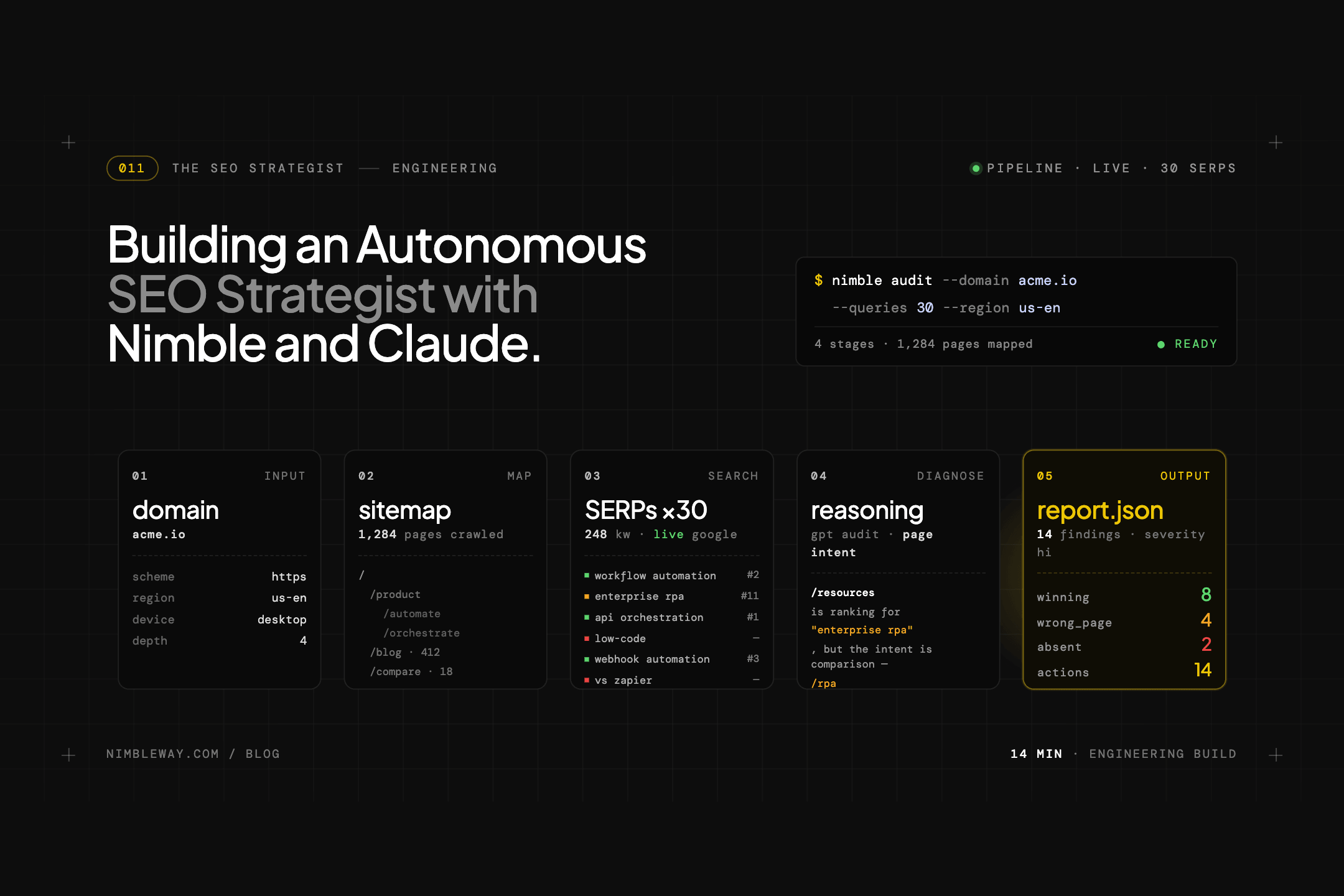
So we built a pipeline that maps a site, identifies and loads key pages, pulls 30 live search rankings, identifies every competitor winning traffic you should own, and uses Claude to generate a prioritised action plan. We ran it against Stripe, and found 16 wrong-page rankings, 4 high-threat competitors, and 8 high-impact fixes that require nothing more than H1 and title tag changes.
What we built
Eight-phase pipeline. Four phases use Nimble to pull live web data. Four use Claude to reason over it.
Input: a domain. Output: a structured markdown report, a full competitor map, per-term diagnoses with priority scores, and an 8-tab Streamlit dashboard.
Results from the Stripe run: 47 pages extracted, 30 search terms tracked, 20 unique competitors identified, site SEO score 58/100. Of the 30 tracked terms: 7 winning (top 3), 7 absent, 16 ranking with the wrong page. Eight quick wins identified — all High impact, all Low effort.
The full project is on GitHub: github.com/Nimbleway/cookbook-seo-strategist
Step 1: Understanding the site
Before generating a single search term, the pipeline needs to know what the company actually does — its products, ICP, and how it positions itself. The starting point is the homepage.
Nimble's extract() fetches the page as clean markdown. No HTML noise, no nav chrome, no JavaScript rendering artifacts:
from nimble_python import Nimble

nimble = Nimble(api_key="YOUR_API_KEY")

result = nimble.extract(
    url="<https://stripe.com>",
    format="markdown",
    render=True,
)
homepage_md = result.text
That markdown goes to Claude with a single prompt: extract a structured company profile — product categories, ICP, business model, brand positioning, and any competitors already mentioned on the homepage. Claude returns a JSON object that anchors everything downstream. It knows what Stripe sells before it's asked to generate any search queries.
Then Nimble maps the site structure — discovering product pages, use-case pages, feature pages, and resource hubs. Claude classifies each discovered URL by page type, filters out login pages, legal pages, and sitemap noise, and selects the 30 highest SEO-value pages for deep extraction.
For Stripe, this produced a selection of 47 pages — every product, use case, and solution page — from hundreds of discovered URLs.
Step 2: Batch page extraction
With the page list selected, Nimble's batch API extracts all 47 pages in parallel:
batch = nimble.extract_batch(
    urls=selected_urls,
    format="markdown",
    render=True,
)

batch_id = batch.id
task_map = {task.id: task.input["url"] for task in batch.tasks}
While the batch runs, the pipeline polls for completion and saves each result as it arrives:
while True:
    progress = nimble.batches.progress(batch_id)
    if progress.status in ("completed", "failed"):
        break
    time.sleep(5)

for task_id, url in task_map.items():
    result = nimble.tasks.results(task_id)
    raw_pages[url] = result.text
Each retrieved page goes through a lightweight Claude pass: extract title, H1, primary topic, page type, target audience, and SEO value. The output is a page inventory — 47 structured records that the diagnostic phases can cross-reference against SERP results later.
Concurrency is what makes this practical. Running 47 extractions serially at ~12 seconds each is ten minutes. Batched, it's under 90 seconds.
Step 3: Generating the right search terms
This phase uses Claude only — no additional data needed. The company profile and page inventory go in together, and Claude generates exactly 30 search terms balanced across six categories:
The prompt constrains the funnel distribution deliberately — 12 awareness, 14 consideration, 4 decision — because mid-funnel is where most SEO value is lost. Transactional terms ("stripe pricing") are easy wins that don't reveal competitive weakness. Consideration-stage terms ("subscription billing software", "Chargebee alternative") are where the real gaps are.
Each generated term is mapped to the existing page that should rank for it. That mapping is what allows the diagnostic to distinguish a content gap from a canonicalization problem — both look like "not ranking" until you check whether there's a page that should be ranking.
Step 4: Live SERP data
This is the data-intensive phase. Nimble's search() fires each query as a live Google search and returns structured results — domain, rank, title, URL, and snippet for each of the top 10 results:
resp = nimble.search(
    query="subscription billing software",
    country="US",
    search_depth="lite",
    parse=True,
)

results = resp.data.parsing["results"]
# [{"rank": 1, "domain": "chargebee.com", "title": "...", "url": "...", "snippet": "..."},
#  {"rank": 2, "domain": "recurly.com", ...}, ...]
For each of the 30 queries, the pipeline checks three things: whether the target domain appears in the results, at what rank, and whether the ranking URL matches the page that should be ranking. That last check catches wrong-page rankings — one of the most common and most fixable SEO problems.
For Stripe, 16 of 30 terms returned a ranking URL that didn't match the expected page. /billing ranked for 3 core billing queries, but the specific URLs that appeared were resource articles, not the product page. Stripe wasn't absent — it was misrouted.
30 queries, all concurrent, return in under 60 seconds total.
Step 5: Diagnosis
With SERP data, page inventory, and search term mappings in hand, Claude runs a term-by-term diagnostic. For each of the 30 tracked queries, it gets four inputs together: what the SERP returned, which URL is actually ranking, which URL should be ranking, and the extracted content of both pages.
The output for each term is a structured diagnosis:
{
  "search_term": "subscription billing software",
  "status": "wrong_page",
  "mapped_page": "<https://stripe.com/billing>",
  "actual_ranking_url": "<https://stripe.com/resources/more/subscription-billing-software>",
  "page_issues": ["resource_article_outranking_product", "missing_internal_links"],
  "strategy_issues": ["no_faq_schema", "keyword_not_in_h1"],
  "top_competitor_for_term": "chargebee.com",
  "page_priority_score": {
    "business_value": 27,
    "ranking_opportunity": 22,
    "fixability": 18,
    "competitor_gap": 12,
    "internal_link_leverage": 8,
    "total": 87
  }
}
The priority score factors in five dimensions: business value of the term, current ranking opportunity, how fixable the specific problem is, the competitor gap, and internal link leverage. It's what drives the recommendations ordering — fixes that are both high-value and simple to implement surface first.
Across the Stripe analysis, the diagnostic identified H1 rendering failures on four pages (/connect, /tax, /use-cases/ai, /use-cases/saas) where the H1 was resolving to the root domain URL rather than keyword-bearing copy — a JavaScript rendering issue quietly eliminating the strongest on-page relevance signal for each page's primary term.
Step 6: Recommendations
The final Claude pass synthesizes everything — company profile, page inventory, SERP data, competitor map, and all 30 term diagnoses — into a structured recommendations output:
- 8 quick wins: specific fixes on existing pages, each High impact / Low effort
- 8 page optimisation briefs: suggested title, H1, H2s, keywords to weave in, content additions, FAQ questions
- 7 new pages: full content briefs for pages that should exist but don't
- 5 strategic themes: pattern-level problems that span multiple terms
The top three quick wins from the Stripe run:
- Rewrite the title and H1 on
/paymentsto match "online payment processing for businesses" — the H1 currently resolves to the root URL - Fix H1 rendering failures on
/connect,/tax, and/use-cases/saas— three pages, one root cause - Add FAQ schema to
/billingtargeting "subscription billing software" — can push the page from #2 to #1 by adding a differentiation signal against Recurly
All three require no new content. They're on-page signal fixes. The projected impact of closing the 8 priority page gaps and building the 6 highest-priority new pages is an SEO score increase from 58 to 74–78 within two quarters.
The dashboard
The pipeline writes all outputs to a run directory. The Streamlit dashboard reads from there — no live API calls on load.
streamlit run dashboard/app.pyEight tabs: Overview (gauge, score breakdown, SERP status chart, quick win preview), SERP Rankings (filterable 30-term table with page-level drill-down), Competitors (threat map and detail table), Diagnosis (issue frequency charts, per-term breakdown), Pages (full inventory), Quick Wins, Recommendations (page briefs, new page briefs, strategic themes), Full Report.
Each run is timestamped and preserved. The dashboard always loads the most recent run, but all historical runs stay accessible.
The data challenge - solved
The three data collection problems this pipeline has to solve are: getting clean page content from a JavaScript-heavy site, pulling live Google search results programmatically, and doing both at scale without writing automation that breaks every time a site updates.
extract() and extract_batch() handle the first problem. Pages render as clean markdown regardless of how much JavaScript the site uses. The content Claude reads is the same content a user sees — not the raw DOM, not partially rendered HTML. That matters for SEO analysis specifically because the failures being diagnosed — missing H1s, thin content, intent mismatches — only appear in the rendered output.
search() handles the second. The results are current, not indexed. For a diagnostic that's supposed to tell you what's ranking today, cached or third-party index data introduces exactly the kind of staleness that makes the output unreliable. Nimble searches live.
Concurrency handles the third. The batch extraction API and the parallel SERP fetch together bring the data collection phases from a theoretical 45–60 minutes (serial) to under three minutes combined. That's what makes it practical to run this as a pipeline rather than a one-time script — you can re-run it monthly and track movement.
Pointing it at a different domain is a single config file change.
Conclusion
SEO strategy is a research problem disguised as a marketing problem. The actual work is data collection: which pages exist, what they say, where they rank, who's outranking them, and why.
Done manually, that's weeks of crawling, spreadsheets, and agency retainers. Done with the right data layer, it's a pipeline.
The same pattern holds across many competitive intelligence problems — pricing, job postings, product launches, review sentiment, SERP monitoring.
The shape of the problem changes, but the core requirement doesn't: structured, current data from the live web, at whatever scale the analysis demands. That's the part that's hard to build from scratch and easy to take for granted once it's solved.
Nimble handles that layer. What gets built on top is limited only by your imagination.
Continue Exploring
FAQ
Answers to frequently asked questions
.webp)


.webp)
.webp)
.webp)
.avif)