









How We Improved Web Search Recall And Efficiency Using Agentic Code Execution
Letting agents write and run code over collected web data raised recall from 59% to 95% across 50 tasks.



Yuval Bertocchi

How We Improved Web Search Recall And Efficiency Using Agentic Code Execution
Letting agents write and run code over collected web data raised recall from 59% to 95% across 50 tasks.
Yuval Bertocchi


Most popular articles


Get structured, reliable data for your stack.
By letting Web Search Agents write and execute code over collected web data, we increased recall from 59% to 95% while cutting cost per correct answer by 2.8×.
At Nimble, we build Web Search Agents to search and retrieve data across the live web. Early versions worked well when an answer could be assembled from a manageable set of pages. They struggled when the task required completeness across an entire site or dataset.
The problem was not retrieval capacity, but retrieval efficiency. In one early test, the agent returned three qualifying companies where another system returned 13. The missing companies were already present in pages our agent had collected. It simply ran out of turns before it could process them.
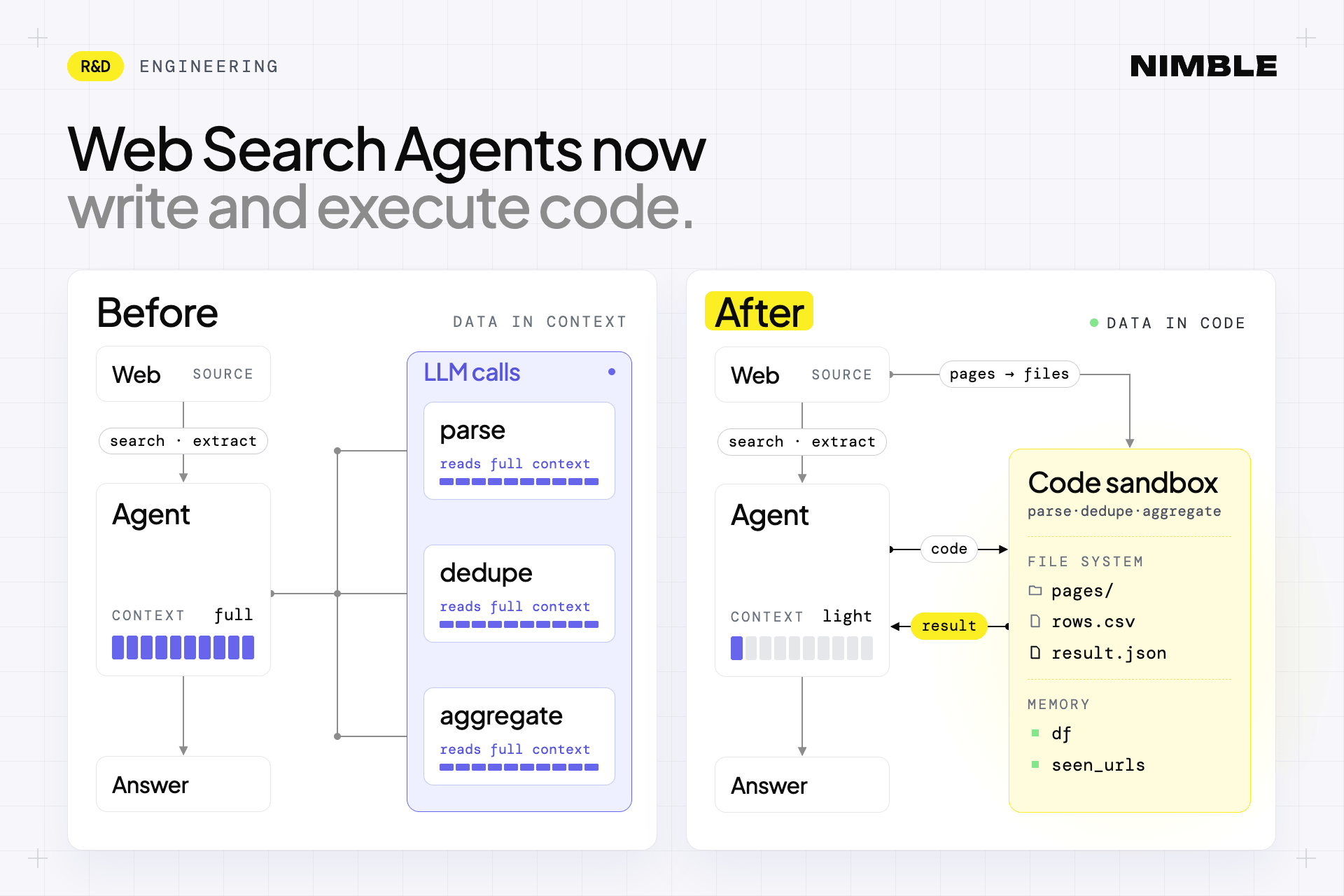
Before, our agents read through hundreds of collected pages through the LLM one by one. Now, our agents can write a parser or transformation once and run it across the full dataset inside an isolated sandbox.
In a 50-task benchmark (100 runs, each task run with and without code execution), that increased recall from 59% to 95% while reducing cost per correct answer by 2.8×. The savings come from running one small piece of code instead of generating a long sequence of agentic tool calls one by one, each of which costs tokens to produce.
59% → 95% recall
$0.0040 → $0.0014 cost per correct answer
The Problem: Efficiently Scaling Web Search + Retrieval
Before code execution, exhaustive web tasks had two expensive loops: the model read each page, then wrote each output row.
Read operations were bounded, and every output row required another model-driven tool call. As the number of pages or records grew, the agent could hit its turn, time, or context limits even when it had already found the right sources.
We tested several ways to extend that architecture:
Adding a Code Execution Sandbox
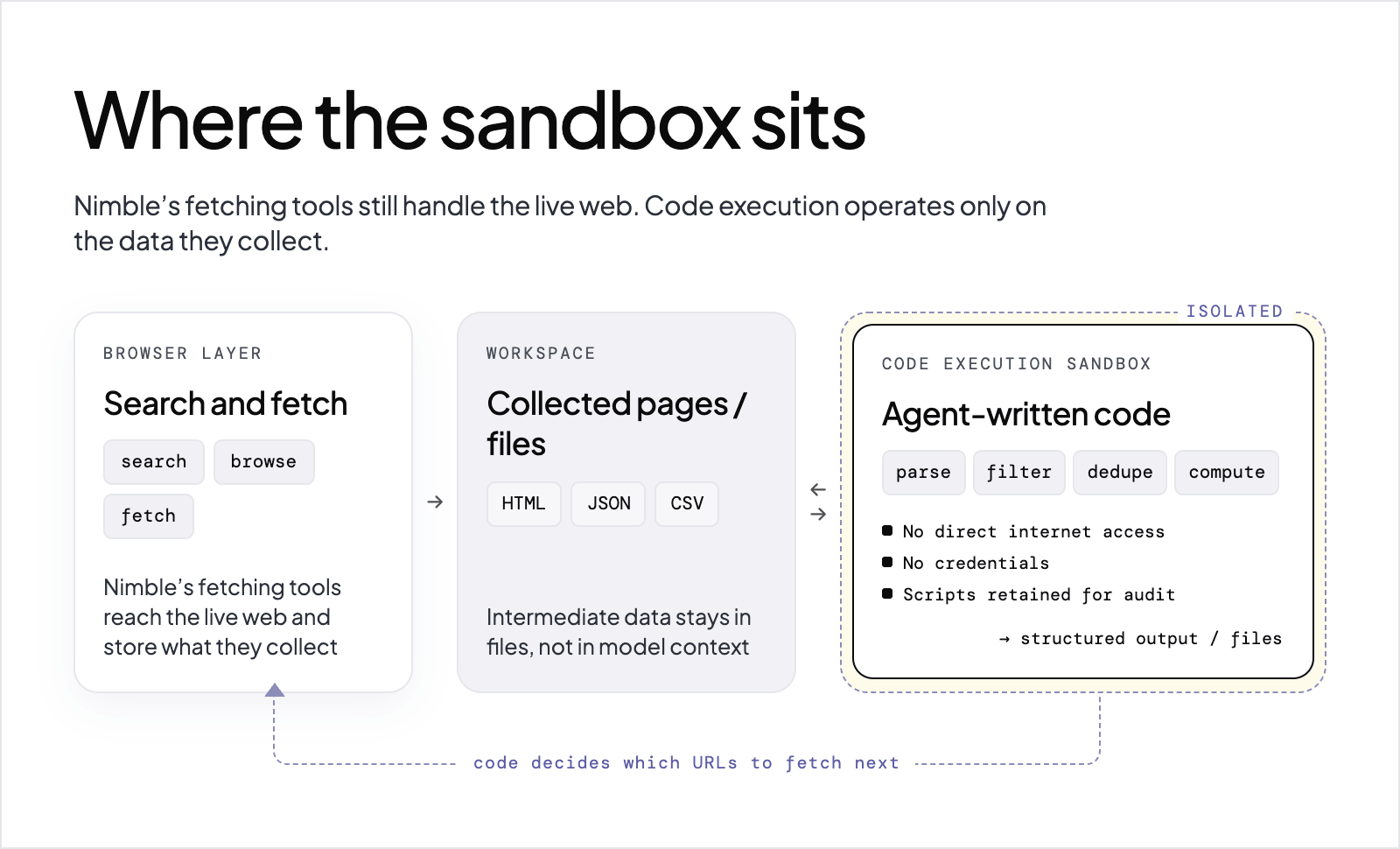
Nimble’s fetching tools still handle browser use. Code execution operates over the data they collect.
Before:
Search and fetch
↓
Model reads page
↓
Model writes rows
↓
Repeat
↓
Output
Now:
Search and fetch
↓
Collected pages / files
↓
Agent writes task-specific code
↓
Code execution sandbox: parse, filter, dedupe, compute
↓
Structured output / files
Code can also inspect what has been collected and determine which URLs should be fetched next, handing that work back to the browser layer. The sandbox itself has no direct internet access or credentials, and executed scripts are retained, both for audit and for reuse. Once a script works, later runs can reuse it instead of generating and debugging it again, which makes the agent more repeatable.
This gives the agent two execution modes. The model handles decisions that require interpretation, such as what constitutes a valid product or which fields matter. Once those decisions become explicit rules, code can apply them consistently across hundreds or thousands of records.
Code execution in production
The strongest use cases are tasks where the agent must apply a known operation across a large body of web data.
The same model applies to filtering, joins, exact calculations, schema transformations, and large file outputs. Intermediate CSV or JSON data can remain in files rather than repeatedly entering model context.
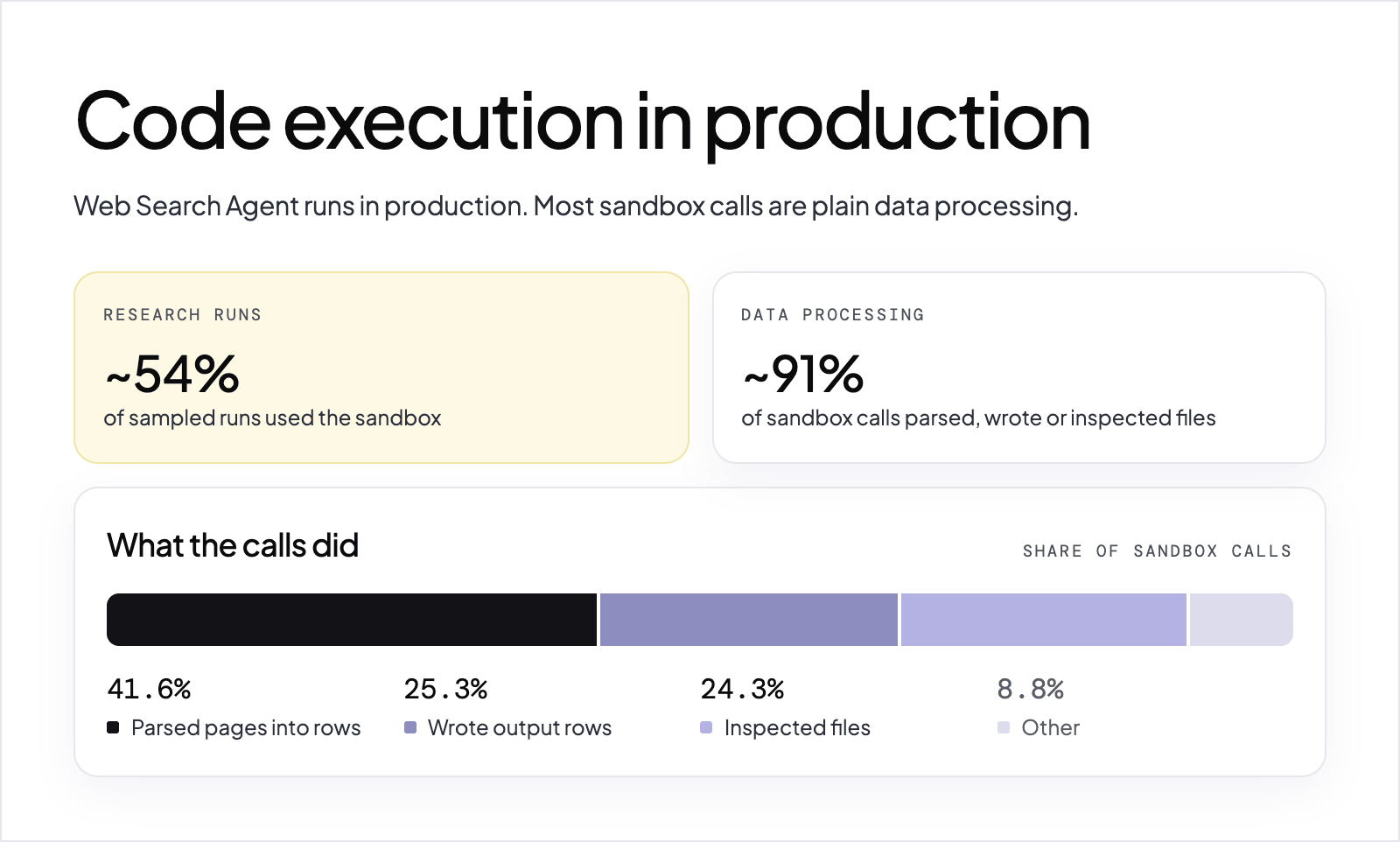
This is already a common execution path in production. Over two weeks, Web Search Agents made 41,181 run_code calls across 5,234 runs, and roughly 54% of sampled research-agent runs used the sandbox.
Most of those calls were practical data-processing work: 41.6% parsed pages into rows, 25.3% wrote output rows, and 24.3% inspected files.
Benchmarks With and Without Code Execution
We tested 50 structured web tasks across eight kinds of work, running each one twice with the same agent, model, and effort level: once with code execution available and once without it, for 100 runs in total. Every task asked for a complete, checkable set of rows, so each answer could be compared row by row against a known reference set. For results on public benchmarks, see How Nimble Ranks On Public And Vertical Web Search Benchmarks.
Recall increased from 59% to 95%
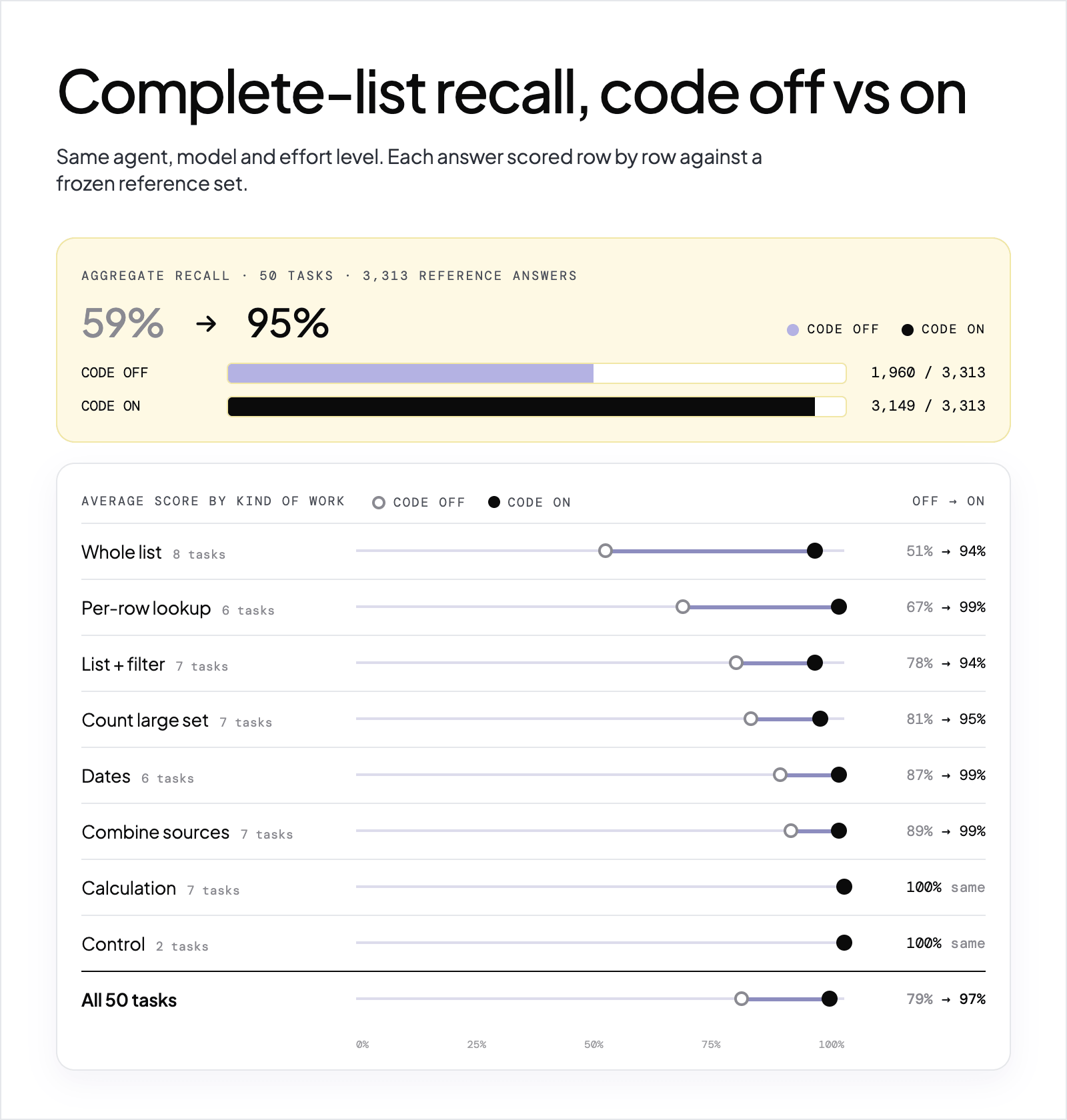
Across the 50 tasks, the reference data contained 3,313 right answers.
The agent found:
- 1,960 with code disabled
- 3,149 with code enabled
Aggregate recall increased from 59% to 95%. The average task score rose from 79% to 97%, and the agent returned a fully correct answer on 39 tasks with code versus 30 without it. Code execution won 17 tasks, tied 32, and lost 1.
The biggest gains appeared where the task required exhaustively processing a large source. On the 13 tasks with 75 or more right answers, the average score rose from 58% to 96%. Without code, the agent returned 153 of 375 final Python PEPs and 24 of 248 Y Combinator Winter 2024 companies; with code, it returned all 375 and 214. Per-row lookups across many pages showed the next-largest gain: the agent found the latest version of all 30 top PyPI packages with code, versus 11 without it.
Cost per correct answer fell by 2.8×
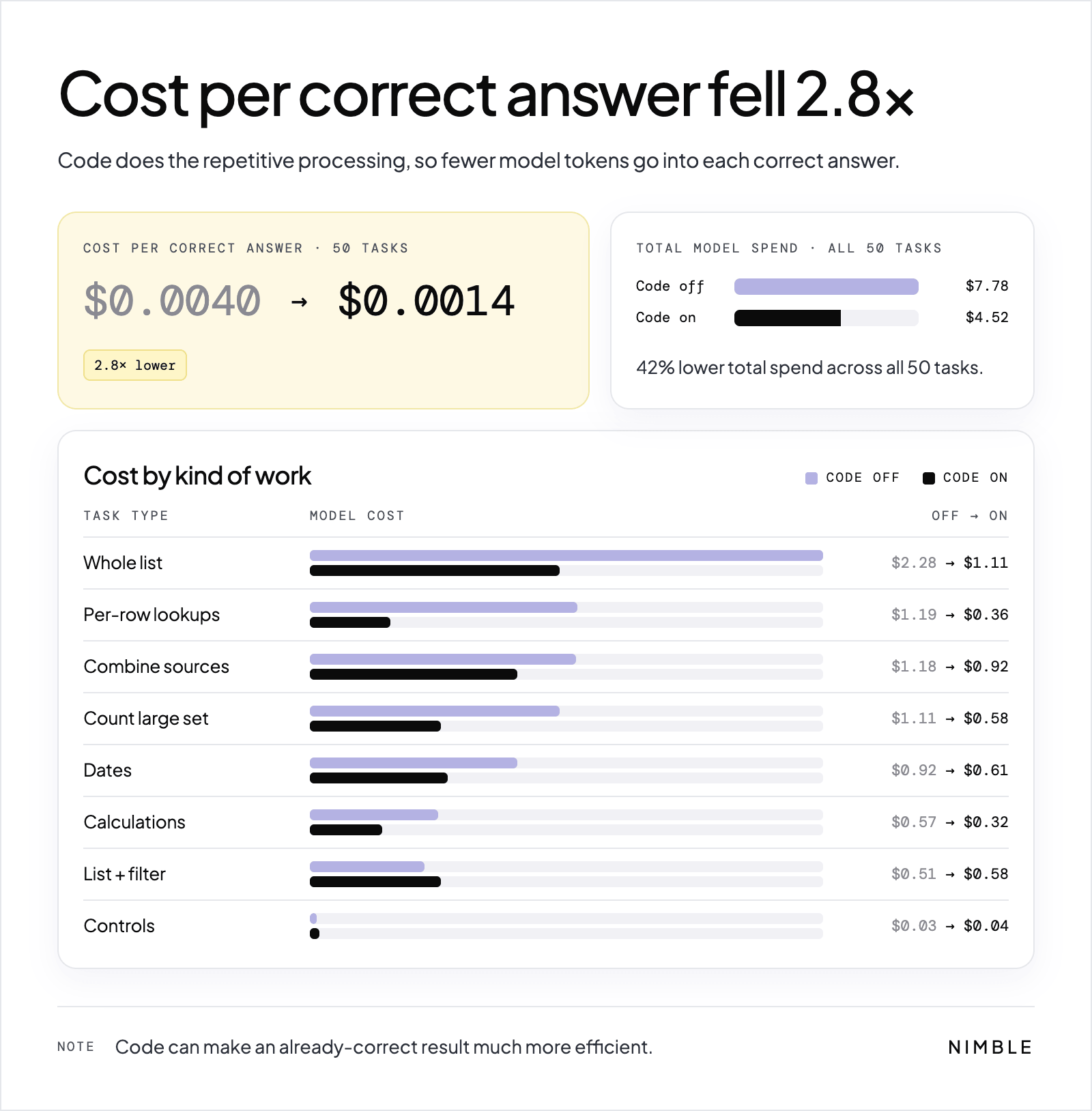
Across the 50-task benchmark, cost per correct answer fell from $0.0040 to $0.0014. Total model spend across all 50 tasks fell from $7.78 to $4.52, a 42% reduction, and code cost less in six of the eight kinds of work.
The saving comes from the shape of the work. Without code, the agent generates a long chain of tool calls, and every call costs tokens to produce. With code, it writes one short script that processes everything at once. Code cost slightly more, by a few cents per task, only on list-and-filter tasks and the two single-fact controls.
Code can also make an already-correct result much more efficient. Both configurations returned all 59 requested Python PEP titles and statuses, but the code-enabled run cost $0.02, compared with $0.24 without code.
Small computations showed little benefit
The seven calculation tasks and two single-fact controls fit inside the model’s context, and both configurations produced fully correct outputs. Code still made the calculations cheaper, but it did not change accuracy. Generated code can need a round of debugging before it works, but that cost is paid once: the working script can then be reused in future runs.
Code execution also does not eliminate the need for validation. The code-enabled agent lost one task, a stadium-capacity lookup where it used outdated or rounded figures, merged two categories on one counting task, and returned extra records on two list tasks.
Reference answers were frozen from primary sources on the day of each run (the site’s own API or feed where one exists, public reference tables otherwise) and built by script rather than by an LLM. Every result was scored with the same matching script, and a row counted only if its values were also correct. Each task ran once per configuration, so individual per-task results can vary from run to run; the aggregate gap across 50 tasks is the more reliable measurement.
From Generated Code to Learned Tools
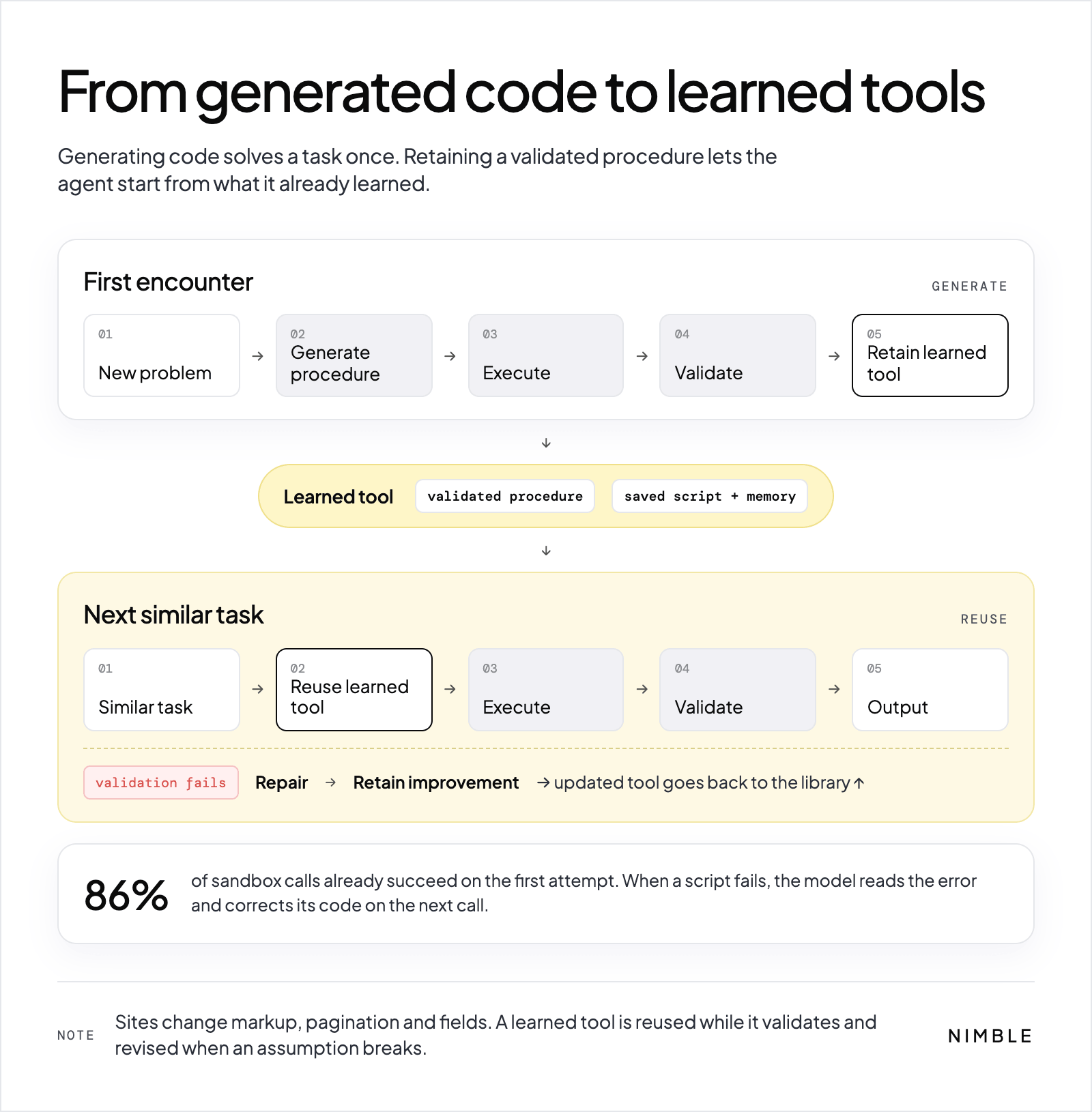
Generating code solves a task once. Retaining a successful procedure lets the agent start from what it has already learned the next time it encounters the same problem.
New problem
    ↓
Generate procedure
    ↓
Execute
    ↓
Validate
    ↓
Retain learned tool
    ↓
Reuse on similar task
    ↓
Execute and validate
       ↳ failure → repair → retain improvement
This matters because web-specific procedures are not static. A site may change its markup, pagination, fields, or underlying data structure. A learned tool can be reused while it continues to validate, then revised when an assumption breaks.
The agent already repairs generated code inside an individual run: 86% of sandbox calls succeed on the first attempt, and when a script fails, the model can inspect the error and correct its code on the next call.
The longer-term mechanism extends that principle across tasks. The useful artifact is a validated procedure for solving a recurring web-data problem.
When Code Execution Is Worth It
Code execution pays off when the amount of deterministic processing is large relative to the amount of reasoning required: exhaustive lists, large datasets, repeated parsing, filtering, joins, aggregation, exact calculations, and structured file generation.
It adds less value when the dataset is small enough for the model to handle directly. The benchmark reflects that distinction: the largest gains came from wide list tasks and per-row lookups across many pages, while small computation tasks were already tractable without the sandbox.
That is the architectural shift.
Nimble Web Search Agents no longer need to read and rewrite every piece of web data through the LLM. The model can decide what needs to happen, generate the procedure, and validate the result while code performs the repetitive processing at scale.
The web stops being a sequence of pages the model has to read one at a time and becomes data the agent can operate on.
To try it, start with the Web Search Agent docs.
Appendix: Benchmark Data
This appendix gives the full results behind the benchmark section. Each of the 50 tasks ran once with code execution available and once without it, using the same agent, model, and effort level.
How the benchmark was run
- Tasks: 50 tasks across eight kinds of work. Each task asked for structured rows with a fixed set of fields, so every answer could be checked line by line.
- Reference answers: frozen from the primary source on the day of each run. We used the site's own API or feed where one exists (job boards, PyPI, GitHub, USGS, nobelprize.org, FRED, World Bank) and Wikipedia tables otherwise. Every reference answer was built by script, never by an LLM.
- Runs: each task ran twice at high effort with the same agent, model, and code version: once with the code tool removed ("off") and once with it available ("on"). 10 tasks ran on September 30, 2026 and 40 on October 7, 2026.
- Scoring: one script matched returned rows to the reference by a stable key (catalog number, ticker, job ID, slug, or name). A row counted only if its values were also correct, for example a party, a capacity within 3 to 5%, or an exact count. Task score is correct rows divided by total right answers; counting tasks score exact buckets.
- Cost: LLM cost per run from our tracing. Sandbox time costs about $0.00003 per second, so it barely registers.
Results by kind of work
All 50 tasks
Counts are correct rows (or exact buckets for counting tasks). Bold marks the better side where the two configurations differ.
*Task 36's code-on result is a re-run. The first attempt timed out at 23 of 28 states ($0.04).
Limits
- One run per configuration. A single task can swing from run to run. The overall gap is large, but per-task numbers should be read as indicative, not exact.
- We chose the tasks and built the reference answers ourselves. Public benchmarks such as WideSearch (paper), 200 table-filling tasks of the same shape with published scores for other agents, are the next step for a direct comparison.
- Live data drifts. Reference answers for jobs, hiring flags, downloads, and GitHub stars were frozen within an hour of the runs, so a handful of edge items may have moved.
- Two scoring rules to note: the "fully remote" OpenAI jobs task used the site's own rule (any location marked Remote), and the Premier League task accepted stadium capacities within 5%.
Reference-answer sources
Fetched on the day of each run.
- Site APIs and feeds: PEP index API · YC W24 batch data · YC company pages · Figma Greenhouse job board · Apple store list · Lex Fridman podcast feed · OpenAI Ashby job board · nimbleway.com sitemap · USGS earthquake catalog · Hugging Face models API · GitHub API · PyPI JSON API · Top PyPI packages · nobelprize.org API · Launch Library 2 · FRED fed funds target · python.org releases API · endoflife.date Python · World Bank GDP per capita
- Wikipedia tables: S&P 500 companies · Nasdaq-100 companies · Nobel laureates in Physics · US cities by population · Colorado fourteeners · Michelin 3-star restaurants · US national parks · US governors · 2024 presidential election · 2024-25 Premier League · Deaths in January 2025 · US population density · NBA · EU member states
FAQ
Answers to frequently asked questions


.webp)

.webp)

.webp)
.avif)