









Overcoming Web Search and Retrieval Challenges for AI Agents
When to add browsing, rendering, network capture, or browser fidelity to capture complete web data.



Charlie Klein
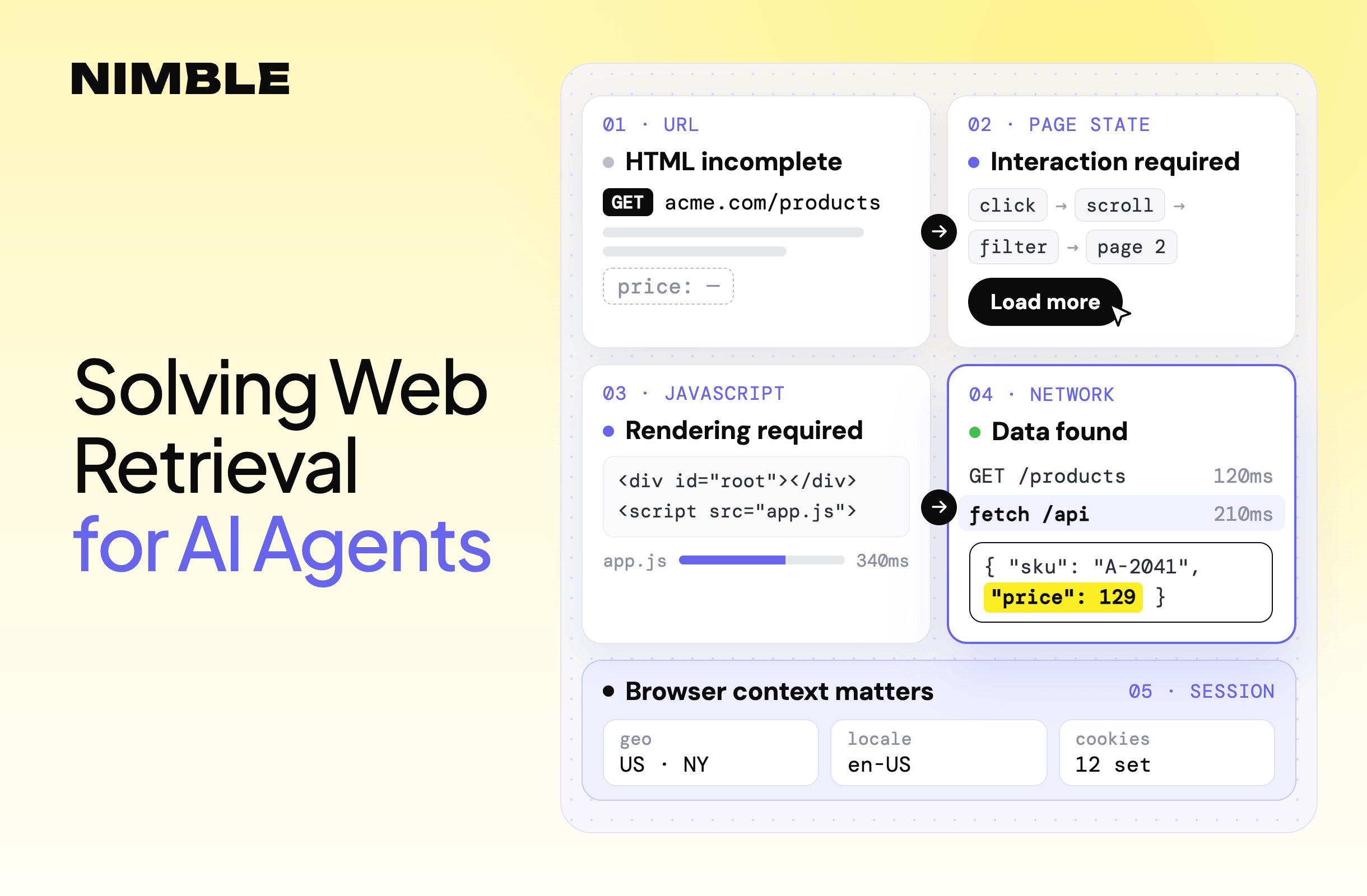
Overcoming Web Search and Retrieval Challenges for AI Agents
When to add browsing, rendering, network capture, or browser fidelity to capture complete web data.
Charlie Klein


Most popular articles

Get structured, reliable data for your stack.
Finding the right URL does not guarantee that the data behind it is easy to retrieve.
A simple web data collector assumes it can request a URL, receive HTML, and extract what it needs. That works well for static pages. It starts to break when useful data depends on browser interaction, JavaScript execution, requests made behind the interface, or characteristics of the browser session itself.
For developers building web data collection systems, each of these failures requires a different response.
TL;DR
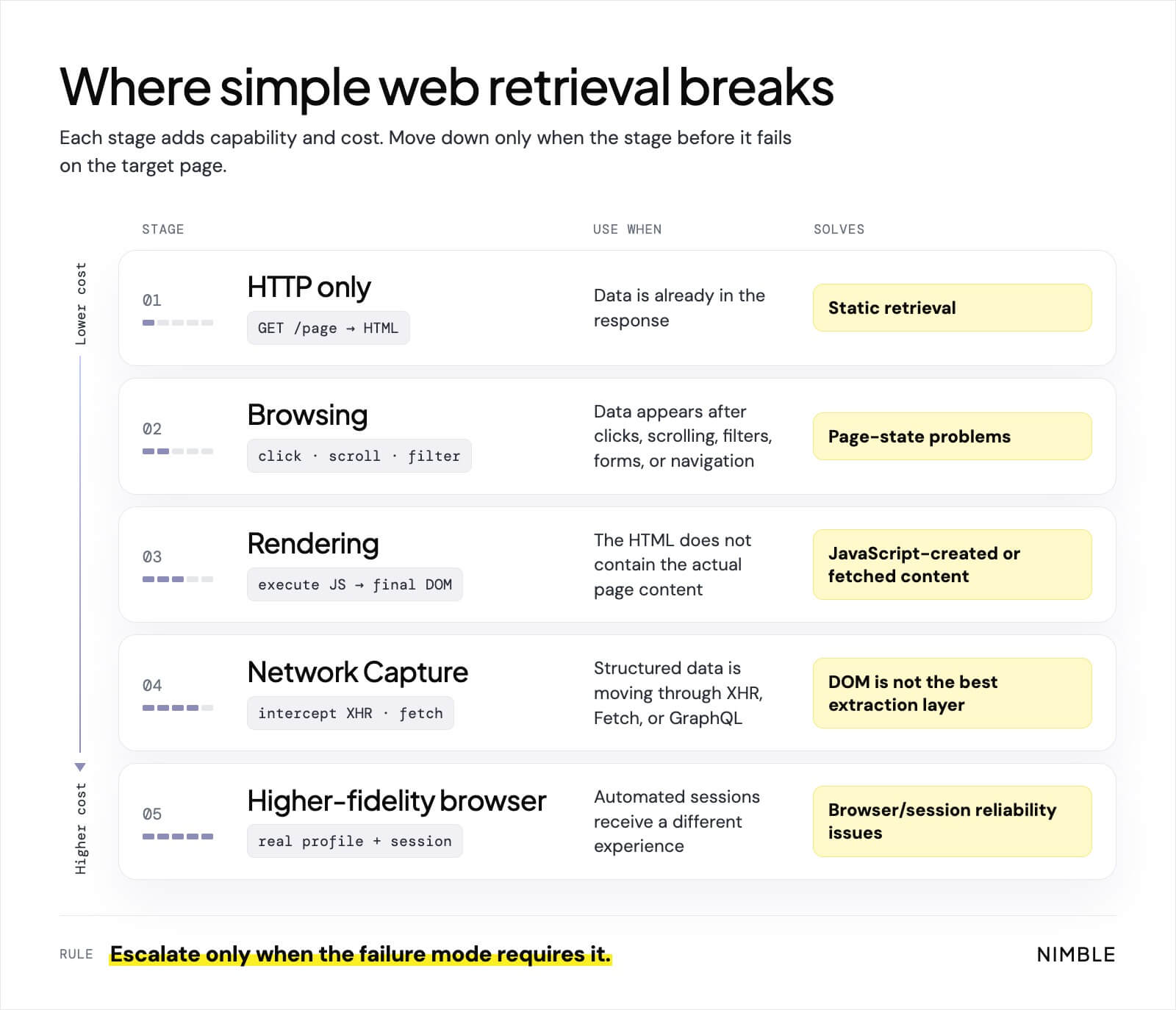
- Use browser automation when the data depends on page state. Clicking, scrolling, filtering, searching, and navigating can expose information that is not available in the page’s initial state.
- Use JavaScript rendering when the HTML response does not contain the page users actually see. Client-side applications may create or fetch their content only after JavaScript executes.
- Inspect network traffic when the DOM is only a presentation layer. Fetch, XHR, and GraphQL responses often carry fields and records the rendered interface never shows.
- Browser fidelity matters when automated sessions receive a different experience. Modern websites can consider browser, session, request, and behavioral signals when deciding how to respond.
- Do not default to the most powerful browser configuration. Rendering and browser-based retrieval add latency, compute cost, and operational complexity, so production systems should add capability only when the target requires it.
When do you need browser automation?
Some pages contain the data you need, but only after the page reaches the right state.
A product catalog may require a location to be selected before inventory appears. A marketplace may reveal more listings after scrolling. A dashboard may require a date filter. Search results may not exist until a form is submitted.
These are browsing problems.
Browser automation changes page state through actions such as clicks, form input, navigation, scrolling, and waiting for elements. Nimble supports direct site browsing for actions such as navigation, clicks, form input, scrolling, and waiting for specific page states.
The difficult part is usually not the click itself. It is knowing when the next action is safe.
Consider:
click "Load more"
wait 2 seconds
extract listings
The two-second delay is an assumption. On a fast page it wastes time. On a slow page it extracts too early. Playwright handles this problem by checking conditions such as whether an element is visible, stable, enabled, and able to receive events before performing an action. Its documentation also discourages fixed production waits because timing-based flows are inherently brittle.
Infinite scrolling adds another problem. Loading 1,000 records does not necessarily mean 1,000 records exist in the DOM. High-performance interfaces often recycle DOM elements, keeping only a small subset of the full list mounted at any moment. Chrome’s reference implementation for infinite scrolling explicitly uses this technique to keep the DOM small.
A scraper can therefore scroll through thousands of records successfully, inspect the DOM at the end, and find only a few dozen. The fix is to capture records as they load instead of reading the DOM at the end. With Nimble, you can pair auto-scroll with network capture so every batch of results the page requests is recorded:
from nimble_python import Nimble

nimble = Nimble(api_key="YOUR-API-KEY")

result = nimble.extract.run(
    url="https://www.example.com/listings",
    render=True,
    browser_actions=[
        {"auto_scroll": {"max_duration": 30000, "idle_timeout": 5000}}
    ],
    network_capture=[
        {
            "url": {"type": "contains", "value": "/api/listings"},
            "resource_type": ["xhr", "fetch"]
        }
    ]
)

print(result.data.network_capture)
Each captured listings response is returned in order, including records the interface has already removed from the DOM.
Browsing changes the state of the page. It does not guarantee that the final DOM contains the entire dataset.
When do you need JavaScript rendering?
Browsing and rendering are related, but they solve different problems.
Browsing changes page state. Rendering executes the JavaScript that creates the page in the first place.
On a traditional server-rendered site, the response might already contain:
<h2>Running Shoe</h2>
<span>$129</span>
A client-rendered application might initially return little more than:
<div id="root"></div>
<script src="/app.js"></script>
The browser then executes the application, requests additional data, and builds the visible page.
Google documents the same distinction in its own crawling system. For traditional pages, parsing the HTTP response can be enough. JavaScript applications using an app-shell model may require a rendering stage before their actual content becomes available.
This is why a broken extraction does not always mean the selector broke. The selector may still be correct while the HTML being parsed no longer contains the element.
Rendering also introduces another question: when is the page finished?
The normal page-load event can fire before asynchronous requests complete. Depending on the target, you may need to wait for DOM readiness, reduced network activity, or a specific element. Nimble supports conditions including domcontentloaded, networkidle2, networkidle0, and element-based waits.
Rendering should still be used selectively. Static HTML is faster and cheaper to retrieve directly. Nimble Extract supports render="auto", which can begin with a simpler retrieval method and add browser rendering when the target requires it.
When should you capture network traffic instead of parsing the DOM?
Sometimes the page shows only a fraction of what the browser actually receives.
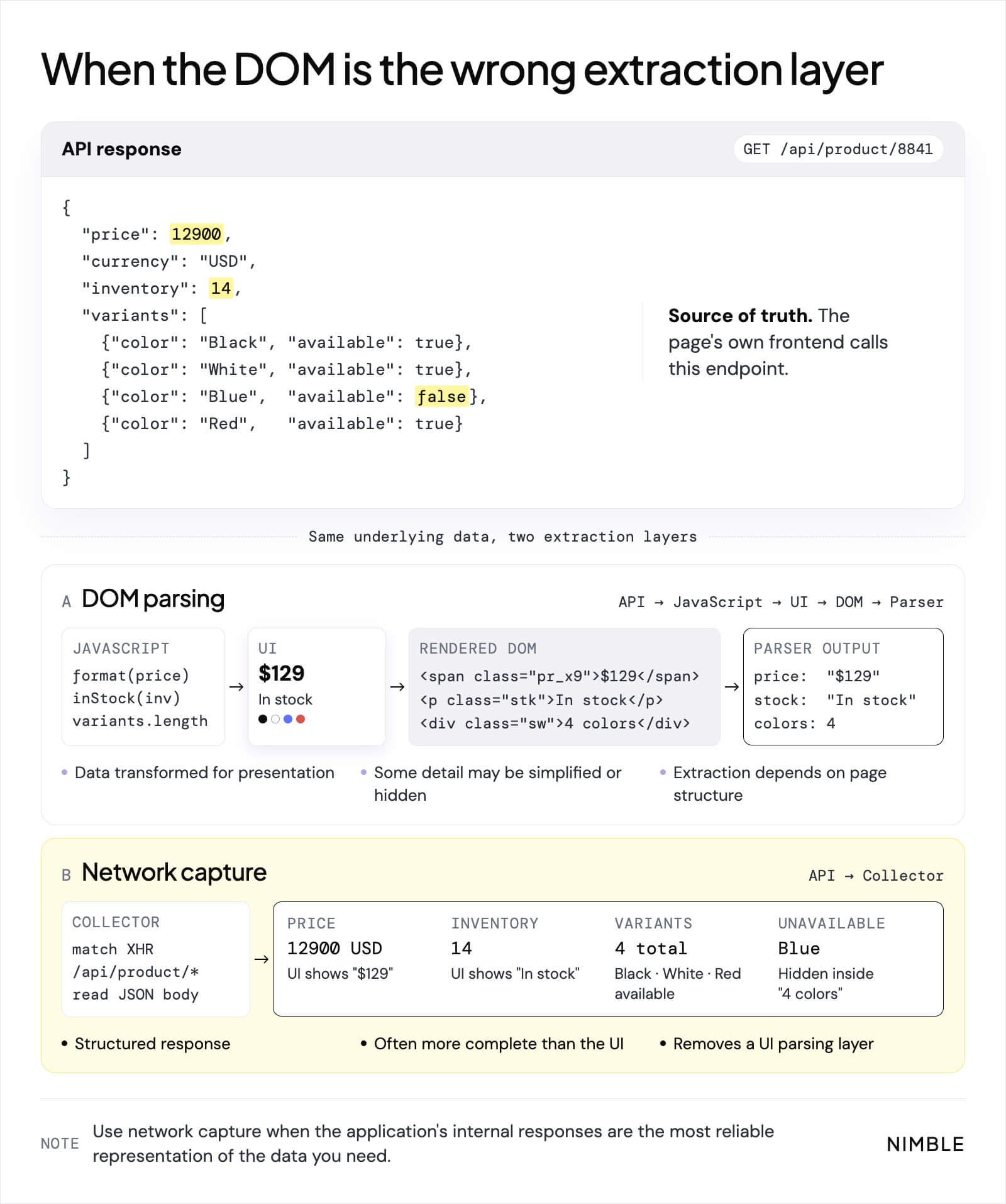
Interfaces round prices, hide unavailable variants, truncate lists, and drop fields that are not useful to a human reader. The requests behind the page often carry all of it. A product interface might display:
$129
In stock
4 colors
while an internal request returns:
{
  "price": 12900,
  "currency": "USD",
  "inventory": 14,
  "variants": [
    {"color": "Black", "available": true},
    {"color": "White", "available": true},
    {"color": "Blue", "available": false},
    {"color": "Red", "available": true}
  ]
}
Parsing the page limits you to what the interface chose to display. Capturing the request expands what you can collect to everything the application loaded, including exact inventory counts, unavailable variants, and fields that never appear on screen.
Chrome DevTools exposes these requests through its Network panel, and browser-based collectors can inspect the same Fetch, XHR, and other network traffic programmatically.
Nimble’s Network Capture can filter browser traffic by URL pattern and resource type, including XHR and Fetch requests. It can also target endpoints such as /graphql or specific API paths.
This creates an important optimization. Once you identify a stable API endpoint that does not require browser execution, you may no longer need to render the page at all. Nimble’s documentation recommends direct XHR mode for those cases because the browser becomes unnecessary overhead.
The DOM shows you what the page chose to display. The network shows you everything the application knows.
Choosing the right level of browser capability
A URL does not always produce an identical response for every client. Websites may consider session state, cookies, browser capabilities, request characteristics, and traffic patterns, and automated sessions may receive challenges, reduced functionality, or different content. Cloudflare, for example, uses JavaScript-based detection to identify headless browsers and other automated traffic. That is why changing a User-Agent string is not equivalent to reproducing a normal browser session, and why some targets require a higher-fidelity browser configuration. Use it within applicable access controls, site terms, and legal requirements.
Still, the most capable solution is not automatically the best one. Browser sessions consume more CPU and memory and introduce concurrency and queueing problems at scale.
A useful rule is:
Use the simplest method that reliably captures the data you need, then add capability when the target requires it.
These capabilities are not mutually exclusive. A difficult page may require rendering, a location selection, several scroll events, and capture of the API requests triggered by those actions.
The important architectural decision is not whether your stack supports browsers. It is when to use each capability and when to stop escalating.
How Nimble handles difficult web retrieval
Finding the right page is only part of web search. The system still needs to capture the complete context behind it, even when that context depends on JavaScript, interaction, or requests happening behind the interface.
Nimble provides a Search API for fast, cost-efficient web data retrieval and Web Search Agents for research tasks that combine search, direct site browsing, extraction, reasoning, validation, and structured output.
When the URLs are already known, Extract handles the retrieval layer. It can start with a simple fetch and add capabilities such as JavaScript rendering, direct site browsing, network capture, or higher-fidelity browser configurations when the target requires them.
For cases where the required access method is not known in advance, render="auto" can handle that escalation:
from nimble_python import Nimble

nimble = Nimble(api_key="YOUR-API-KEY")

result = nimble.extract.run(
    url="https://www.example.com",
    render="auto"
)

print(result.data.html)
The goal is to use enough capability to capture the required data without adding browser overhead where it is not needed.
Across 5,856 URLs, Extract achieved 90% completeness and 99.1% fetch success.
Web retrieval is a sequence of failure modes
A URL is an entry point, not a guarantee that the useful data is sitting in the HTML behind it.
Sometimes the data requires interaction. Sometimes JavaScript has to create it. Sometimes the cleanest version exists in network traffic rather than the DOM. Sometimes the browser environment itself affects what the server returns.
A reliable web retrieval stack needs to recognize those failure modes and use the right access method to capture the required context completely and accurately.
See how Nimble Extract captures complete web data across static and dynamic sites → Read the Extract docs
FAQ
Answers to frequently asked questions


.webp)

.webp)
.webp)
.webp)
.avif)