









10 Claude Web Search Best Practices for Accurate Results
10 Claude Web Search Best Practices for Accurate Results



Charlie Klein
10 Claude Web Search Best Practices for Accurate Results
10 Claude Web Search Best Practices for Accurate Results
Charlie Klein
Abstract
- Claude Web Search enables AI applications to retrieve current web information during inference, but reliable results depend on how the retrieval is designed and validated.
- Production workflows improve accuracy by defining clear search intent, enforcing recency, comparing authoritative sources, and preserving citations.
- Separating retrieval, extraction, and analysis makes AI outputs easier to verify, debug, and scale across structured workflows.
- A generic web search can still return noisy or incomplete context because it is not tailored to a specific agent use case. Production systems may also need persistent retrieval knowledge, structured workflows, and clearer source controls.
AI agents can sound current even when their sources are stale.
Claude Web Search gives AI applications access to current web information and cited search results through Anthropic’s API. Anthropic treats web search and web fetch as separate capabilities, so search does not guarantee that every answer reflects the complete, currently rendered version of each source page.
A 2025 study of production AI agents found that reliability, defined as consistent correct behavior over time, remains the top development challenge for teams deploying agents. For production teams, web access is only the starting point.
Generic retrieval can still return noisy, incomplete, or poorly matched evidence because it lacks context about the agent’s use case. Production workflows need clearer source standards, stronger retrieval controls, and a way to inspect how evidence was gathered.
This guide covers ten practices for using Claude Web Search in production-minded workflows, from sharper prompts and source standards to structured responses, retrieval testing, and governed retrieval.
What is Claude Web Search?
Claude Web Search is Anthropic’s live web retrieval tool for Claude. It allows Claude to look up current information during an API request, use the retrieved material as context, and cite the sources behind its answer. That makes it useful for questions where the answer may have changed recently, such as product pricing, software releases, company updates, regulations, market data, or current events.
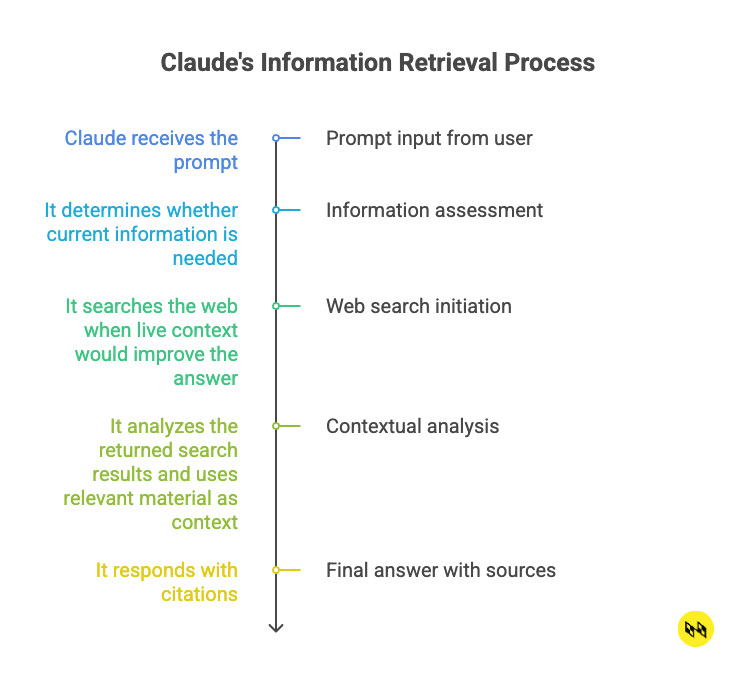
At a basic level, Claude Web Search works like a retrieval step inside the conversation:
- Claude receives the prompt.
- When the web search tool is available, Claude evaluates whether a search would improve the answer. It searches the web based on the application’s tool configuration and search-use limits.
- It analyzes the returned search results and uses relevant material as context.
- It responds with citations.
Developers can shape retrieval behavior with controls such as search-use limits, allowed and blocked domains, location parameters, and, where supported by the selected tool version, result filtering.
The strongest use cases are conversational research and source-backed answers. Developers can use Anthropic’s native Web Search tool directly or connect Claude to external retrieval services through MCP, including web search MCP servers, when they need custom providers, internal data sources, or specialized retrieval logic.
For teams working in Claude Code, a plugin can bring web search and extraction into the development environment. Developers can then use natural-language prompts to search, extract content, map or crawl sites, validate vendor claims, and run structured-data workflows.
Teams that need search results, webpage content, or structured web data for their own systems to process typically use a Search API. Teams that need a completed research task involving multiple searches, extraction, and reasoning are better suited to Web Search Agents.
Claude can search the web and reason over what it finds, but developers building production AI agents need an even greater degree of control over freshness, structure, and reliability than conversational web search can provide on its own. Production AI systems also depend on data context that helps agents interpret retrieved information consistently across business workflows.
Benefits of Claude Web Search
- Fewer stale responses – Live information improves response quality because Claude can check what is true now instead of relying on facts captured during training.
- Better answers for time-sensitive queries – Recent source material can change the answer entirely, especially for queries tied to pricing, availability, regulations, or technical changes.
- More transparent outputs – Citations give users a way to inspect the evidence behind a claim rather than accepting the response at face value.
- Stronger research workflows – Claude Web Search helps users gather current source material for competitive analysis, market research, technology evaluation, documentation lookup, and company research, giving teams a better evidence base before you compare options or make decisions.
- More capable AI agents – Web search gives Claude-based agents a way to retrieve current evidence before reasoning or taking action.
Where Generic Web Search Falls Short in Production
Generic search can return noisy or incomplete results because it is not tailored to a specific agent’s use case. It also lacks persistent knowledge of which sources, retrieval paths, and prior outputs were most useful.
Complex research workflows often require multiple searches, browser access, extraction, validation, and synthesis. Teams must usually build and maintain that orchestration themselves.
Production systems also need visibility into source selection, retrieval steps, failures, and changes over time. Citations help, but they do not provide a complete operational record.
10 Claude Web Search Best Practices for Accurate Results
1. Define the Search Intent Clearly
Claude needs to know what kind of answer the system wants. “Research AI search tools” gives the model too much room. It may retrieve category pages, listicles, product pages, or outdated comparisons.
A stronger prompt names the task and the retrieval target:
“Find current product documentation for AI search APIs used by developers building production research agents. Compare freshness controls, source citations, structured output support, and web access method. Prioritize official documentation and product pages.”
The stronger prompt gives Claude a topic, audience, objective, source type, and output expectation. It’s explicit about which evidence the model should value.
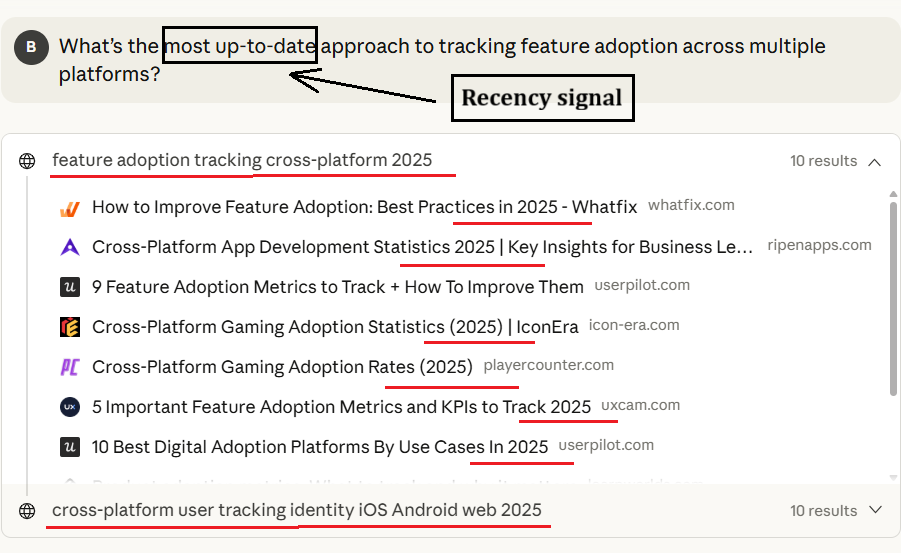
2. Add Recency Requirements to the Prompt
Current information should never be implied. Ask for it directly through natural language phrases such as:
- “as of today”
- “published within the last 30 days”
- “latest available filing”
- “current listed price on the live product page”
For technical documentation, ask Claude to check the current version. For market or pricing data, ask for the retrieval date in the output. And instead of asking a broad question like “What does this iPad model cost?”, give Claude a clear freshness requirement:
“Search for the current listed Walmart price for this iPad model. Prioritize the official Walmart product page, state the retrieval date, and say that the price could not be verified if the page is unavailable.”
3. Ask Claude to compare multiple sources
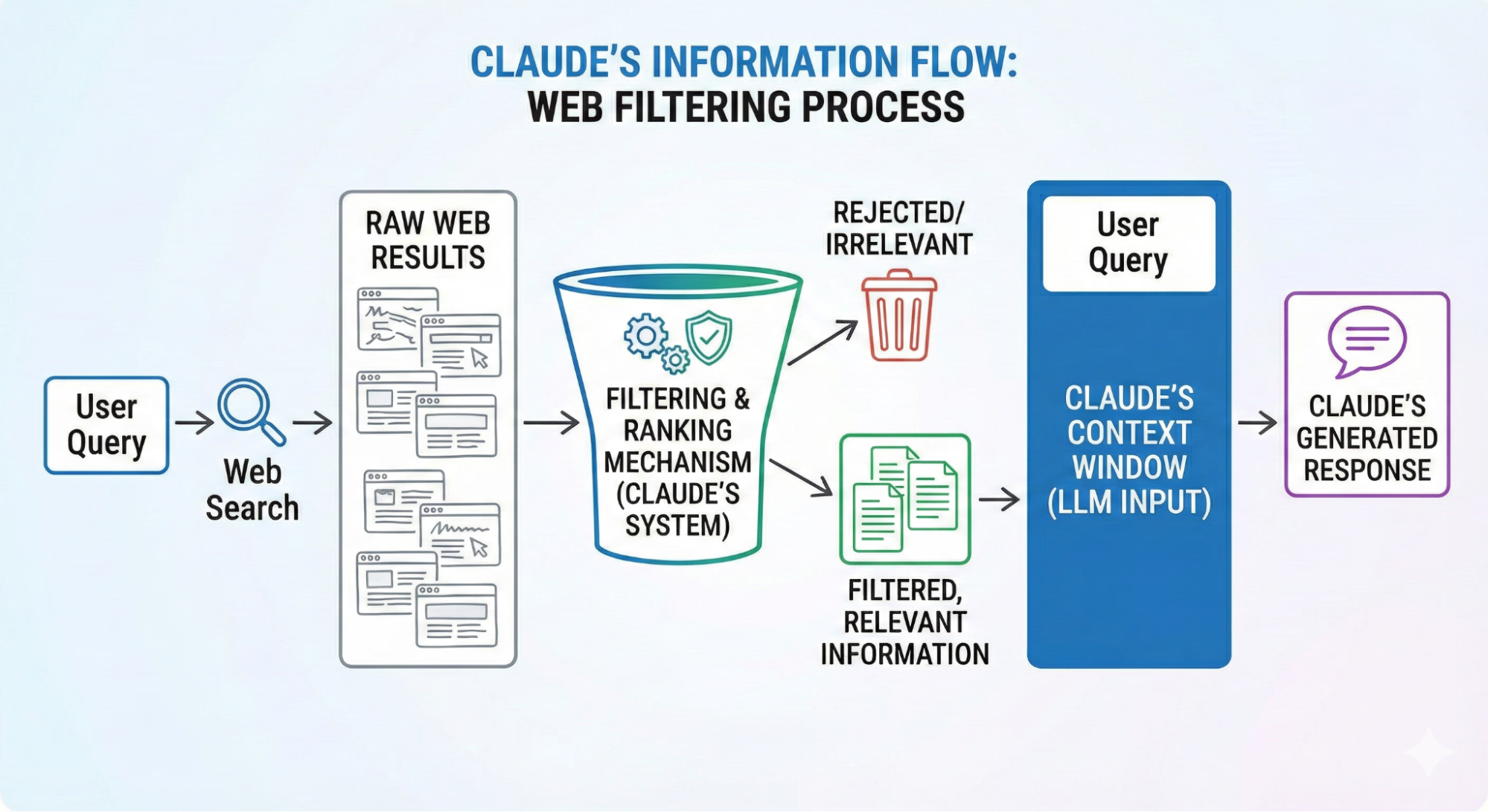
A single source can be correct and still incomplete. It may reflect one vendor’s framing or an outdated documentation page. If Claude relies too heavily on that source, the answer can inherit the same limits. For factual questions, ask Claude to compare multiple authoritative sources before it summarizes the answer. For example:
“Use at least four authoritative sources. Prioritize official documentation, primary company pages, and government sources. Summarize the points of agreement first, then flag any conflicting claims with citations.”
4. Preserve and Review Citations for Factual Claims
Claude’s web search tool automatically returns citations for information drawn from search results. Developers should preserve those citations in user-facing responses and design prompts that clearly distinguish sourced facts from analysis or inference.
You should still open important sources because the presence of a citation does not, by itself, establish that the source is authoritative or that the claim has been interpreted correctly.
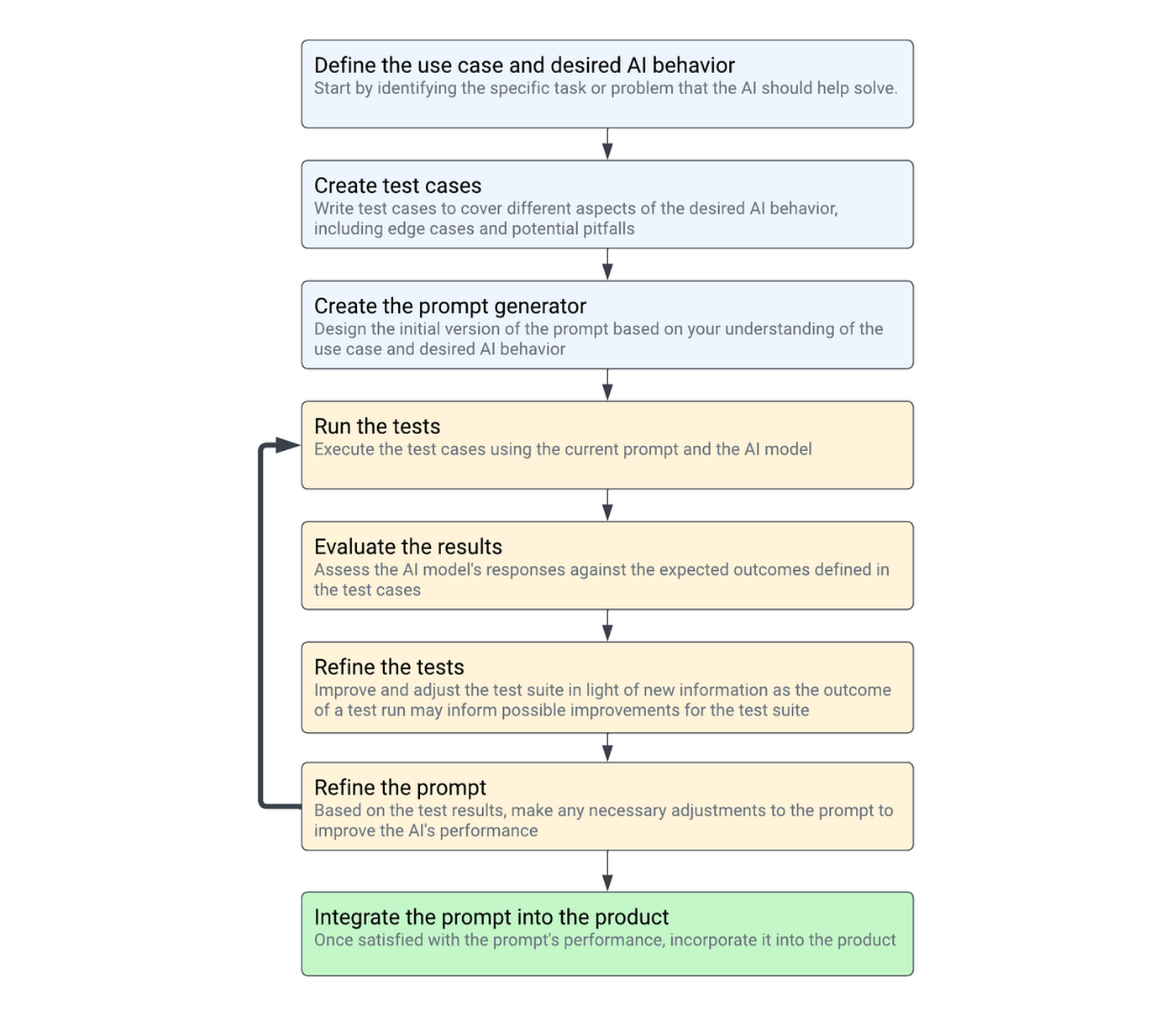
5. Separate Retrieval From Analysis
Avoid packing the entire workflow into one prompt. If Claude has to find sources, extract facts, judge credibility, and make a recommendation all at once, the final answer can be difficult to debug.
Instead, split the task into stages:
- Ask Claude to find relevant sources.
- Then have Claude extract the fields your workflow needs, such as source URL, publication date, price, author, region, product name, or software version.
- Only after that should Claude analyze the extracted facts.
With this approach, if an output looks wrong, the team can isolate the failure. You can see whether the problem came from poor source selection, flawed reasoning, or another issue. That is much harder when retrieval and reasoning are buried in the same response.
6. Avoid Weak Sources for High-Stakes Claims
Claude can search broadly, so source standards need to be set before retrieval begins. When the answer may shape a workflow, policy, code change, or risk decision, weak sources should stay out of the evidence set and out of the reasoning process.
For example:
“Do not use opinion posts, unsourced listicles, affiliate pages, copied summaries, or forum comments as evidence for factual claims. Prioritize primary sources. If a claim cannot be verified from a reliable source, say so.”
7. Use Structured Output Formats
For machine-readable workflows, choose the output method based on your requirements. Claude’s Structured Outputs feature can enforce a JSON schema, but it cannot currently be combined with citations in the same response.
If you need both source provenance and validated JSON, use separate retrieval and transformation steps, or preserve citations in an accompanying record outside the strict JSON response.
For recurring extraction tasks, the challenge extends beyond asking a model to format its answer. Teams may need to collect the same fields across many pages, apply a consistent schema, and deliver the results to databases, analytics tools, or AI applications. Nimble’s Extraction Templates support this type of repeatable structured extraction, helping applications turn live webpage content into consistent records at scale.
8. Test Queries Against Fast-Changing Data
Before using Claude Web Search in an agent workflow, test your prompts against facts that are easy to verify. Current product prices, recent software releases, and market data all work well because you can quickly compare Claude’s answer against the live source.
These tests show whether Claude is actually retrieving current information. They also reveal when the prompt is too vague to guide the kind of source selection the workflow needs. If a prompt fails due to information that changed this week, it will likely fail in a workflow that requires freshness.
9. Build Fallbacks for Blocked or Incomplete Pages
Pages may be paywalled, blocked, removed, partially rendered, or unavailable during retrieval. Fallback logic can ask Claude to search an alternate official source, retry with a different domain, or return a clear “unable to verify” response.
For business-critical workflows, fallback handling may also route the task to a dedicated web data infrastructure capable of rendering dynamic pages and managing access at scale.
10. Log Source URLs, Timestamps, and Extracted Fields
Web search results need a record. Log the original query, source URLs, retrieval timestamp, prompt version, extracted fields, and final answer.
A simple log entry might include:
query, source_url, retrieved_at, page_date, extracted_price, currency, confidence, and error_status.
This makes bad answers easier to investigate for the same reason staged retrieval does: your team can see where the failure started. The difference is that logs can be saved. In enterprise workflows, that record is useful for debugging, source freshness checks, prompt comparisons, audit trails, and internal review.
From Claude Web Search to Production Web Intelligence
Claude Web Search can help AI applications answer current questions with cited sources, but reliable results still depend on how the retrieval is designed. Clear intent, recency requirements, source standards, structured outputs, and logging all improve the quality and traceability of the final response.
For production AI systems, however, conversational search is only one part of the workflow. Teams may also need repeatable retrieval, structured extraction, source visibility, and infrastructure that can support research and data collection across many pages and sources.
Nimble provides web search infrastructure for AI agents and applications that need relevant, live web context. Its Search API retrieves search results, webpage content, and structured web data for systems that handle their own reasoning. Web Search Agents go further by orchestrating multi-step research across sources, using use-case context, Search Plans, and retrieval history to improve relevance, completeness, and visibility.
Together, these capabilities help teams build AI workflows with more relevant web context, clearer source provenance, and less retrieval engineering overhead.
Explore Nimble’s Search API and Web Search Agents to see how live web context can support more reliable production AI systems.
FAQ
Answers to frequently asked questions





.webp)

.webp)
.webp)
.avif)