









Stream Structured Web Data In Minutes With Nimble



Charlie Klein

Stream Structured Web Data In Minutes With Nimble
Charlie Klein


Most popular articles


Get structured, reliable data for your stack.
We’re thrilled to announce Extraction Templates, which let you query the web like it’s a live database.
The web is the largest real-time data source in the world, but turning messy, dynamic pages into structured, production-ready datasets is still fragile and time-consuming. Traditional scrapers break. Pre-built templates are rigid. Vendors move slowly.
With Nimble Extraction Templates, you can:
- Get structured data from any domain in minutes: Launch production-ready data streaming by providing simple inputs like a URL, product ID, or search query.
- Easily adjust schemas to capture new fields fast: Add, remove, or modify fields in plain English. When your business needs change, your data pipeline updates in minutes.
- Stream data you can trust: JavaScript rendering, proxies, unblocking, retries, parsing, and extraction logic are packaged into a single executable template that delivers consistent, complete data feeds.
The result: structured, live web data streamed directly into your workflows — without building or maintaining scraping infrastructure. You can try it free or watch the demo video below to see Extraction Templates in action.
How to Collect Web Data with Extraction Templates
Extraction Templates are purpose-built to navigate webpages, extract relevant data, and process it into structured tables for specific domains. Instead of configuring headless browsers to render JavaScript, proxies, parsing logic, retries, and anti-blocking manually, Extraction Templates handle it for you.
You provide basic inputs (URL, product ID, search query), Nimble returns structured data tables. That’s all there is to it.
Running Prebuilt Extraction Templates
Managed Extraction Templates are prebuilt and Nimble-maintained, designed to stream structured data from specific domains (e.g., Amazon, Google, LinkedIn), which you can find in the “Gallery”. If you’re running a Managed Extraction Template and a website changes (which would normally break the data collection), Nimble updates the template to maintain consistent data streams.
Step 1: Select a template and provide inputs
Choose a template from the Agent Gallery (e.g., amazon_pdp, google_search). You can see the schema and example outputs for each template, and even run it yourself to test it.
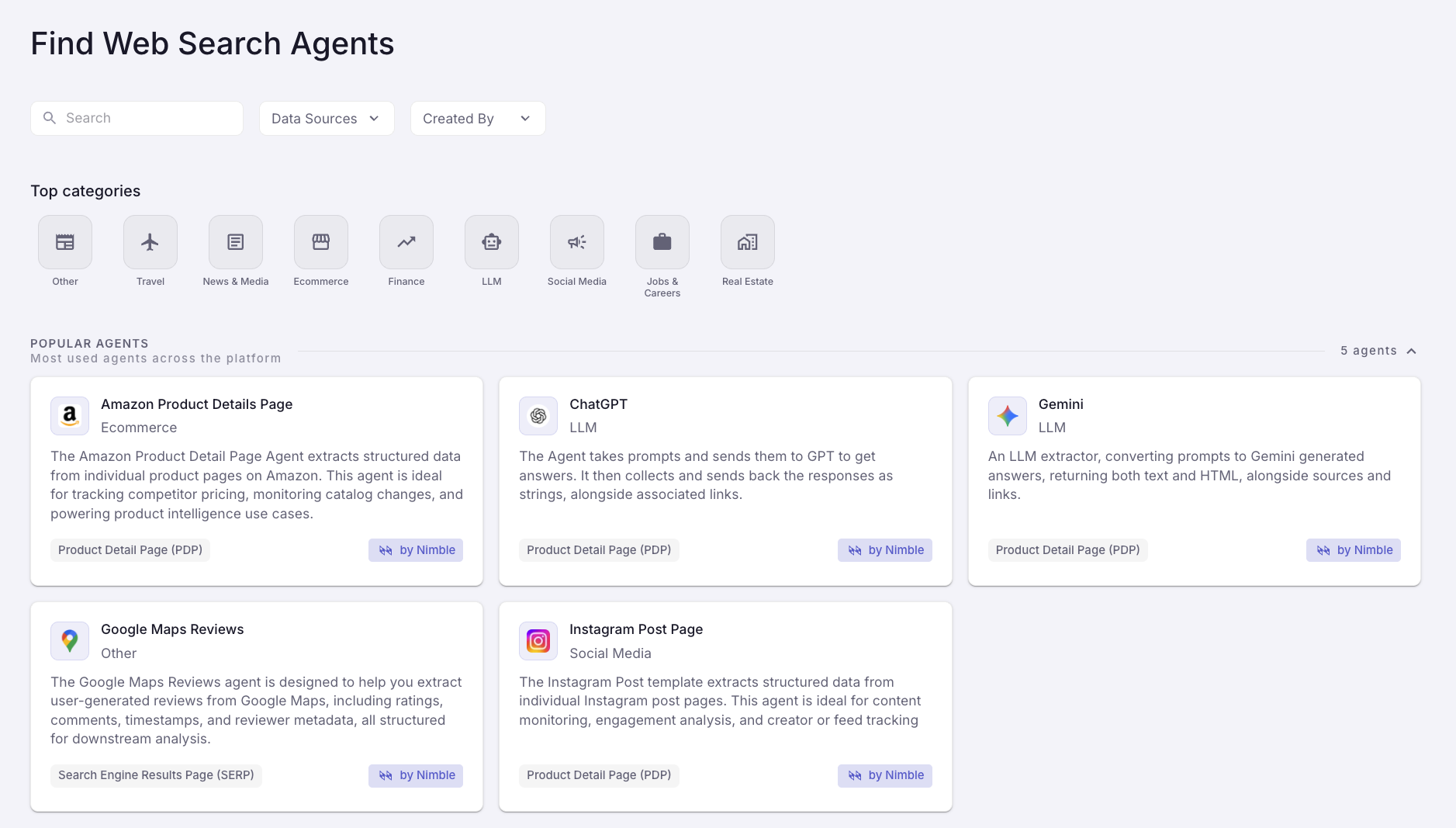
Each template requires specific inputs depending on the use case, for example:
- The Google Maps Search template requires a search term
- The Amazon Product Page template requires the product’s unique identifier (ASIN)
- The ChatGPT template requires a prompt
If you’re running templates via Agent Jobs (see below), add your data destination.
Step 2: Run the Template
You can run templates in two ways:
- Agent Runs: Test Extraction Templates in our UI, and then run them via API using our python SDk, node.js SDK or simple cURL requests.
- Agent Jobs: Extraction Templates collect data on a schedule (weekly, daily, intraday, etc) and stream it to your data lake. You’ll soon be able to configure this yourself in the platform. For now, reach out to us and we’ll configure it for you.
Step 3: Receive Structured Data
Once executed, the Extraction Template navigates the target domain, extracts the specified fields, and structures the results into clean data tables.
Build your own Extraction Templates
If the Gallery doesn’t have the Extraction Template you need, you can build your own with just a prompt in the Agentic Studio.
Describe the specific data you need, and Nimble will generate an Extraction Template in a few minutes that browses, extracts, and structures data from any website into clean tables.

From there, you can run your Custom Extraction Template just like you’d run a Managed one.
Query the live web with Claude, Cursor, and Other Coding Agents
You can also build and run Extraction Templates directly inside AI coding tools, so you can ask for data in natural language and get results immediately.
- Install nimble-agents skill:
https://skills.sh/?q=nimble - Connect your coding agent (Claude, Cursor, etc.)
- Prompt it like you're querying a database: “Retrieve the top 20 TVs from amazon with price, rating, and review count.”
Instead of scraping scripts, you orchestrate live web data pipelines using natural language.

Summary: Why Extraction Templates for data collection?
Extraction Templates change how teams collect web data. Instead of building and maintaining scraping infrastructure, you run executable data pipelines that browse the live web and return structured results.
That means you can:
- Launch structured data feeds in minutes — from any supported domain or custom site.
- Adapt instantly when requirements change — update schemas and extraction logic without rewriting scripts.
- Operate with production-grade reliability — built-in rendering, retries, and anti-blocking ensure complete, consistent datasets.
If your workflows, dashboards, or AI systems depend on live web data, Extraction Templates give you a faster, more reliable way to turn the web into structured intelligence — without the maintenance burden.
Want to give it a shot yourself? Try it for free.
FAQ
Answers to frequently asked questions

.webp)



.webp)
.webp)
.avif)
.webp)