







The Developer’s Guide to Faster, Cheaper Extraction


Tom Shaked
.webp)
The Developer’s Guide to Faster, Cheaper Extraction
Tom Shaked


Most popular articles


Get structured, reliable data for your stack.
Rendering is often treated as a catch-all solution in scraping pipelines. When HTML looks empty, the instinct is to reach for a headless browser and hope the missing data appears. It often does, but the cost of that decision compounds quickly. Rendering is the most resource-intensive way to extract web data, and most pages simply don’t need it.
Understanding when the browser is required, and when it’s unnecessary overhead, is one of the biggest levers for improving speed, reducing compute spend, and scaling cleanly.
This guide walks through the deeper technical considerations behind rendering, how professionals decide when to use it, and how Nimble’s Web API automates that choice.
What Rendering Really Involves
Rendering isn’t just “running JavaScript.” It activates a full browser stack, which introduces work in several layers.
JavaScript execution
SPAs ship large JS bundles that must be downloaded, parsed, and executed before anything meaningful appears. Even optimized headless engines spend hundreds of milliseconds here.
Network waterfall
Browsers automatically fetch every resource the page requests: additional scripts, images, fonts, JSON endpoints, dynamic imports. A simple HTML fetch might transfer 50 KB. A fully rendered session might transfer several megabytes. At large volumes, this inflates bandwidth and egress bills and limits concurrency.
Hydration and layout
Client-side frameworks trigger hydration, layout passes, and reflow. These long tasks create tail latency that never appears in a fetch-based workflow.
Runtime cost
Headless browser sessions load V8, Blink, rendering pipelines, event loops, and supporting subsystems. Each session consumes meaningful CPU and memory, which constrains parallelism.
Rendering produces complete data on JS-heavy sites, but it’s expensive across every axis: time, bandwidth, compute, and operational complexity.
The Fast Path: When Rendering Isn’t Needed
A large portion of the modern web still returns complete content without requiring a browser. Server-rendered pages, static blogs, hybrid frameworks, and pages with embedded JSON often provide everything you need via a simple GET-style request.
In those cases, rendering adds no value. A native fetch is faster, cheaper, and dramatically easier to scale.
Typical “fast path” candidates include:
- News and editorial sites where the full article HTML comes from the server
- Documentation and marketing sites built with static site generators
- Hybrid frameworks that send a fully formed HTML document and only enhance it with JS
- Pages that include JSON-LD or serialized state in <script> tags
Example: Scraping a news article with Nimble using native fetch
Below is a minimal Python example using Nimble’s Web API to scrape a news article without rendering. We explicitly force the VX6 driver, which is optimized for fast native requests, and keep render set to false.
import os
import requests

NIMBLE_CREDENTIAL = os.environ["NIMBLE_API_KEY"]  # base64(username:password)

endpoint = "https://api.webit.live/api/v1/realtime/web"
headers = {
    "Authorization": f"Basic {NIMBLE_CREDENTIAL}",
    "Content-Type": "application/json",
}

payload = {
    "url": "https://www.example-news.com/world/article-12345",
    "render": False,        # no JS execution
    "driver": "VX6",        # fast native driver, no browser session
}

resp = requests.post(endpoint, headers=headers, json=payload, timeout=30)
resp.raise_for_status()
On a typical SSR news page:
- This call completes in a few hundred milliseconds
- You get the full article content in html_content
- You avoid spinning up a browser, downloading megabytes of JS, and paying the 2–7 second render cost
Teams still over-render here because of misleading HTML samples, weak instrumentation around embedded JSON, or legacy assumptions from older scrapers. With a simple pattern like the one above, you can treat “no-render” as the default and only fall back when the page truly requires a browser.
The Complex Path: When You Do Need to Render
At the opposite end are modern web apps that genuinely depend on client-side execution. These pages often return little more than a skeleton or shell in the initial HTML, and only become meaningful after JavaScript runs and data is fetched asynchronously.
Common signals that you’re in this world:
- Client-side routing with React Router, Vue Router, or similar
- GraphQL queries or fetch calls that only fire after hydration
- Shadow DOM or Web Components hiding structure from static parsing
- Minimal server-rendered output that looks like placeholders or skeleton loading states
- DOM nodes that are created entirely in JavaScript
A plain GET request against these pages returns “something,” but it’s not what you need: no price, no inventory, no reviews, no real content.
Example: Scraping a React-based ecommerce product page with Nimble using VX10
Here’s how you might handle a modern ecommerce product page that only loads key data after multiple client-side calls. In this case, we tell Nimble to use the VX10 driver, which runs a full browser-like environment and executes JS all the way to a stable DOM.
import os
import requests

NIMBLE_CREDENTIAL = os.environ["NIMBLE_API_KEY"]  # base64(username:password)

endpoint = "https://api.webit.live/api/v1/realtime/web"
headers = {
    "Authorization": f"Basic {NIMBLE_CREDENTIAL}",
    "Content-Type": "application/json",
}

payload = {
    "url": "https://www.example-shop.com/product/sneaker-xyz",
    "parse": True,          # ask Nimble to return structured JSON
    "render": True,         # execute JS and wait for the page to fully load
    "driver": "VX10",       # advanced driver for complex JS-heavy sites
    # optionally: extra timeout, custom headers, or location targeting
    # "timeout": 30000,
    # "country": "US",
}

resp = requests.post(endpoint, headers=headers, json=payload, timeout=60)
resp.raise_for_status()
If you try the same URL with render=False and driver="VX6", you’re likely to see:
- Bare layout or skeleton screen in html_content
- Missing core fields like price, stock, or reviews in parsing
- No access to the client-triggered network calls that actually supply the data
Switching to driver="VX10" with render=True gives Nimble permission to:
- Load the full JS runtime
- Execute hydration and client-side routing
- Wait for GraphQL or REST calls to complete
- Capture the final DOM and extract structured entities
For sites like this, rendering isn’t optional. It’s the only way to get a correct, production-grade snapshot of the page.
How Nimble Selects the Right Mode Automatically
Most scraping systems force developers to choose between fetch and rendering ahead of time. Nimble takes a different approach. It evaluates each target URL and decides which execution path is necessary.
- VX6 for basic fetch and SSR content
- VX8 for pages that need light JS interactions
- VX10 for robust JS interactions and stealthy undetection capabilities.
- VX12 A dedicated driver specifically designed to retrieve data from popular social media platforms.
The driver is selected based on content completeness, resource loading patterns, the presence of client-side loaders, and page-level behavior. Developers don’t need branching logic or fallback heuristics. The system decides whether the page needs full rendering or a fast fetch, and routes accordingly.
Benchmarks: Fetch vs Render vs Hybrid
Nimble engineers benchmarked several JS-heavy domains using the platform’s dynamic driver selection. These times reflect the end-to-end process needed to return fully resolved, structured data.
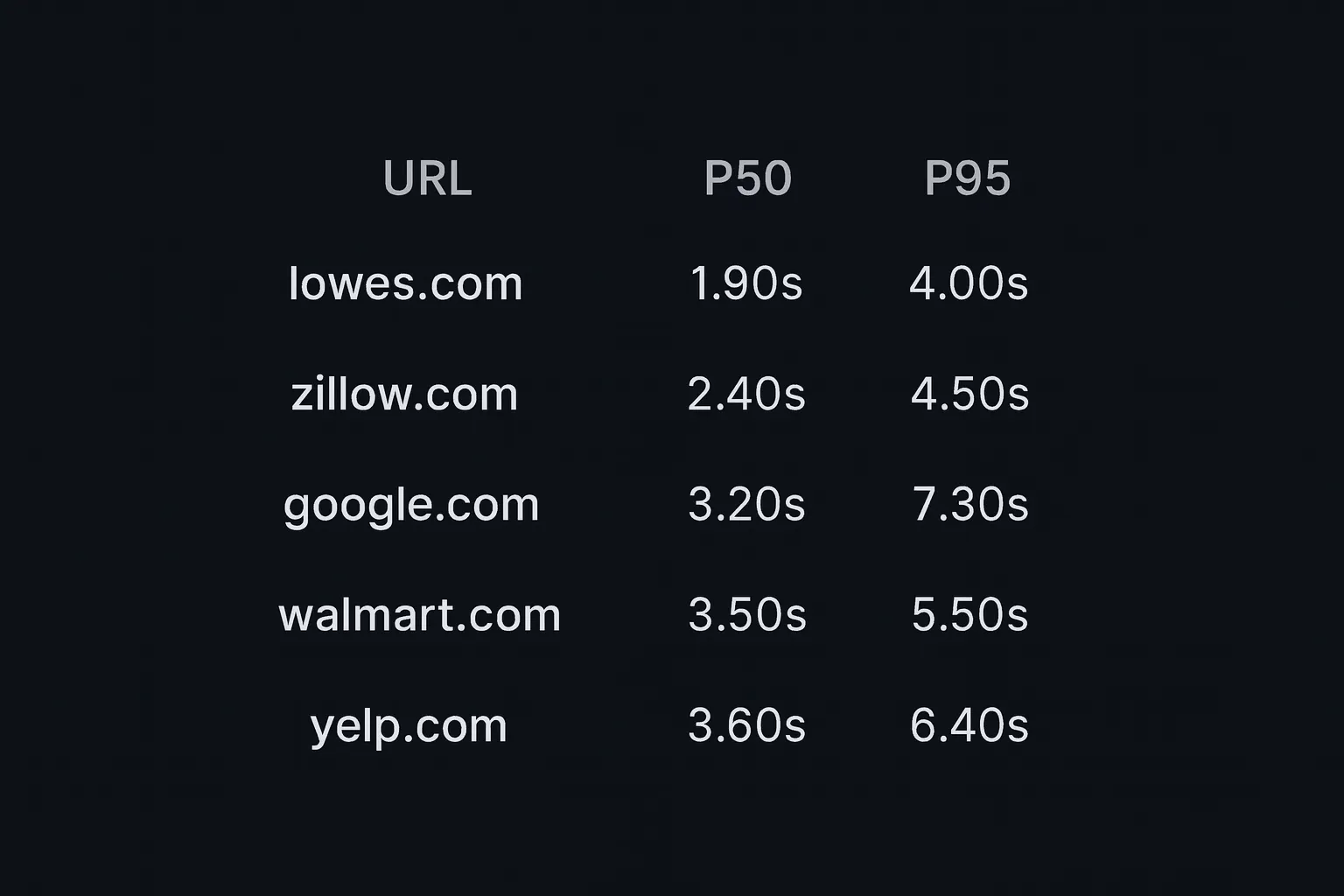
These domains rely heavily on client-side code. Even so, Nimble’s optimized execution consistently lands in the 2–4 second range at the median.
To understand the value of selective rendering, compare three approaches on pages of this complexity:
Native fetch
Fastest by far, typically a few hundred milliseconds, but generally incomplete on SPAs.
Nimble’s hybrid approach
Approximately the P50/P95 values above. The system fetches when possible, renders when necessary, and avoids unnecessary browser work. Completeness remains high.
Always-render (DIY Playwright/Puppeteer)
Commonly 5–7 seconds or more. Full browser startup, full resource loading, and maximum network transfer for every single URL.
Selective rendering matters. At scale, the difference between a 300 ms fetch and a 7 second render defines the operational cost and feasibility of the entire pipeline.
Rendering and Pipeline Architecture
Rendering affects more than performance. It changes the structure of the pipeline itself.
High-concurrency rendering requires dedicated workers, memory budgeting, queueing strategies, session isolation, and retry mechanisms that don’t exist in fetch-based systems. Teams often end up maintaining parallel logic: one branch for fetch, one for headless rendering, and fallback logic when the fetch path fails.
An adaptive system simplifies all of that: one request model, one interface, and the best execution mode selected automatically.
Conclusion
Rendering has an important role in modern scraping, but it shouldn’t be the default. It’s a precision tool, not a hammer. The goal is simple: use it only when a page genuinely needs it.
Nimble’s Web API handles this choice automatically. Pages that can be fetched are fetched. Pages that require a browser get one. You get the completeness of rendering on the sites that need it, and the speed and efficiency of fetch everywhere else.
The result is a pipeline that’s faster, cheaper, and far easier to maintain without compromising data quality.
FAQ
Answers to frequently asked questions



.webp)
.webp)
.avif)
.webp)